WebGL 2 or WebGPU Not Supported? How to Fix It in Every Browser (2026)
Last updated: September 2026.
If a game or 3D page says your browser doesn't support WebGL 2 or WebGPU, the cause is almost always one of four things: hardware acceleration is switched off, your GPU or driver is on the browser's blocklist, the browser is too old for the API, or you're in a virtual machine or remote desktop session with no real GPU. Turn hardware acceleration on, update the graphics driver, update the browser, and confirm the result with a capability test. For WebGPU, also check the platform: as of September 2026 Firefox only ships it on Windows and Apple Silicon Macs, and Chrome on Linux only on Intel Gen12+ and recent NVIDIA hardware.
This is the troubleshooting page. To understand the two APIs and pick one to build on, read WebGPU vs WebGL for Games.
Quick answer
- Diagnose first: open the WebGL and WebGPU checker. It shows whether WebGPU, WebGL 2 and WebGL 1 work and names the GPU your browser is using. If the renderer says SwiftShader, llvmpipe or "Software", you're on CPU rendering and the fixes below apply.
- Chrome and Edge: Settings, System, turn on "Use graphics acceleration when available", relaunch. Check
chrome://gpu(oredge://gpu). If WebGL is "Software only" or "Unavailable", update the GPU driver. Last resort:chrome://flags/#ignore-gpu-blocklist. - Firefox: Settings, General, Performance, untick "Use recommended performance settings", tick "Use hardware acceleration when available". Check
about:support, Graphics. Last resort:about:config,webgl.force-enabledtotrue. - Safari: update to Safari 26 for WebGPU and Safari 15 or newer for WebGL 2. There's no acceleration toggle to flip.
- The Unity "does not support graphics API WebGL 2" message means
canvas.getContext('webgl2')returned nothing. Same fixes, and on Safari it means a version older than 15. - Work or school device, VM, remote desktop: the GPU is blocked by policy or isn't there. Ask IT, or play on a device with a real GPU.
Quick reference
WebGPU support as of September 2026, from the WebGPU implementation status wiki (updated August 13, 2026), Firefox and WebKit release notes, and caniuse.
| Browser | Windows | macOS | Linux | Android | iOS and iPadOS |
|---|---|---|---|---|---|
| Chrome and Edge | 113+ (Windows on ARM: behind a flag) | 113+ | 144+ on Intel Gen12+, 147+ on NVIDIA (driver 535.183.01+) under Wayland, others behind flags | 121+ on Android 12+ with ARM, Qualcomm or Intel GPUs, 139+ for Imagination on Android 16+, Samsung Xclipse in progress | Uses Apple's WebKit engine, so test on the device |
| Firefox | 141+ (July 22, 2025) | 145+ on macOS 26 with Apple Silicon, 147+ on all supported macOS with Apple Silicon, Intel Macs Nightly only | Nightly only, shipping planned for 2026 | Behind a flag | Uses Apple's WebKit engine |
| Safari | n/a | 26+ (September 15, 2025, on macOS Tahoe, Sequoia and Sonoma) | n/a | n/a | 26+ |
WebGL 2 is the baseline. Per caniuse it's in Chrome 56+, Edge 79+, Firefox 51+, Safari 15+ and iOS Safari 15+, and Unity's compatibility page lists Chrome 58+ on Android. If WebGL 2 fails on any current browser, the problem is the machine, not the browser version.
The 30-second diagnosis
Start with the WebGL and WebGPU checker. It runs when the page loads and uploads nothing. Read three things off it.
On a machine with the problem, the page looks like this.
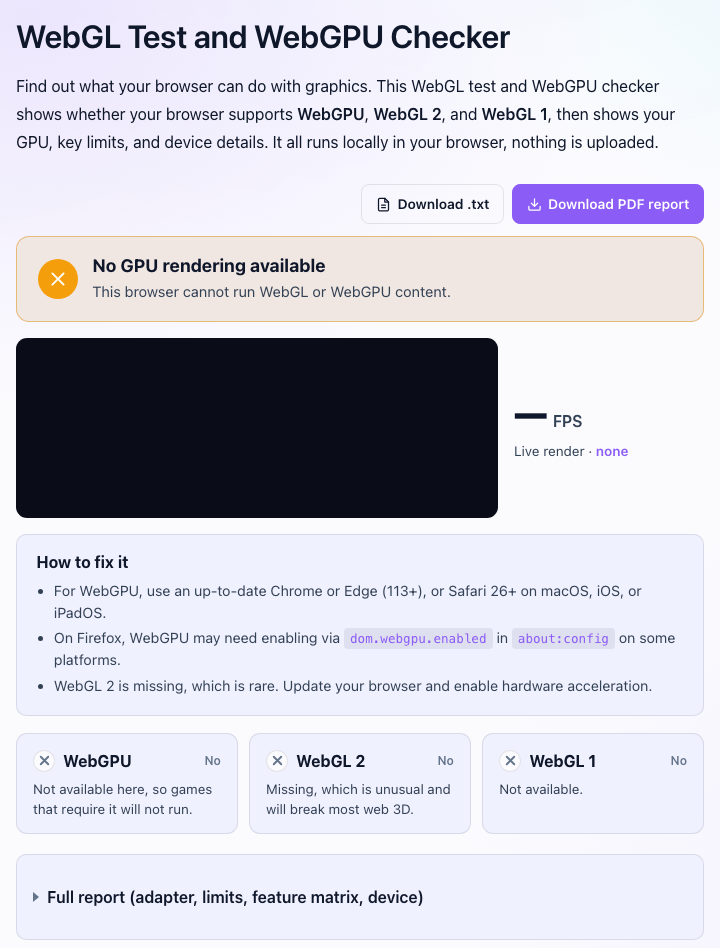
Which APIs pass. If WebGL 2 works and only WebGPU fails, go to the table above, because WebGPU depends on browser, OS and GPU together and the answer may be "not on this platform yet". If WebGL 2 also fails, keep reading: that points at acceleration, drivers or a blocklist.
The renderer line. A real GPU shows up as something like "ANGLE (NVIDIA, NVIDIA GeForce RTX 4060 ...)" or "Apple M2". SwiftShader, llvmpipe, "Microsoft Basic Render Driver" or anything with "software" in it means your browser is drawing on the CPU. Games crawl, and WebGPU won't appear.
The browser's own GPU page. In Chrome type chrome://gpu into the address bar (Edge: edge://gpu). "Graphics Feature Status" lists WebGL and WebGL2 as "Hardware accelerated", "Software only, hardware acceleration unavailable" or "Unavailable", and "Problems Detected" further down says why, usually naming a blocklist entry or a driver. In Firefox, about:support has a Graphics section where "Compositing" shows whether acceleration is on and a Failure Log or Decision Log explains any block. Safari has no equivalent page.
"Software rendering" means this: browsers keep a list of GPU and driver combinations known to crash or misrender, and when your machine matches an entry they disable the feature or fall back to a CPU rasterizer. Chromium's blocklist disables all GPU acceleration for the Microsoft Basic Render Driver ("GPU access is blocked if users don't have proper graphics driver installed after Windows installation"), for VMware and VirtualBox, and for old Intel and NVIDIA drivers. Entries are keyed on driver versions, which is why "update the driver" fixes so many of these.
One thing changed in 2026. Chromium used to fall back to SwiftShader, a CPU implementation of WebGL, whenever the GPU was blocked, so WebGL "worked", slowly. Microsoft's Edge policy docs state that starting in version 144 SwiftShader is deprecated and "WebGL context creation fails in scenarios where SwiftShader is used", and Chromium's SwiftShader doc says the same for Chrome, with --enable-unsafe-swiftshader as the opt-in. A blocklisted machine that used to get a slow game now gets a "not supported" error.
Put together, the diagnosis is three questions asked in a fixed order, and each one has a single fix attached.
Chrome and Edge
Chrome and Edge share the Chromium engine, so everything here applies to both. Swap chrome:// for edge:// where needed.
The hardware acceleration toggle
Open Settings, then System, and make sure "Use graphics acceleration when available" is on (in Edge it's under System and performance). Relaunch, because the setting only applies after a restart. It's off surprisingly often, because a lot of "fix Chrome flicker" advice says to turn it off. Then open chrome://gpu. If WebGL and WebGL2 say "Hardware accelerated", you're done. If not, the browser is refusing your GPU on purpose, and the reason is under "Problems Detected".
Windows
The usual culprit is a stale or generic driver. If the renderer says "Microsoft Basic Render Driver", Windows has no real driver for your GPU at all, and Chromium treats that as "block everything". Install the driver from NVIDIA, AMD or Intel directly rather than waiting on Windows Update. On a laptop with two GPUs, Windows Settings, System, Display, Graphics lets you pin the browser to the high-performance GPU. A browser on the integrated chip passes the checker but can crawl in a heavy game.
Windows on ARM (Snapdragon laptops) is a WebGPU special case: the implementation status wiki lists it as behind chrome://flags/#enable-unsafe-webgpu or the --enable-unsafe-webgpu switch. WebGL 2 works normally there.
macOS
Macs rarely hit this because Apple ships the driver with the OS. If Chrome on a Mac reports software rendering, suspect the acceleration toggle, an ancient macOS, or a virtual machine. Updating macOS is the driver update.
Linux
Linux is where WebGPU has the most caveats. Per the wiki, Chrome ships WebGPU by default on Linux for Intel Gen12 and newer from Chrome 144, and for NVIDIA with driver 535.183.01 or newer under Wayland from Chrome 147. Everything else (AMD, older Intel, NVIDIA on X11) needs the flag stack the wiki lists: --enable-unsafe-webgpu --ozone-platform=x11 --use-angle=vulkan --enable-features=Vulkan,VulkanFromANGLE. The rollout runs WebGPU on Vulkan while the rest of the browser stays on OpenGL, which is why it's gated per GPU family.
For WebGL 2 on Linux, the question is whether Mesa is using your GPU or the llvmpipe software rasterizer. If the renderer says llvmpipe, update the Mesa drivers for your GPU (or the NVIDIA proprietary driver).
The blocklist override
chrome://flags/#ignore-gpu-blocklist ("Override software rendering list") makes Chrome use your GPU even when it's on the blocklist. It's the right move when the list wrongly rejects your GPU, or when you'd rather have occasional glitches than no WebGL. It's the wrong move when the block exists because the driver crashes, so try the driver update first.
Android Chrome
WebGL 2 has been in Android Chrome since version 58, so on any current phone a WebGL 2 failure usually means a blocklisted GPU driver, which on Android you can't update separately. Check for a system update, then try chrome://flags/#ignore-gpu-blocklist, which exists on Android too.
WebGPU on Android arrived in Chrome 121 for Android 12 or newer with ARM, Qualcomm or Intel GPUs, and in Chrome 139 for Imagination GPUs on Android 16 or newer. The wiki still lists Samsung's Xclipse GPUs (Exynos Galaxy phones) as in progress, so a fully updated Exynos Galaxy can report no WebGPU. That's not a bug on your end.
Firefox
Hardware acceleration and the override
Open Settings, General, scroll to Performance, untick "Use recommended performance settings", and make sure "Use hardware acceleration when available" is ticked. Restart Firefox. Then check about:support, Graphics: "Compositing" should say WebRender, and a blocked WebGL shows up in the Failure Log or Decision Log with the driver or feature that was blocked.
Mozilla's blocked graphics drivers page documents the overrides. In about:config, set webgl.force-enabled to true to override a WebGL block and layers.acceleration.force-enabled to true to override a compositing block. Mozilla's wording: "do this at your own risk. There usually are good reasons why features are blocked". Update the driver first.
WebGPU: which Firefox on which OS
Firefox is where "WebGPU not supported" is most often just the platform. From the release notes: Firefox 141 (July 22, 2025) enabled WebGPU on Windows. Firefox 145 (November 11, 2025) added macOS 26 Tahoe on Apple Silicon. Firefox 147 extended that to "devices with Apple Silicon processors on all supported macOS versions". Intel Macs, Linux and Android are still out: MDN's experimental features page says that for "other platforms such as Linux and macOS on Intel Silicon it is enabled in nightly", and the wiki lists Linux as expected in 2026 and Android as behind a flag.
The preference is dom.webgpu.enabled in about:config. On a platform Firefox hasn't shipped, flipping it to true in the release build exposes an implementation Mozilla hasn't finished for that OS, so expect crashes. If you want WebGPU on Linux Firefox today, use Nightly, where it's on by default. Caniuse marks Firefox "disabled by default" because it tracks flags per browser, not per OS, so don't let that page tell a Windows user they lack it.
Safari
Safari has no acceleration toggle and no blocklist you can override. The version is the whole story.
WebGL 2 needs Safari 15 or newer on macOS and iOS. Unity's compatibility page puts it plainly: "Apple Safari doesn't support WebGL 2 in versions before Safari 15". A Mac stuck on an old macOS can't get a newer Safari, so the fix is a macOS update or installing Chrome or Firefox, which run WebGL 2 on older macOS.
WebGPU shipped in Safari 26.0 on September 15, 2025 on macOS Tahoe, Sequoia and Sonoma, plus iOS 26, iPadOS 26 and visionOS 26, on by default. WebKit's release post says WebGPU "supersedes WebGL on macOS, iOS, iPadOS, and visionOS and is preferred for new sites and web apps". If you're on Safari 26 and WebGPU still fails, check that the page is served over HTTPS (WebGPU only works in secure contexts in every browser) and that it isn't inside an embedded web view.
On Safari 17 and 18, WebGPU exists behind a feature flag. On macOS, open Safari Settings, Advanced, tick "Show features for web developers", and a Feature Flags tab appears where you can turn on WebGPU. On iOS 18 the path is Settings, Apps, Safari, Advanced, Feature Flags (older iOS: Settings, Safari, Advanced). That's the pre-release implementation, fine for a demo, not something to ship a game against.
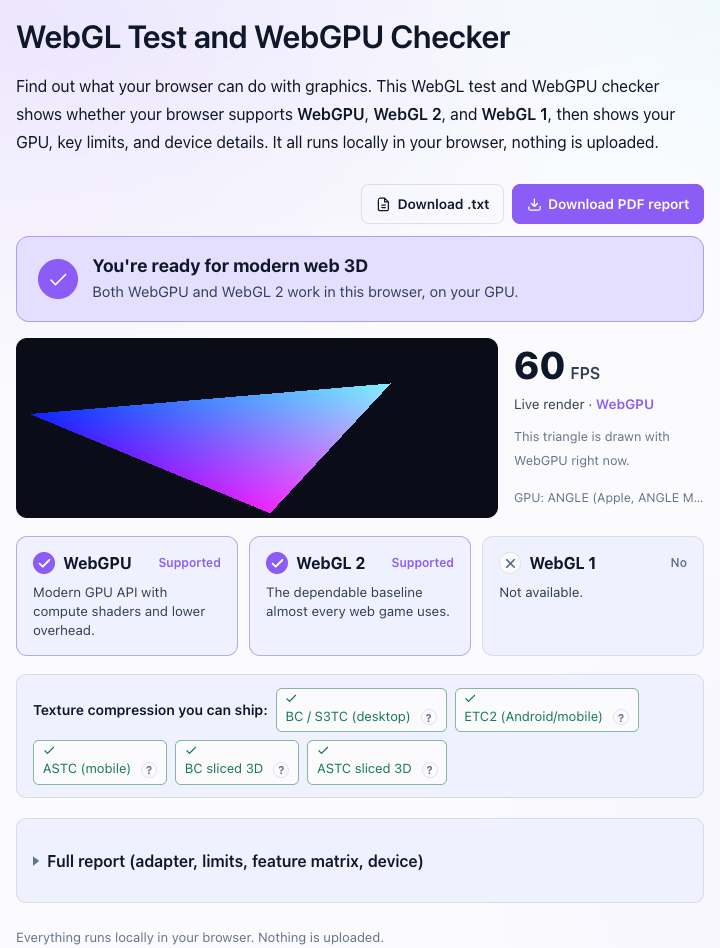
Whichever browser you fixed, reload the checker. A healthy result looks like this.
Work laptops, school Chromebooks, VMs and remote desktop
If the toggles are missing or don't stick, look at who manages the device.
Managed browsers can have acceleration turned off by policy. Chrome and Edge both have a HardwareAccelerationModeEnabled policy, and Microsoft's documentation says that when it's disabled the browser "turns off graphics acceleration". The Settings toggle greys out or reverts, and chrome://policy lists what's applied. Since Chromium 144 there's also EnableUnsafeSwiftShader, a temporary policy that keeps the old CPU fallback alive on machines with no GPU. If you administer a school lab that just lost every WebGL site, that policy is the stopgap while you sort out drivers.
Virtual machines present a virtual GPU that browsers refuse. Chromium's blocklist has explicit entries ("Do not use GPU accelerated rendering with VMware on Windows", "VirtualBox driver is unstable on linux", "Parallels drivers older than 7 are buggy"), all disabling every accelerated feature. Enable 3D acceleration in the VM settings with current guest tools, or accept that the VM is for testing the no-GPU path and play on the host.
Remote desktop is the same problem in a different costume. An RDP session, a Citrix or Horizon desktop, or a cloud PC typically exposes a basic display adapter, so the browser sees no usable GPU. Run the browser on the local machine instead of inside the session.
Chromebooks are the easy case: ChromeOS has had WebGPU since Chrome 113, so a failure there is almost always policy or a device past its update date.
The Unity "does not support graphics API WebGL 2" error
The exact text players see:
Your browser does not support graphics API "WebGL 2" which is required for this content.
It comes from Unity's web loader when the webgl2 context request returns null. Unity's browser compatibility page says Web builds need a browser that is "WebGL 2 capable", with WebGL 2 as the default graphics API, so the loader has nothing to fall back to unless the developer added one.
If you're the player, the causes in order of likelihood: hardware acceleration is off, the GPU driver is blocklisted (and since Chromium 144 no longer rescued by SwiftShader), you're in a VM or remote session, or you're on Safari 14 or older. If the checker passes WebGL 2 but the game still fails, the page is probably in an embedded frame or web view without GPU access, and opening the game's URL directly fixes it.
If you're the developer, the Graphics APIs list in Player Settings, Web, Other Settings decides how often players hit this. With Auto Graphics API on, Unity tries WebGL 2 first, and community threads note the same warning appears when the fallback to WebGL 1 succeeded but WebGL 2 didn't, so the message alone doesn't tell you whether the game ran. A Linear color space forces WebGL 2 only. Adding "WebGL 1 (Deprecated)" keeps very old browsers playable at the cost of post-processing and texture formats, for roughly 1.5 MB more in the data file by one developer's measurement. Unity 6 also lets you add WebGPU, still marked experimental, and its enabling guide says Unity uses the first API in the list and falls back down it, so the safe order is WebGPU, then WebGL 2. Whatever you pick, replace the default error text in your template with something a player can act on.
Symptom to cause
Black or blank canvas, no error. A context was created but the GPU isn't drawing. Usual causes: a context lost right after creation, a GPU that can't handle the shader, or a privacy extension that spoofs WebGL. Try a private window with extensions off, then read the console for "context lost" or shader compile errors.
"WebGL context lost" mid-game. MDN's context loss notes list the reasons: pages competing for the GPU, a laptop switching between integrated and discrete GPUs, the browser resetting the GPU to break a stall from another tab, or a driver updating in the background. Close other GPU-heavy tabs, plug the laptop in so it stops switching GPUs, and reload. If it happens every time, the game is running out of GPU memory on your device, which is a game bug rather than a browser setting.
Runs at 1 to 5 fps. Software rendering. Check the renderer for SwiftShader, llvmpipe or "Software", then fix acceleration or drivers. On a phone, a 3x device pixel ratio means nine pixels drawn per CSS pixel, and a game that doesn't cap its resolution will crawl, which is on the developer.
WebGPU missing on a machine with working WebGL 2. Check the table first. Then the URL: navigator.gpu is undefined on plain http:// pages. Then look for a WebGPU line in Graphics Feature Status. On Linux Chrome and non-Windows Firefox the answer is usually "not on this platform yet".
For developers: detect, fall back, and tell the player
Detect both APIs before loading anything heavy, and make the failure path a message rather than a blank page. MDN's pattern for WebGPU is to check navigator.gpu, then call requestAdapter(), which resolves to null when no adapter is available. For WebGL, getContext('webgl2') returns null on failure.
async function pickRenderer(canvas) {
  if (navigator.gpu) {
    const adapter = await navigator.gpu.requestAdapter()
    if (adapter) return { api: 'webgpu', adapter }
  }
  const gl2 = canvas.getContext('webgl2', { failIfMajorPerformanceCaveat: true })
  if (gl2) return { api: 'webgl2', gl: gl2 }
  const gl2soft = canvas.getContext('webgl2')
  if (gl2soft) return { api: 'webgl2', gl: gl2soft, software: true }
  return { api: null }
}
Two details matter. failIfMajorPerformanceCaveat: true makes getContext fail instead of handing you a software-rendered context, so you can detect "this will run at 2 fps", warn the player, and then decide whether to accept the software context anyway. And a canvas holds exactly one context type, so decide before you create it or use separate canvases. requestAdapter() also accepts featureLevel: 'compatibility', a restricted WebGPU subset for OpenGL ES 3.1 and Direct3D 11 class hardware.
Handle context loss too. Listen for webglcontextlost, call preventDefault() so the browser knows you intend to recover, and rebuild GPU resources in webglcontextrestored. Games that skip this show the "black canvas, no error" symptom every time a laptop switches GPUs.
canvas.addEventListener('webglcontextlost', (e) => {
  e.preventDefault()
  pauseGame()
})
canvas.addEventListener('webglcontextrestored', () => {
  recreateGpuResources()
  resumeGame()
})
Tell the player something useful. "WebGL 2 not supported" is a dead end for a twelve-year-old on a school Chromebook. A better message names what you detected (browser, OS, whether WebGL 1 worked, whether the renderer looked like software), gives the one-line fix for their browser, and links to a page like this one or the checker so they can confirm the fix. Log the same result to analytics, because the share of players failing WebGL 2 tells you whether a lighter fallback is worth building.
Engines handle most of this. Three.js's WebGPU renderer, Babylon.js and PlayCanvas fall back to WebGL 2 automatically, and the web games tech stack guide covers which does what. If you're writing to the APIs directly, the WebGPU getting started and WebGL fundamentals tutorials both start from a working detection block.
Common Questions
How do I check if WebGPU is enabled in my browser?
Open the WebGL and WebGPU checker, which reports WebGPU as supported or not along with the adapter vendor and architecture. In Chrome or Edge, chrome://gpu lists WebGPU under Graphics Feature Status, and in the console navigator.gpu is undefined when the API isn't exposed. It only works on HTTPS pages.
How do I enable WebGL in Chrome?
Go to Settings, System, turn on "Use graphics acceleration when available", and relaunch Chrome. Then open chrome://gpu and confirm WebGL and WebGL2 say "Hardware accelerated". If they don't, update your GPU driver, and as a last resort enable chrome://flags/#ignore-gpu-blocklist.
How do I enable WebGPU in Firefox?
On Windows it's on by default since Firefox 141, and on Apple Silicon Macs since Firefox 145 (macOS 26) and 147 (all supported macOS versions). On Linux, Intel Macs and Android it hasn't shipped: the dom.webgpu.enabled preference in about:config exposes the unfinished build, and Firefox Nightly has it on by default, so use Nightly if you need it there today.
Does Safari support WebGPU?
Yes, since Safari 26.0 (September 15, 2025) on macOS Tahoe, Sequoia and Sonoma, iOS 26, iPadOS 26 and visionOS 26, on by default. Safari 17 and 18 had it behind a feature flag under Settings, Advanced, "Show features for web developers". WebGL 2 needs Safari 15 or newer.
Why does WebGL say blocked or software rendering when hardware acceleration is on?
Your GPU or its driver is on the browser's blocklist, so the browser refuses it even with acceleration enabled. chrome://gpu under "Problems Detected" or Firefox's about:support Graphics section names the entry. Update the driver from the GPU maker, and if the block is stale, override it with chrome://flags/#ignore-gpu-blocklist or Firefox's webgl.force-enabled.
Why is my Unity WebGL game not working in the browser?
If the page shows "Your browser does not support graphics API WebGL 2", the browser couldn't create a WebGL 2 context. Turn on hardware acceleration, update the GPU driver, make sure you're not in a VM or remote desktop session, and on Safari update to version 15 or newer. If the checker shows WebGL 2 working but the game still fails, open the game's URL directly rather than inside an embedded frame.
Does WebGL 2 work in Chrome on Android?
Yes, since Chrome 58, so on any current phone it works unless the GPU driver is blocklisted, which you fix with a system update or chrome://flags/#ignore-gpu-blocklist. WebGPU is separate: Chrome 121+ on Android 12+ with ARM, Qualcomm or Intel GPUs, Chrome 139+ for Imagination GPUs on Android 16+, and Samsung Xclipse GPUs are still in progress.
Related
- WebGL Test and WebGPU Checker: see what your browser actually exposes, with GPU name and limits
- WebGPU vs WebGL for Games (2026): what the two APIs are and which to build on
- Web Games Tech Stack in 2026: WebGL, WebGPU and Wasm, and which engines use which
- WebGPU getting started: your first WebGPU code, starting from detection
- WebGL fundamentals for games: the baseline API, with code
- Cross-Origin Isolation Checker: the other "why won't this game load" test, for SharedArrayBuffer and threads