Best AI 3D Model Generators in 2026 (Text-to-3D and Image-to-3D)
Meshy download terms, Tripo plans, Rodin plans and TRELLIS.2 licensing checked September 14, 2026. Other competitor sections retain their July 2026 review dates; check the linked sources for newer terms.
For a game asset, choose by the file you can actually download: Meshy and Tripo offer hosted generation and editing, Rodin offers detailed geometry controls, and Microsoft’s TRELLIS.2 is an option for self-hosted image-to-3D. Free generation does not always include a usable export. Cinevva’s 3D Model Generator accepts images or text, uses credits for generation and offers a free first GLB export.
This guide goes deep on 3D generation only. For textures, audio, and the rest of the AI asset pipeline, see our AI asset generators guide.
How to use this comparison
Compare input type, exported files and usage rights before choosing a generator. A mesh you can edit in an engine is a different deliverable from a Gaussian splat you can view. The recommendations here are editorial judgments, not a controlled benchmark with the same input and hardware for every tool. Cinevva publishes this guide and offers one of the listed products. For our own tool, check the linked workbench and plans for the current credit and export limits.
Quick picks
- Hosted generation and editing: Meshy (clean topology options, Low Poly Mode, big ecosystem).
- Hosted character workflow: Tripo (auto-rigging, retopology and engine bridges; check export access).
- Detailed geometry controls: Rodin Gen-2.5 by Hyper3D (sculpt-level detail, 10M+ polygon output).
- Self-hosted image-to-3D: Microsoft TRELLIS.2 (MIT model/code, PBR; dependencies have separate terms).
- Browser options: Cinevva's 3D Model Generator and Image to 3D capture.
Comparison at a glance
| Tool | Type | Input | Output | Commercial use | Free tier |
|---|---|---|---|---|---|
| Meshy | Hosted | Text, image | GLB, FBX, OBJ and other mesh formats | Free: CC BY 4.0 with attribution; paid: private assets | 100 credits/month; 10 Meshy 6 Lite downloads/month; Meshy 6/7 downloads paid |
| Tripo | Hosted | Text, image | GLB, FBX, OBJ, STL, PBR, auto-rig | Paid plans | 200 credits/month, non-commercial; limited exports |
| Rodin Gen-2.5 | Hosted | Text, image, multi-image | Mesh with PBR, quad option | Paid plans | Free to generate |
| Hi3D (Hitem3D) | Hosted | Image, multi-image | High-res mesh | Paid plans | Trial credits |
| Tencent Hunyuan 3D | Hosted | Text, image, sketch | OBJ, GLB, PBR | Check plan terms | 20 generations/day |
| Cinevva 3D Generator | Hosted | Text, image | GLB, OBJ, PBR | See plan terms | Generation uses credits; first GLB export free |
| TRELLIS.2 | Open source (MIT) | Image | GLB, OBJ, PLY, PBR to 4K | Yes | Self-host |
| Hunyuan3D 2.1 | Open source | Image | Mesh + PBR | Yes, region limits | Self-host |
| SAM 3D | Open source | Single photo | Gaussian splat, geometry | Yes (SAM License) | Self-host |
| SPAR3D | Open source | Single photo | Textured GLB mesh | Yes under $1M revenue | Self-host |
The dated checks above cover plan access and licensing, not a new same-input quality benchmark. Check current terms before shipping; credits are not comparable model counts across vendors.
The hosted tools
Meshy
Meshy combines text/image generation with mesh editing and export. Its free-download distinction matters more than a blanket “free tier” label.
| Free allowance | 100 credits per month |
| Free downloads | 10 per month from Meshy 6 Lite; Meshy 6 and Meshy 7 downloads require a paid subscription |
| Usage rights | Free output uses CC BY 4.0 with attribution; paid plans offer private ownership |
| Formats | GLB, FBX, OBJ, STL, USDZ and BLEND |
Check the generation model before spending credits if you need a free download. Meshy free-plan documentation, formats and pricing. Checked September 14, 2026; no new quality benchmark was run for this update.
Tripo
Tripo combines generation with rigging, retopology and bridges to game engines and DCC tools. Choose the plan around export and usage rights as well as credit allowance.
| Free | 200 monthly credits; public, non-commercial models; limited exports |
| Pro allowance | 3,000 monthly credits; private models and commercial use |
| Annual price shown | $20/month equivalent, billed $240/year |
| Workflow | Rigging, animation, retopology and DCC bridges; access varies by plan |
The pricing page estimates model counts, but retries and optional operations affect how many finished assets you get. Compare the actual checkout billing interval instead of treating an annual equivalent as a monthly commitment. Tripo pricing. Checked September 14, 2026.
Rodin (Hyper3D)
Rodin is worth evaluating for detailed assets and multi-image input. Its Gen-2.5 API reference documents generation controls; that is vendor documentation, not a Cinevva quality ranking.
| Free access | Preview generation before confirming spend; limited legacy-model exports |
| Creator | $30/month, or $24/month equivalent billed $288/year |
| Business | $120/month, or $96/month equivalent billed $1,152/year |
| Plan distinction | Creator includes production features and unlimited export; Business adds API access and high-poly quad options |
Use a small representative asset to check the export you need before choosing a plan. Hyper3D pricing. Checked September 14, 2026.
Hi3D (formerly Hitem3D)
The notable 2026 entrant. Built by Math Magic on two published research models, Sparc3D (NeurIPS 2025, watertight high-res geometry) and Ultra3D (part-attention acceleration), it generates at up to 1536³ voxel resolution, the highest raw geometric fidelity of any hosted tool. It rebranded from Hitem3D to Hi3D in 2026.
| Type | Hosted |
| Input | Image and multi-image |
| Output | High-resolution watertight mesh |
| Commercial | Paid plans, check current terms |
| Free tier | Trial credits |
| Best for | Detail-first work: miniatures, collectibles, 3D printing |
Honest take: it has become the go-to for print-first workflows where watertight geometry and fine detail beat everything else. For games you'll be decimating its output hard, so it makes most sense when you need one gorgeous hero prop. hi3d.ai
Tencent Hunyuan 3D (hosted platform)
Tencent took the Hunyuan3D model family global in November 2025 with an English-language platform at 3d.hunyuanglobal.com, running its newest engines (3.0, and 3.1 since January 2026) that are not open-sourced. In 2026 it grew into HY 3D Studio, a full pipeline: image to 3D to retopology to UVs to texturing to rigging to animation.
| Type | Hosted (newest models), open weights for older versions |
| Input | Text, image, sketch |
| Output | OBJ, GLB with PBR textures |
| Commercial | Check plan terms, enterprise API via Tencent Cloud |
| Free tier | 20 free generations per day |
| Best for | Generous free experimentation with a frontier engine |
Honest take: 20 free generations a day is the most generous free allowance of any hosted frontier model, and the 3.x engines produce noticeably better geometry than the open 2.1 weights. The platform is newer to Western users, so read the terms on output rights before you build a pipeline around it. 3d.hunyuanglobal.com
Gone in 2026: Luma Genie and CSM
Two names you'll still see in older roundups are effectively dead. Luma's Genie text-to-3D tool no longer appears anywhere on Luma's site, which has pivoted fully to video generation and creative agents. CSM (Common Sense Machines) shut down its Cube platform on January 5, 2026, and the company was acquired by Google that same month. Don't start new projects on either.
The open-source models
Open models flip the deal: you supply the GPU, and in exchange there's no credit meter and no plan gating your commercial rights. Only the model license itself applies.
Microsoft TRELLIS.2
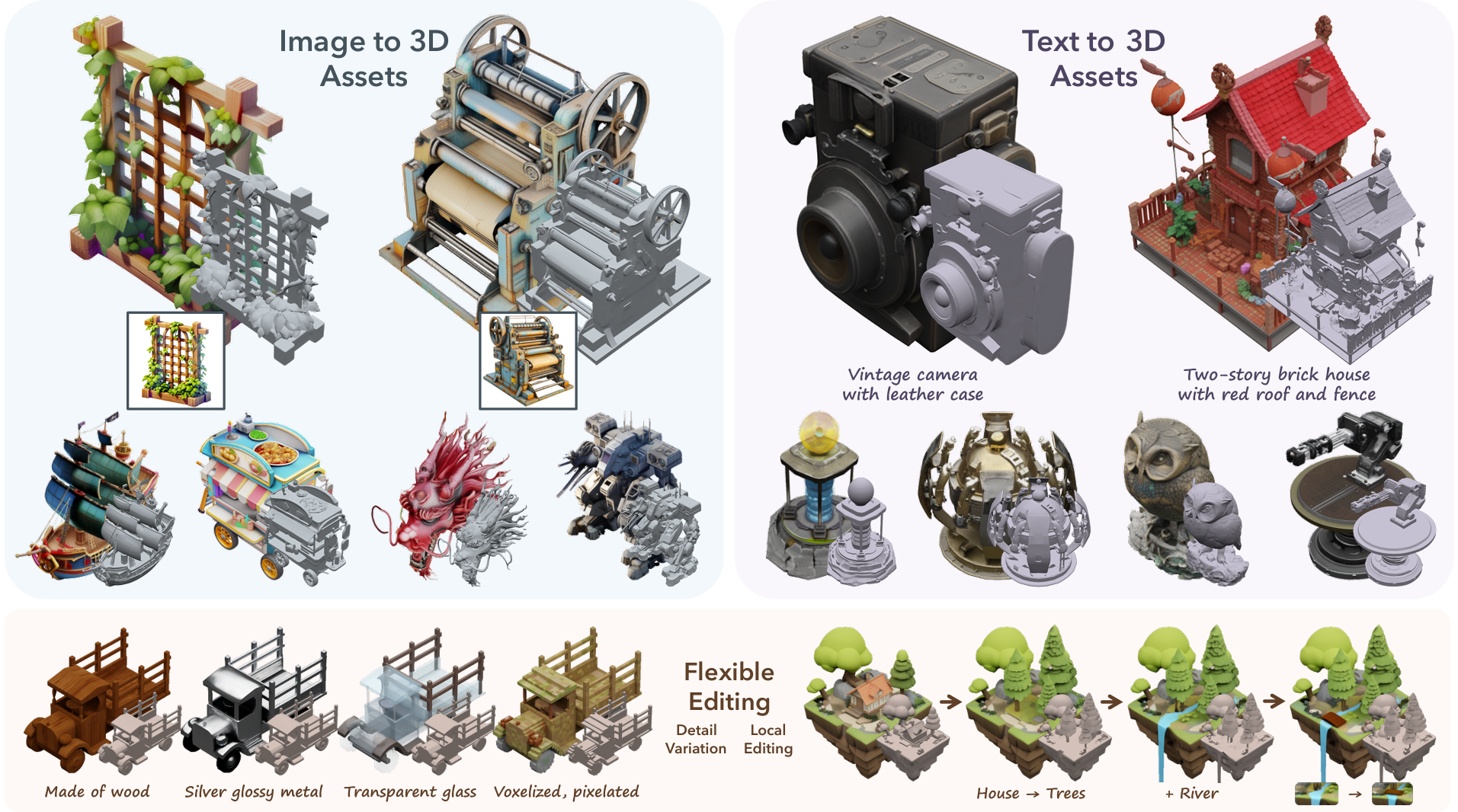
The current open-source leader. Released December 2025 under the MIT license, TRELLIS.2 is a 4B-parameter image-to-3D model built on a sparse voxel representation (O-Voxel) that handles complex topology, sharp edges, and full PBR materials. It exports GLB with textures up to 4096², plus OBJ, PLY, radiance fields, and Gaussian splats.
| Type | Open source, MIT |
| Input | Image |
| Output | GLB (PBR to 4K), OBJ, PLY, radiance field, Gaussian splat |
| Commercial | Yes, no restrictions |
| Free tier | Free forever if you have the GPU |
| Best for | The best quality-to-freedom ratio in 3D generation today |
Honest take: MIT license means zero commercial ambiguity, and output quality genuinely competes with the paid hosted tools. You need a capable NVIDIA GPU to run it locally, or you can rent inference by the second on GPU clouds. If you self-host one model, make it this one. github.com/microsoft/TRELLIS.2
Hunyuan3D 2.1 (open weights)
Tencent's fully open release from June 2025: complete model weights and training code for a 3.3B shape model plus a 2B PBR texture model. It's the model behind Cinevva's free 3D Model Generator, and the one most products in this space quietly run under the hood.
| Type | Open weights and training code |
| Input | Image (text works via an image-generation step first) |
| Output | Textured mesh with production PBR materials |
| Commercial | Yes, but the license excludes the EU, UK, and South Korea |
| Free tier | Free to self-host |
| Best for | Production PBR texturing on open weights, fine-tuning |
Honest take: the PBR paint model is still the strongest open texturing stack, and full training code means you can fine-tune it on your own art style. The community license's territory exclusion (EU, UK, South Korea) is a real constraint if you're shipping a product there, where TRELLIS.2's MIT license is the cleaner pick. github.com/Tencent-Hunyuan/Hunyuan3D-2.1
SAM 3D (Meta)
Not a mesh generator, and that's the point. SAM 3D is Meta's pair of open models (SAM 3D Objects and SAM 3D Body) that reconstruct 3D geometry, texture, and scene layout from a single ordinary photo, even with occlusion and clutter. The primary output is a Gaussian splat as a .ply file. Code and checkpoints are on GitHub under Meta's permissive SAM License, which allows commercial use.
| Type | Open source, SAM License |
| Input | Single photo (plus an object mask) |
| Output | Gaussian splat (.ply), geometry, texture, pose |
| Commercial | Yes |
| Free tier | Free to self-host; Cinevva usage follows the workbench credit allowance |
| Best for | Capturing real objects from one photo |
Honest take: it's reconstruction, not generation. Point it at a real object and you get a faithful 3D capture without a photogrammetry rig. The splat output is for viewing and reference rather than direct game import (more on that below). Cinevva offers it in the browser as Image to 3D object capture. github.com/facebookresearch/sam-3d-objects
TripoSR and SPAR3D (the fast reconstructors)
Two older but still useful single-image models. TripoSR (Tripo and Stability AI, MIT license) reconstructs a mesh in under half a second on a datacenter GPU, at correspondingly modest quality. SPAR3D (Stability AI, January 2025) produces a textured, UV-unwrapped GLB in under a second and supports point-level editing. SPAR3D ships under the Stability Community License: free for commercial use until your organization passes $1M in annual revenue, then you need an enterprise license.
Honest take: both are outclassed on quality by TRELLIS.2 and Hunyuan3D 2.1 in 2026. Their edge is speed, which matters if you're generating meshes live inside an app.
Also worth knowing
Sparc3D, the NeurIPS 2025 model behind Hi3D, has a public Hugging Face demo and produces watertight meshes at 1024³ resolution. Roblox's Cube 3D is open text-to-mesh code but ships under a research-only RAIL license, so you can't use its output in a commercial game.
Cinevva's in-browser 3D tools
Cinevva provides browser tools for generating an editable mesh or capturing an object as a Gaussian splat. Sign in and check the credits shown in each workbench before generating.
The 3D Model Generator turns a photo, an image URL, or a text prompt into a textured polygon mesh with PBR materials, downloadable as GLB or OBJ. There's a Rapid mode (about 2 minutes) and a Pro mode (about 5 minutes), and the output drops straight into Blender, Unity, Godot, or a web game. You can also send the result to the Auto Rigger to get a skeleton and preset animations, then use Prompt Animations to generate a custom motion from a text description and retarget it onto that skeleton.
The Image to 3D capture runs Meta's SAM 3D on a single photo and returns a Gaussian splat you can orbit in the browser and export as .ply. Use it to capture a real object, then use the 3D Model Generator when you need an editable mesh of the same subject.
Generating and previewing a mesh uses the credits shown in the workbench. Your first GLB export is free; further exports are included with Standard and Pro. Previewing, rigging, and animating remain available before export. See plans and pricing for access and usage terms.
Test the exported character, not just its preview
A visible animation in a web preview does not establish that your downloaded file contains a skeleton, animation channels and all its textures. Start with our downloadable Blender character example: it records file size, triangles, embedded clips, texture dependencies and an exported walk you can inspect. The example uses an existing CC0 model; it is an import/export reference, not a generator benchmark.
For a fair generator comparison, use the same input and record the model/version, settings, credit cost, queue and processing time, triangles, missing textures, deformation under the same motion, and import in the same engine version. Keep failed results in the comparison. Our Auto Rigger covers the rigging step; the Blender add-on offers local humanoid rigging when you prefer to work inside Blender.
What AI meshes are actually like (the honest part)
Every generator on this page produces a dense triangle mesh, typically tens of thousands to a few hundred thousand triangles, with automatically unwrapped UVs. Here's what that means in practice.
Topology. Raw AI output has no edge loops, no sensible pole placement, and no deformation-friendly structure. Quad remesh options (Meshy, Tripo, Rodin) give you quads, but they're evenly distributed quads, not the concentrated loops around joints and faces that character animation needs. For a static prop this doesn't matter at all. For an animated character, plan on manual retopology or accept visible crunching at the shoulders.
Textures. PBR support is now table stakes, and TRELLIS.2, Hunyuan3D 2.1, Meshy, and Rodin all produce real metallic-roughness maps. Two recurring flaws: baked-in lighting in the albedo (shadows painted into the texture) and uneven texel density where the auto-unwrapper crammed UV islands. Both are fixable in Blender, neither fixes itself.
Poly counts. Expect 20k to 300k triangles per asset by default, and into the millions on Rodin's high-effort modes. That's fine for a hero prop, ruinous for a hundred scattered rocks. Check what you actually got in a GLB viewer, then budget a decimation pass and test on your actual target hardware, especially for web and mobile games.
What's shippable today. Static props, environment dressing, stylized items, and blockout geometry are genuinely production-usable straight out of these tools, and this is where AI generation already beats searching free model sites on speed. Rigged background characters are usable with auto-rigging if they stay in the background. Hero characters with close-up facial animation still need a human pass on topology, and hard-surface models needing exact symmetry or CAD precision still come out slightly melted.
Gaussian splats vs meshes
A mesh is polygons: vertices, triangles, UVs, textures. A Gaussian splat is a cloud of thousands of tiny colored, semi-transparent blobs that together look photoreal from any angle. Splats capture real-world objects and scenes with a fidelity meshes struggle to match, which is why capture tools like SAM 3D and Luma's ecosystem output them.
For games, the tradeoffs are sharp. Splats have no surfaces, so collision, physics, and dynamic lighting don't work on them directly. They're also heavy: roughly 180 MB for a million splats versus 5 to 20 MB for a comparable textured mesh, which rules them out on most mobile budgets. Engine support is real but plugin-based in 2026: UnityGaussianSplatting for Unity 6, third-party plugins for Unreal 5.7, and compressed formats (SPZ, SOG, KSPLAT) for the web.
The pattern that works: splats for photoreal backdrops and set dressing the player never touches, meshes for everything interactive. If you captured something as a splat and need it in gameplay, regenerate it as a mesh with an image-to-3D tool.
Who owns an AI-generated 3D model?
Three layers to check, and they're different for hosted and open tools.
Copyright. Under current US Copyright Office guidance, purely AI-generated output isn't copyrightable on its own. Your retopology, texturing, rigging, and integration work adds human authorship, and the game as a whole is protected either way. Practical effect: you likely can't stop someone from reusing a raw generated mesh, which matters more for asset sellers than for game developers.
Hosted tool terms. This is where people get burned. Meshy free-tier models are public under CC BY 4.0 (commercial use allowed, attribution required, and anyone else can use your model too), with private ownership starting on Pro. Tripo's free tier is flatly non-commercial. Rodin gates downloads and commercial terms behind paid plans. The pattern across the industry: generate free, pay to own. Read the current terms before shipping, because these change without fanfare.
Open model licenses. Self-hosting sidesteps platform terms entirely, but the model license still applies. TRELLIS.2 model and code are MIT; its rendering dependencies have separate terms, as the repository license notes explain. SAM 3D's license permits commercial use. Hunyuan3D 2.1 excludes the EU, UK, and South Korea. SPAR3D is free until $1M annual revenue. Roblox Cube is research-only. "Open" is not one thing, so check the specific license.
For the broader rules on asset licensing, see our game asset licenses guide.
Common Questions
What is the best AI 3D model generator in 2026?
Start with Meshy or Tripo for a hosted workflow, evaluate Rodin for detailed geometry controls, or TRELLIS.2 for self-hosting. These are use-case suggestions, not a controlled quality ranking; compare free-download access, cleanup and the exported result on your own input. For a browser workflow, Cinevva's 3D Model Generator accepts images or text and offers a free first GLB export; generation uses credits.
Can I use AI-generated 3D models in a commercial game?
Usually yes, but the rights depend on where the model came from. Hosted tools gate commercial use behind paid plans (Meshy Pro, Tripo Pro, Rodin's paid tiers), and free-tier output is either non-commercial or public under CC BY 4.0. Models you generate with open-source weights like TRELLIS.2 carry no platform terms at all, though the model's own license still applies. Confirm the current terms of whichever tool you used before shipping.
Are AI-generated meshes good enough for games?
For static props, environment pieces, and stylized items, yes, they're production-usable today after a decimation pass, which you can run in the browser with our mesh simplifier and compressor. For animated characters they're partly there: auto-rigging handles background characters, but hero characters still need manual retopology because AI topology lacks the edge loops animation requires. Treat generators as a props-and-blockout engine first and a character pipeline second.
What is the best free AI 3D model generator?
Cinevva's 3D Model Generator offers a free first GLB export. Generating uses credits, and further exports require Standard or Pro; it is not an unlimited free service. Tencent's Hunyuan 3D platform gives 20 free generations a day on its newest engine. Meshy's free tier includes 100 credits a month but publishes your models under CC BY 4.0. Self-hosting TRELLIS.2 is free without limits if you have the GPU.
Text-to-3D or image-to-3D, which gives better results?
Image-to-3D, consistently. A reference image pins down proportions, materials, and style, while a text prompt leaves the model guessing. The strongest workflow in 2026 is two steps: generate a clean reference image with an image model, then feed it to an image-to-3D generator. Most tools, including Cinevva's, do exactly this behind the scenes when you type a text prompt.
What happened to Luma Genie and CSM?
Both exited the space in practice. Luma removed Genie from its site as the company pivoted to video generation and creative agents. CSM shut down its Cube platform on January 5, 2026, and was acquired by Google the same month. If a roundup recommends either, it's out of date.
Do I need a powerful GPU to generate 3D models with AI?
Not if you use a hosted tool or a browser tool, where generation runs on the provider's servers. You only need your own GPU (a capable NVIDIA card) to self-host open models like TRELLIS.2 or Hunyuan3D 2.1 locally, and even then you can rent GPU inference by the second instead.
Cinevva has AI 3D generation built into the editor, so a prompt becomes a model already placed in a playable game.
Related
- Best AI Asset Generators for Games: the full pipeline with textures, audio, and rigging
- Best Free 3D Model Sites for Games: search instead of generate
- Long-Reference Video Models: the video side of generative AI
- 3D Model Generator: text or photo to textured PBR mesh; first GLB export free
- Image to 3D Capture: free single photo to Gaussian splat
- Game Asset Licenses Explained: what you can actually ship
- Free Character Animations and Auto-Rigging: rig the model once you have it