Appearance
Skip to content
Arcade › Glam Room
Glam Room
How to play
Play right here in your browser without an account or download. Follow the controls shown in the game, and use Play fullscreen for a larger view.
Help this game get better
Made by someone like you, with room for your ideas. Share what you enjoyed, what needs work, or how you could help.
Join the conversation on Discord ↗
Nobody has said anything about Glam Room yet. Play it, then tell the creator what you would add next.
Comments are shared with the public Discord thread.
Make your own game
Glam Room was built with the Cinevva game creator: describe the game you want in chat, watch it get built, and play it in your browser minutes later.
Remix Glam Room opens the real game in the creator and forks its actual files, chat and design doc, so you start from the code rather than from a description.
Read the build brief for Glam Room
Cinevva's analyzer read this game's design doc and its source, then wrote the brief below. "Make your own" hands it to the game creator as your opening message, so you start from a real spec rather than a one-line idea.
Create a polished single-screen fashion styling game titled “Glam Room.” The player builds a complete look for a “🌸 Garden Gala” brief by selecting one item in each of five categories: Outfit, Skirt, Hair, Makeup, and Sparkle (accessories). Use a soft, feminine editorial UI with a pale blush/lavender background, white translucent rounded panels, subtle borders and shadows, dark plum typography, pink/lilac/mint accents, and responsive behavior for desktop and mobile.

Layout: a top header has a gradient pink-to-lavender rounded-square sparkle logo, the bold “Glam Room” title, and on the right the uppercase label “TODAY’S BRIEF” plus a pill reading “🌸 Garden Gala.” Below, use three rounded panels on desktop: a left “Style shelf” panel, a central “Make the entrance” stage, and a right “Runway readiness” panel. On narrower screens stack/reflow these panels while keeping the stage prominent.

Left Style shelf: show “Tap pieces to build your look,” then horizontally scrollable category tabs labeled Outfit, Skirt, Hair, Makeup, and Sparkle. The active tab is a dark plum pill with white text; inactive tabs are pale pink with muted text. Display a two-column grid of four selectable item cards. Each card is white with a pink-lavender border, rounded corners, a large colored glossy swatch with a soft white highlight, item name, and a small descriptive note. The selected card has a stronger pink outline, pale pink background, and a circular checkmark in its upper-right corner. The exact catalog is:
- Outfit: Rose Corset (soft glam, #e98eb3, score 10), Lilac Bow (dreamy, #b7a4ef, score 9), Mint Satin (fresh, #8bcfc0, score 8), Midnight (bold, #4b3a5d, score 9).
- Skirt: Tulle Skirt (twirl-ready, #c7a4ee, score 10), Pink Pleats (polished, #f09ab8, score 8), Denim Mini (cool girl, #7aa0d8, score 7), Silk Column (sleek, #d4ad7d, score 9).
- Hair: Soft Waves (romantic, #60425e, score 9), Golden Bob (sunlit, #dca75d, score 8), Pink Pop (playful, #d879b0, score 10), Midnight Long (mysterious, #2d2948, score 8).
- Makeup: Peach Glow (warm blush, #f4a284, score 8), Berry Lip (statement, #b83e72, score 10), Glass Gloss (fresh face, #ed9db8, score 8), Plum Smoke (editorial, #7e4b8f, score 9).
- Sparkle/accessories: Gold Chain (classic, #f2bf64, score 9), Pearl Drop (elegant, #fff2da, score 8), Silver Star (cool tone, #b9c8e7, score 8), Charm Stack (extra sparkle, #f48bb5, score 10).

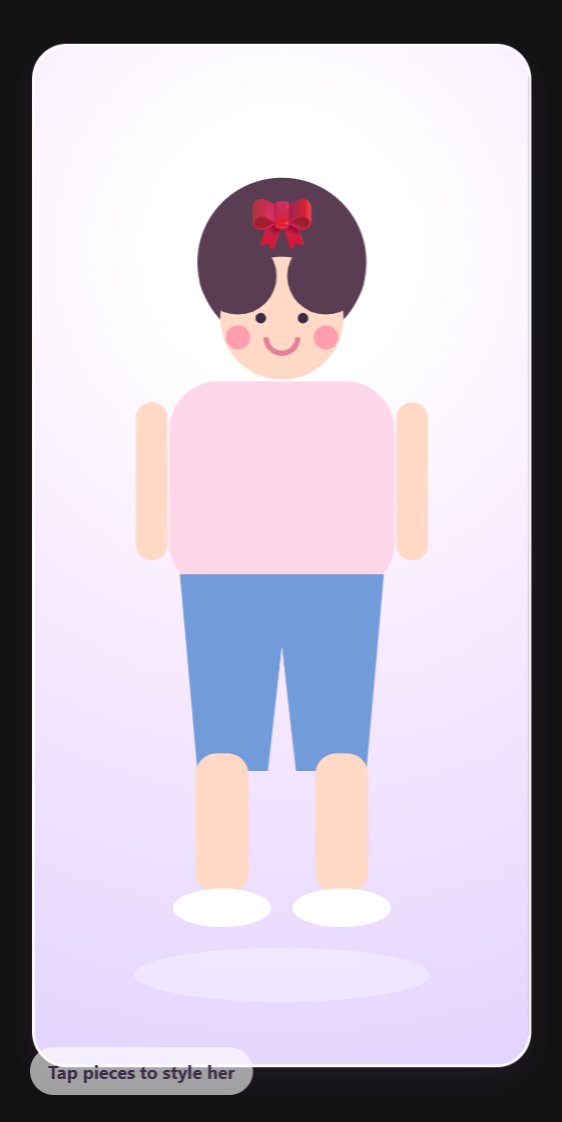
Central stage: title “Make the entrance,” subtitle “Mix soft color, shine, and one brave detail,” and a small white score pill reading “Style [score].” Below is a large rounded scene with a pastel gradient from blush pink through lavender to mint/blue, a soft glowing light spot, several white sparkle symbols, and a low pink-white oval podium. Show the styled fashion model/avatar centered on the podium. The visible presentation is a polished glamour/fashion preview; if using the supplied implementation style, use a realistic fashion model photo with a subtle vignette and an overlay chip showing the selected outfit and skirt, plus small details for selected makeup and accessory. The preview must visibly update as choices change, and its selected-color styling should reflect the chosen items. In the shown visual treatment, the character is a cute stylized full-body figure with dark hair, pink top, lavender skirt, shoes, and a jewelry detail against the pastel stage.

Right Runway readiness panel: heading “Runway readiness,” with a rating at right: “Iconic” when score is at least 88, “Polished” for 76–87, otherwise “Almost there.” Beneath it place a horizontal progress meter filled with a pink-to-lavender gradient to the current percentage. Show five completed checklist rows, each with a mint circular check icon: “Outfit selected,” “Silhouette styled,” “Hair finished,” “Makeup added,” and “Accessories on.” Include the hint text: “Tip: matching a bold outfit with a polished accessory gives your look a bonus.” Add a dark plum primary button labeled “Submit look ✨” (after submission it changes to “Change look ✨”) and a pale pink secondary “Reset shelf” button.

Interaction and rules: initialize with Rose Corset, Tulle Skirt, Soft Waves, Berry Lip, and Gold Chain selected, and show the Outfit tab. Clicking a category switches the shelf; clicking a card selects it, updates the preview and score, and returns to an unsubmitted state. Calculate the style score as 50 plus the five selected item scores, capped at 100. Add a 4-point combination bonus if the outfit is Rose Corset with Tulle Skirt OR Midnight with Silk Column. With the default selection the score is 93. Submission keeps the current score, changes the button text, and shows a temporary dark rounded toast such as “Look submitted — 93/100. The judges are obsessed!” for scores 88+; lower scores use “One more sparkle could push it higher.” Reset restores all defaults and shows a toast “Shelf reset — start a new look!” Use hover lift/shadow on cards and subtle transitions. Keep all content and controls within the viewport where possible, with the compact stacked mobile layout matching the same visual language.