Animating tails the rigger never gave a bone
By Oleg Sidorkin, CTO and Co-Founder of Cinevva
Updated September 11, 2026: what the mouse taught us adds elastic bends, floor contact, and a second kind of tail-induced body lift.
A user rigged an anthropomorphic fox in our rigger and played the Walk clip. The body was fine. The tail folded up against the left leg like a wet towel, and where the left and right leg weights met, it tore. That fox is the running example below, and the fix is now live in the rigger and in the runtime library that plays its clips.
Both the fox and the mouse featured in this article were generated with our 3D model generator, then rigged and animated in Cinevva.
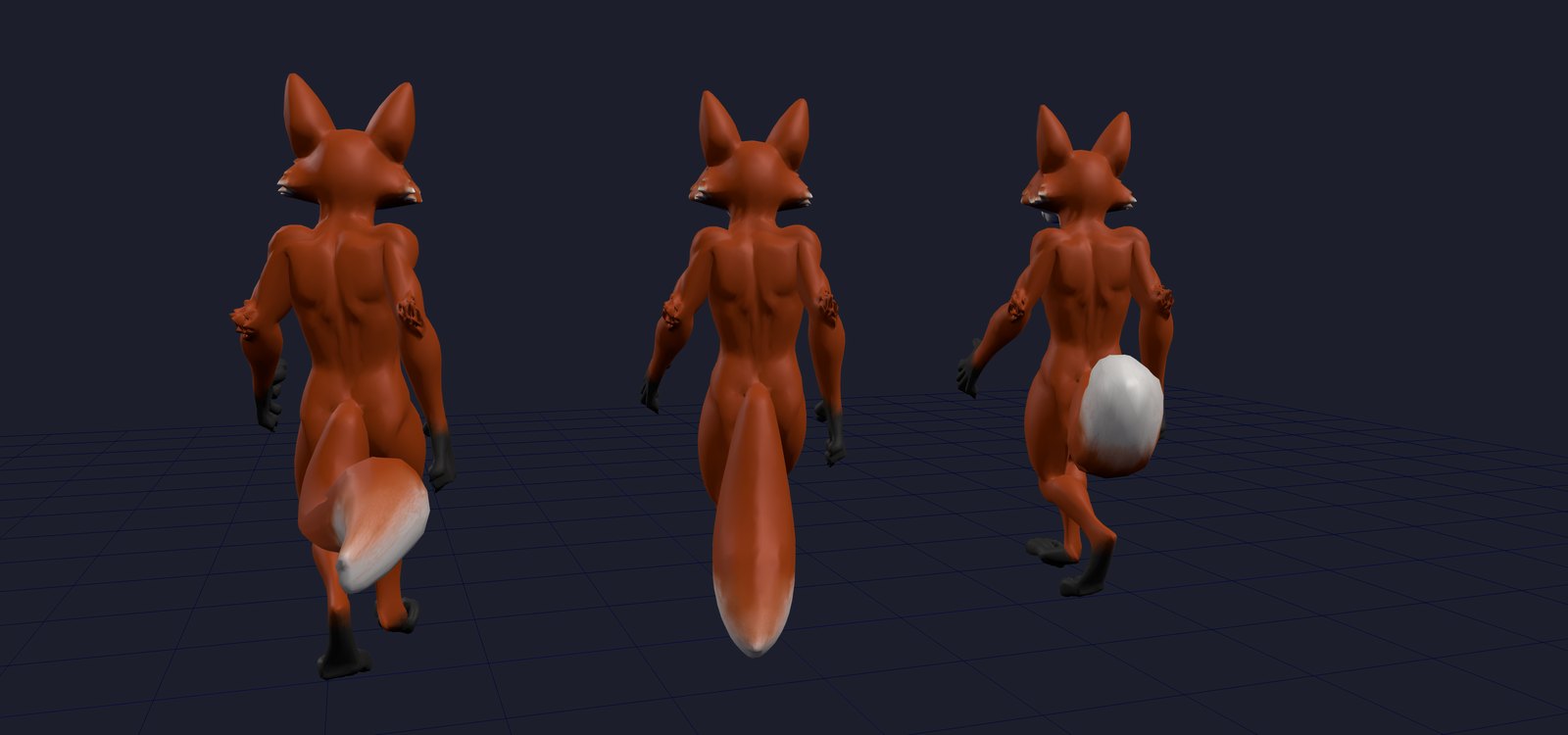
Left to right, mid-stride at the same frame: the rig as it came out of the rigger, the same rig with the tail handed to the pelvis as one piece, and the tail on its own bone chain with the runtime swinging it. You can orbit all three further down.
Why a humanoid rigger does this
Our Fast engine is built on Make-It-Animatable, which predicts a fixed Mixamo-style skeleton: 22 body bones, or 65 with fingers. Every vertex in the mesh has to be assigned to one of those bones. A tail isn't on the list, so the model does the next best thing it knows and hands the tail's vertices to whatever body part is nearest in its learned feature space. For this fox that was the left shin, with the rest split between the two thighs.
The fixed template has no tail bone, so adjusting its weights alone can't give the tail independent motion. Other appendages, including wings and long hair, also need controls beyond that body skeleton.
We measured what that costs on the fox's 1,582 tail vertices before touching anything. The distance from each vertex to the bones that actually move it (weighted by the weights) averaged 47 cm on a 191 cm model. The tail was being driven from half a metre away.
Finding the tail
The pass works from the mesh and skeleton in a rigged GLB. It uses their geometry rather than information specific to our rigger.
A distance field over the skeleton. For every vertex
and a vertex's skeleton distance is the minimum over all segments. Leaf joints get a short stub past the joint so a snout or a hand isn't counted as far from its own bone. A vertex is far when that distance exceeds 7% of the model's height. For the fox that's 13 cm.
Connected pieces of far skin. Far vertices are grouped into connected components along the mesh's own faces. One detail cost us an hour: exporters split vertices at UV and hard-normal seams, so this mesh has 23,129 vertices but only 29,081 triangles, and the face graph alone breaks one tail into dozens of islands. We weld vertices by position first, run connectivity on the welded graph, and write weights back per original vertex.
Where does it attach? The collar of a piece is the ring of non-far vertices next to it. Its centre tells us where the piece hangs from, by nearest joint, with one bias: a torso or thigh joint within 1.5 times the nearest distance wins, because around the pelvis the thigh heads sit exactly as close as the hips do and a tail root between them belongs to the body. We don't use the collar's weights for this. On a tail modelled as its own shell (most game models), the collar is the tail's own root ring, carrying the same bad weights we're trying to fix.
Is it an appendage or is it body? Two tests. A thick torso's far-off skin wraps around a bone, so its centre of mass lands back on the bone. A tail sticks out to one side, so its centre of mass is far from every bone. We require the centroid's skeleton distance to be at least 40% of the piece's reach. Then a shape test: with
The fox's tail came out as two overlapping shells (fur over skin, never welded), so pieces on the same attachment whose bounding boxes overlap by more than half are merged. We build a single chain for the merged tail.
Step one: make it rigid
The first version used a rigid attachment. Every vertex of the piece gets weight 1.0 on Hips. The tail stops tearing and moves as one piece with the pelvis. It looks like a plank, and that is the middle fox in the picture. We shipped this as a milestone because its stretch is exactly zero by construction, which makes it a useful reference for the measurement below.
Step two: grow a chain along it
A coordinate along the tail. We run Dijkstra from the collar into the piece over mesh edges weighted by edge length. Every tail vertex gets a geodesic distance
Joints. The number of segments is Tail_1 through Tail_K plus a weightless Tail_End, parented under Hips, sharing the Hips bind rotation so each is a pure translation in its parent's frame. Their inverse bind matrices follow directly. The existing clips contain no tracks for these joints, leaving them available for secondary motion.
Weights. With
At a joint the two bones meet at 50/50, and in the middle of a segment one bone owns the skin outright. For the root segment, "prev" is Hips, so the tail blends into the body instead of creasing at the collar.
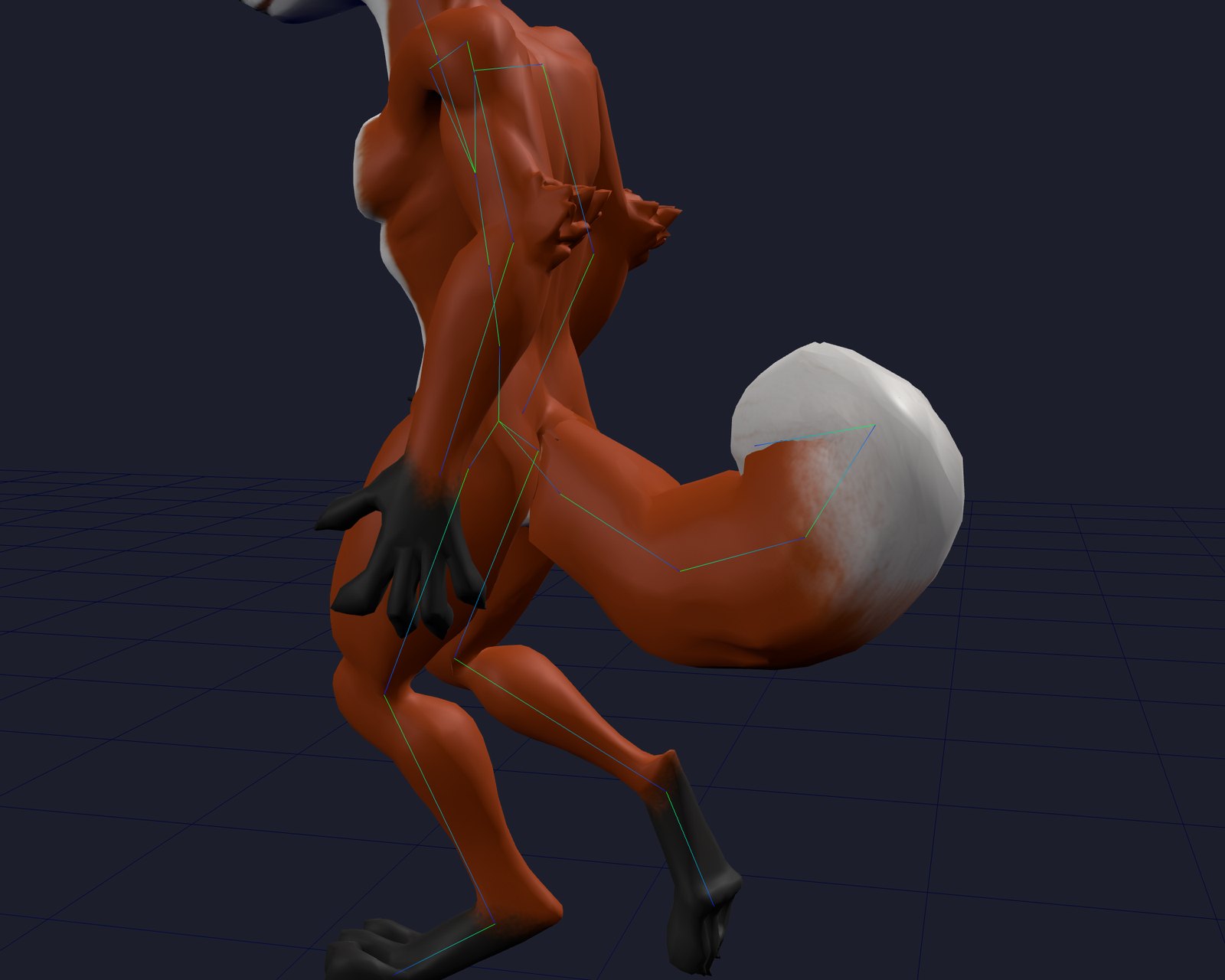
After the pass, the weighted bone distance on the tail dropped from 47 cm to 17 cm, which is about the tail's own radius. The new bones run through the tail itself.
Step three: something has to move the bones
No clip in our library has tail tracks, so without more work the chain holds its bind pose and the fox walks around with a plank. Games solve this with procedural secondary motion, and so do we, in the runtime library every rigged model already loads.
Each joint tip is a particle
with
Because the particles live in world space, turning or accelerating the hips makes the tail lag behind and swing through the spring update.
Motion and stretch checks exposed three problems in the early solver.
The first version pulled each particle a fixed fraction of the way to its target every frame, 12% at 60 fps. Written as a spring that is
The second version fed the rope correction back as velocity, correction divided by
The third was the carry angle below. It was applied in each joint's own frame, so a four-bone tail lifted four times over, curled into a ball against the fox's back, and tore its own skin at every bend. The measurement below is what found it: tail edge stretch went to a p99 of 2.3 against a body baseline of 1.3, worse than the shin it started on. carry is now the lift of the whole tail, shared across its joints.
Clipping. The tail was modelled hanging straight down between the legs, and the walk cycle put the feet through it. The rest pose the spring aims for is therefore not the mesh's own: a carry of 50° lifts the rest targets backward and up around the hips' side axis, the way a fox holds its tail when moving. That 50° is the whole tail's lift, shared across its joints, so the arc is gentle wherever the chain came out four bones long or eight. And no particle may cross the plane through the tail root that faces forward, so the tail can never swing between the legs.
Measuring it
These are the original fox measurements from September 6, before the mouse changes below. They document the first chain solver rather than a fresh benchmark of the revised defaults.
We measured edge stretch throughout the clip to capture deformation during motion. For every mesh edge whose two vertices are both on the tail, we take the ratio of its skinned length to its bind length at 24 evenly spaced times through the Walk clip. A ratio of 1 is undeformed skin. An edge stretched past 1.5 or squashed below 0.67 counts as torn. Body edges are measured the same way as a baseline for what normal skinning distortion looks like.
| Walk clip, 96,864 tail edge samples | p95 | p99 | max | torn |
|---|---|---|---|---|
| Original rig | 1.60 | 2.42 | 4.03 | 11.4% |
| Rigid to Hips | 1.00 | 1.00 | 1.00 | 0% |
| Tail chain | 1.09 | 1.18 | 1.30 | 0% |
| Body, for reference | 1.13 | 1.29 | 1.78 | n/a |
The original rig stretched one in nine tail edges past tearing, and its worst edge was four times its bind length. The chain's worst edge is 30% long, inside the body's own baseline of 1.78, with no samples exceeding our tearing thresholds. The rigid tail sits at exactly 1.00 because it moves as one piece, which provided a control for the stretch measurement.
A swinging tail deforms its skin, so we compared stretch with the body baseline and checked how much it moved. An earlier version reached a p99 of 1.03 because the velocity bug above had over-damped the tail until it barely moved.
The live comparison
Three copies of the fox, same clip, same frame. Drag to orbit, wheel to zoom. Switch clips, turn the tail physics off to see the chain in its carried rest pose, and turn on the bones to see where the chain sits.
The same chain from the side, alone, with the skeleton drawn. Sprint is the clip that shows the spring best.
What the mouse taught us
The fox established that a chain could stop the tearing. A mouse with a long, thin tail made the remaining motion errors much easier to see. A sharp bend that disappears inside a fox's fur reads as a broken joint on the mouse. Its tail also reaches the floor, and its modelled shape curls to one side. Those are three different problems, and turning up the spring stiffness doesn't solve all of them.
Try the mouse across the animation library below. Drag the character to orbit, scroll the thumbnail strip sideways, or use its search and category filter to find a motion. Click a tile to play it on the large preview. Walk, Crouch Backward, Crawl Idle and Back Flip are useful places to start when inspecting the tail. The strip uses the same live animation previews as our animations hero and makes the full catalog available, loading motions as you browse.
Open the full animation library → to try these motions on your own rigged character and export the clips you choose.
A chain of springs still needs bending resistance
The particles were constrained to keep each bone's length, but each joint could still swing almost independently. Length constraints prevent stretching, but they don't prevent a hinge from folding. The mouse exposed exactly that distinction.
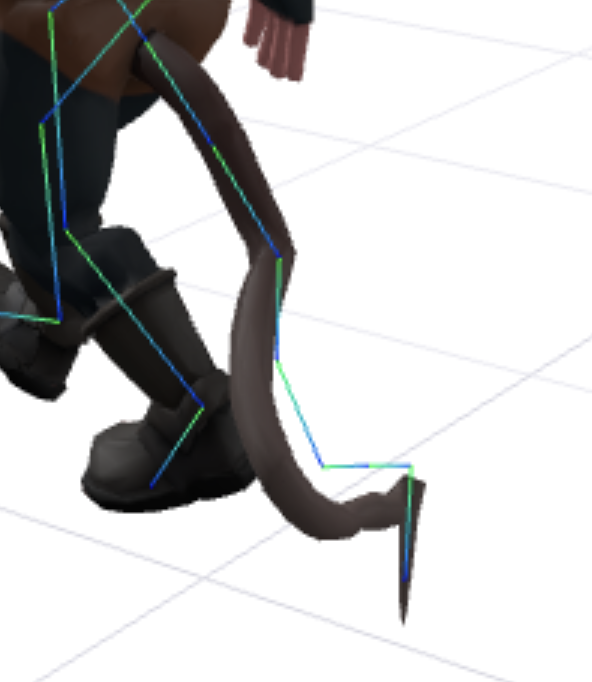
Before the fixes: keeping segment lengths intact wasn't enough to keep the curve smooth.
We now couple neighboring joints' extra bends, measured relative to the resting curve. The bends are compared in a common reference frame so different bone axes don't turn a left bend into an unrelated twist on the next joint. Each step reads a snapshot of its neighbors rather than partly updated values. The coupling blend is
A joint's elastic bend is limited to 30° beyond its resting direction. We also increased damping to 0.65 and remove velocity that keeps pushing into the bend stop, so it can't accumulate and release as a snap. The base remains supported by the hips and the tip remains softer. Contact can override the bend limit when the tail needs to lie on the floor.
Coupling rotations rather than particle positions. Number the
This conjugation changes the bend's coordinate frame and doesn't add another rotation to the character. Using snapshots
At the base, the neighbor target is halfway between the next joint's bend and the identity quaternion
For a unit quaternion
We transform this bend back into the parent frame and apply it to
The loaded pose isn't necessarily the bind pose
The mouse's saved file already had about 28° of rotation on its last tail joint. We were reading that loaded rotation as neutral, then adding spring motion on top. A previously animated or exported pose had become a permanent part of the spring's target.
The solver now recovers neutral local transforms from the skeleton's inverse bind matrices when available. If a rig has no Tail_End helper, its last segment continues the incoming tangent expressed in that last bone's own local frame. Copying a vector from the parent's frame is wrong as soon as the terminal bone has a different orientation.
The one-sided curl had another cause: it was present in the actual bind geometry. Correctly recovering the bind pose therefore preserved the bias. The simulation now defaults to a centered resting arc, built in hips space and converted into each corrected parent's frame. restCurve can blend the modelled curl back in: 0 is the centered arc, 1 retains the authored curve. That changes what the springs aim for. It doesn't rewrite the mesh or its skin weights.
Recovering the reference transforms. Let
Decomposing
Constructing the centered arc. Let restCurve, and
Here
The tail may touch the ground but may not lift the mouse
Ground contact rotates a segment onto the intersection of its length sphere and the floor. Simply clamping a particle's height would shorten the bone, and clamping and then restoring its length can put it underground again. We leave 0.025 world units below the centerline for thickness, discard downward contact velocity and damp sliding. The flat floor defaults to world Y = 0 and can be moved or disabled. This is a plane constraint rather than terrain or full mesh collision.
The sphere–floor intersection. Write
If the predicted endpoint is below the floor, define
Its height is exactly
After the other velocity projections, a contacting particle has its remaining downward velocity removed and its velocity damped:
This is inelastic contact with simple damping rather than a Coulomb-friction model. It prevents gravity from storing downward speed while the tail rests on the floor.
That solved the tail's penetration, but there were two other places where a tail could make the feet float.
First, the viewer placed the lowest point of the entire loaded mesh on the ground. If the saved tail hung below the soles, it lifted the whole character to accommodate the tail. Viewer placement now ignores tail-dominated skin when finding the body floor, while camera framing still includes the whole character.
Second, the retargeter's body-grounding pass also counted the tail. During Back Flip it raised the pelvis to keep that skin clear, even though the independent tail solver would move it afterward.
Which skin is allowed to raise the pelvis? Let
Here
For the comparison below, the reported extra lift is a difference between the final pelvis trajectories, not merely the raw correction:
Measured pelvis lift near the end of Back Flip
We sampled the same mouse at the same animation times, changing whether the tail was included in body grounding. Both columns use the same model world coordinates, and the difference isolates the extra height introduced by counting the tail.
| Time in the 1.93 s clip | Pelvis height: tail counted | Pelvis height: tail excluded | Extra lift from counting the tail |
|---|---|---|---|
| 1.16 s | 50.5 cm | 35.0 cm | 15.4 cm |
| 1.55 s | 81.3 cm | 70.3 cm | 11.0 cm |
| 1.84 s | 92.2 cm | 77.2 cm | 15.0 cm |
| 1.93 s | 90.6 cm | 77.2 cm | 13.4 cm |
The character should rise as it stands after landing. The error is the additional lift in the last column rather than that intended recovery motion. Values are rounded independently from the sampled world positions.
On this mouse, excluding the tail removed roughly 15 cm of extra pelvis lift late in Back Flip. Near the end, the body probe stayed within about a millimetre of its reference floor instead of floating several centimetres above it. Tail skin now defines neither the body's floor nor the correction that raises its pelvis. The tail solver itself only rotates tail bones and never translates the model, hips or feet.
An animation can inherit a pose before you ever play it
The lifted crouch exposed a separate problem. We generate library clips progressively so the viewer can start playing before every clip is ready. Retargeting was using the same skeleton as playback. Between solves, the preview could move the pelvis, and the next clip would read that animated pose as its calibration reference. Resetting when switching clips could not repair a bad reference already baked into the generated tracks.
Retargeting now works on private skeleton copies made from a stable calibration captured before playback begins. Later clip requests reuse that reference, and concurrent requests have separate bones. A regression test moves and rotates the live hips between delivered clips, and the generated tracks must remain identical to a clean run, and solving must leave the live pose untouched.
Not every visible movement was a bug. Climb Idle has a small pelvis bob in its source loop, with a stationary root. And a fresh Crawl Idle solve kept the mouse's hands below its head throughout the loop, and the raised-hands screenshot was consistent with an earlier contaminated clip, rather than evidence that the source animation wanted that pose. Comparing the source, a fresh solve and the playing result kept us from flattening intentional motion to hide a calibration error.
What we check now
The checks cover fast hip sweeps on chains of different lengths, smoother neighboring bends, equal left/right responses, recovery of the bind pose, a rotated terminal bone without a helper, and loop closure after warm-up. Floor tests cover crouching, raised floor planes, settling and release when the hips rise. Separate regressions verify that tail contact never moves the body and that tail skin can't request a pelvis lift.
These checks cover the listed solver behaviors. The live examples show the revised motion for visual inspection, and the fox stretch table records the original September 6 measurements and hasn't been rerun with the new defaults.
What this changes for you
If you rig a character with a tail at cinevva.com/tools/rigger, the tail comes back on its own bone chain, the job status carries an appendages entry describing what was found, and the preview swings it. Models rigged through the platform API get the same file. The original integration in rt/1.1.12 made createAnimator find Tail_* bones and drive them with no extra code, and the spring's frequency, damping, gravity and carry angle are options if you want a heavier or a lazier tail. Older files without a tail chain can be run through the pass again by re-rigging. The September 11 changes described above are now live in Cinevva's web previews. Games pinned to an older runtime and previously exported clips don't update automatically. Existing baked clips need to be regenerated to pick up the fixes.
In Blender. The add-on runs the same pass, on the rig table before it builds the armature, so a tail rigged on your own machine gets the same chain under the same names. There is a Tail checkbox next to Fingers, and the result card says what it found.
Outside our runtime. A spring in a game is no help to someone opening the file in Blender, Unity or Unreal, where the tail would sit still. So an export now bakes it: each selected clip is simulated and the tail's rotations are sampled into real keyframes. The exporter runs the clip without recording until the tail returns to where the pass started, then records, because a cycle baked from a cold start doesn't close and the tail jumps on loop. The tip is the softest link by design, so its transient is the slowest to settle and one warm-up pass isn't always enough.
The pass is conservative. It grows a chain only for a long piece hanging from the pelvis. Ears, hair and sleeves are untouched, and so is anything wide on the torso: an earlier version handed a cape or a skirt rigidly to its torso bone, and watching it run on real uploads changed our mind. One was a 6,540-vertex garment at the waist that the rigger had spread sensibly across the hips and both thighs, and one bone would have stopped it following the legs at all. Handing a garment to a single bone is a big change to someone's character made on a guess about what the piece is, so it is now something you ask for rather than something that happens to you. There is no collision with the legs beyond the forward plane, and no idle sway when the character stands still, so a standing fox's tail hangs still at its carried pose. Those are the next two things on the list, along with the same treatment for wings, which want a different rest pose and a different spring.