The mouse still won't blink
By Oleg Sidorkin, CTO and Co-Founder of Cinevva
We've put a lot of work into the tools that bring your models to life at Cinevva: rigging them, getting animations onto them, and fixing the awkward details that show up once they move. That work has taken us through legs that won't bend, animation transfer, and tails with no bones to drive them.
Now I want to give those characters some emotion. A character should be able to look surprised, annoyed, or pleased as well as walk across a scene. That means getting the face to move: eyelids, brows, cheeks, and a mouth that can do more than hold its resting pose.
We've started looking at recent facial-rigging research to see how far we can get from an existing mesh to usable expressions. This is the first account of that work: what we could actually run, how we prepared the character, and what happened when we tried it.
Our test subject was the mouse from the tail work. It already had a body rig and six animation clips. It could walk, jump, and sprint, but its face stayed fixed through all of them.
We tried NFR, a research implementation that transfers expressions onto a supplied face mesh. The first output was a sheet of poses labelled jaw open, smile, blink, pucker, and brow raise. I couldn't see much useful animation in it. The jaw had pulled the muzzle around, and most of the other pictures looked almost the same.
There was a preparation problem worth fixing before judging the result. We had cut away much of the mouse's eye rims while making the input mesh. So we redid the crop, ran it again, and rendered both attempts in motion. Here they are.
What went into NFR
The full character has 22,744 exported vertices and 30 joints, but no facial blendshapes or dedicated jaw and eye bones. We needed to add the face controls without disturbing the existing rig.
NFR's input requirements explain why we couldn't just hand it the GLB. It expects a facial surface with the eyes and mouth cut open, internal structures and eyeballs excluded, and the mesh roughly aligned to its examples. We removed the back of the head, ears, and neck, made the openings, and kept the largest connected piece. That left 777 vertices and 1,296 triangles.
Every vertex in this crop still corresponded to a position on the original character. After inference, we subtracted the predicted neutral face from each predicted expression, converted the offsets back to the mouse's scale, and applied them to the matching original vertices. Movement faded out near the edge of the crop so it wouldn't stop abruptly where the face met the rest of the head.
This gave us nine blendshapes: stored vertex offsets that a slider can blend into the neutral mesh. Setting every slider to zero restored the original mouse. We kept its skeleton, textures, and six body clips, then added a separate test clip for each expression.
The inference itself took about seven seconds on a T4, once the checkpoint and input were loaded. Getting a usable expression was going to take longer.
We had cut through the parts we needed
Our first eye cuts were broad ellipses. On this face, they removed much of the rim around each eye. The mouth cut was below the visible lip seam. Neither mistake was obvious from the numbers describing the mesh: it had finite coordinates, no degenerate triangles, and no nonmanifold edges.
Look at the crop, though, and the problem is fairly clear. We were asking for eyelid movement after discarding much of the surface that might provide it.
For the second pass, we rendered the head from the front and two oblique angles. I used the assistant's image understanding to help mark the eye openings, rims, mouth seam, muzzle, nose, brows, and whiskers. Those outlines were projected onto the visible triangles of the original mesh. Keeping the projection and triangle IDs let us check which actual pieces of the face survived each cut.
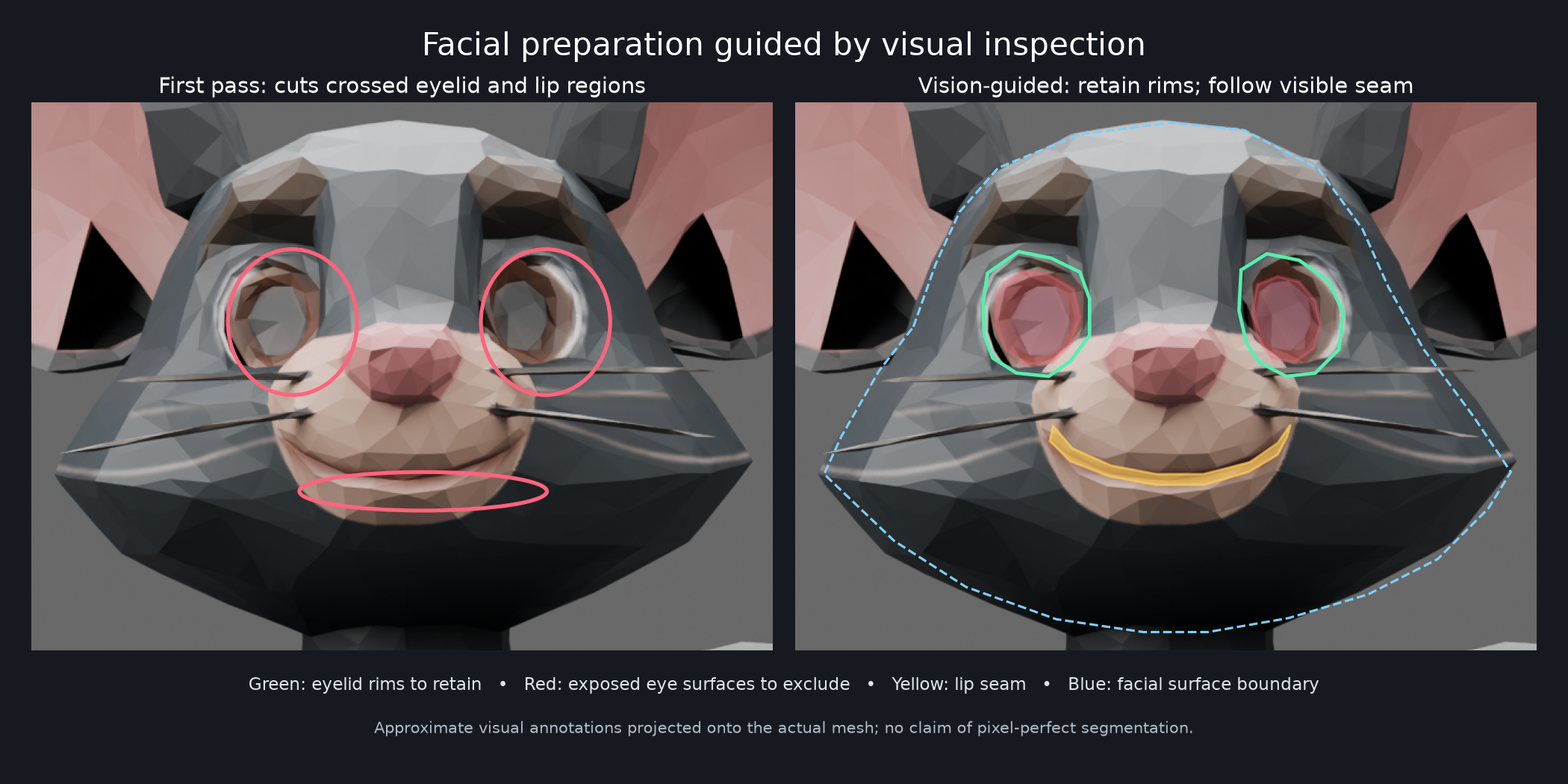
We marked 131 visible triangles as belonging to the two eye rims. The first crop had kept only 25 of them. The new one kept 123. That's a useful improvement in the input, although it measures retention against our own annotations rather than independent segmentation accuracy.
We also changed the alignment. Instead of matching the earlier reference extent, we used corresponding facial landmarks to set a uniform scale and position. The new crop had 586 vertices and 952 triangles. It still had gaps and open boundaries, because this pass selected existing geometry rather than building new eyelids or an inside for the mouth.
More movement, more stretching
The second run used the same weights and the same nine expression controls. I wanted to see the whole motion this time, so we rendered intermediate strengths between neutral and each full expression, then returned to neutral. The video at the top shows both versions under identical lighting.
The eyes still stay open. The jaw control changes the muzzle without producing a convincing mouth opening. Some mouth controls move more than before, especially the funnel, but the surface distorts with them.
We checked edge lengths to put a number on that distortion. For every edge in the character mesh, we divided its length at full expression by its neutral length and counted the ones that more than doubled.
| Control | First crop: edges over 2× | Revised crop: edges over 2× | Worst revised stretch |
|---|---|---|---|
| Jaw open | 13 | 44 | 5.27× |
| Smile left | 0 | 30 | 5.53× |
| Mouth funnel | 0 | 89 | 11.29× |
A short edge can give a large ratio, so I wouldn't use this alone to score a facial rig. In this case it agrees with what the renders show. The revised mouth moves more, and some of that movement is stretching we don't want.
We changed three things together: the crop, the alignment, and the fade at the outer boundary. This comparison can't tell us which change caused each artifact. It does tell us that the revised preparation, as a whole, didn't solve the face on this character.
Why we used NFR
We looked at other implementations before running this experiment. Google's GNM Head loaded and produced expressions on its own human-head mesh. Getting those expressions onto our mouse would have required a separate fitting and transfer step. Example-Based Facial Rigging needed corresponding expression examples that our character didn't have.
RigAnyFace and OmniFaceRig were also relevant, but as of September 11, 2026, we hadn't located public inference code and weights we could run for either. OmniFaceRig's dataset link still said "Coming Soon." NFR had a released checkpoint and a path for custom meshes, so that was the one we took through to an animated mouse.
These weren't five comparable runs. We tested NFR on our facial surface, checked GNM on its native head, and stopped at input or availability limits for the others.
The next attempt needs an eyelid
The crop was poor, and fixing it was worth doing. But retaining an eye rim doesn't give it enough geometry or the right motion to cover the eye. The mouth has a similar problem: we can pull on the muzzle, but this experiment hasn't built the opening and interior that the pose needs.
I'd tackle one blink and one jaw opening next. Give the eyelid a shape that can close over the eye, prepare the lips and mouth interior, then fit or author the corrective shapes for those two movements. Check them from the side as well as the front before adding the rest of the controls.
We kept both attempts, including the raw predictions and the exact crops, so we can compare that work against this result. For now, the body rig and its animations are intact. The facial shapes remain an experiment. I wouldn't use them in a finished character.