Appearance
Skip to content
Arcade › ClipLoop
ClipLoop
About ClipLoop
youtube IG
How to play
Click the game above and it runs right here in your browser. No download, no installer, no account needed. renner.ellisvl built it with Cinevva, so it works on a phone or a tablet too.
Discussion
Nobody has said anything about ClipLoop yet. Play it, then tell renner.ellisvl what you would add next.
Make your own game
ClipLoop was built by renner.ellisvl with the Cinevva game creator: describe the game you want in chat, watch it get built, and play it in your browser minutes later.
Remix ClipLoop opens the real game in the creator and forks its actual files, chat and design doc, so you start from the code rather than from a description.
Read the build brief for ClipLoop
Cinevva's analyzer read this game's design doc and its source, then wrote the brief below. "Make your own" hands it to the game creator as your opening message, so you start from a real spec rather than a one-line idea.
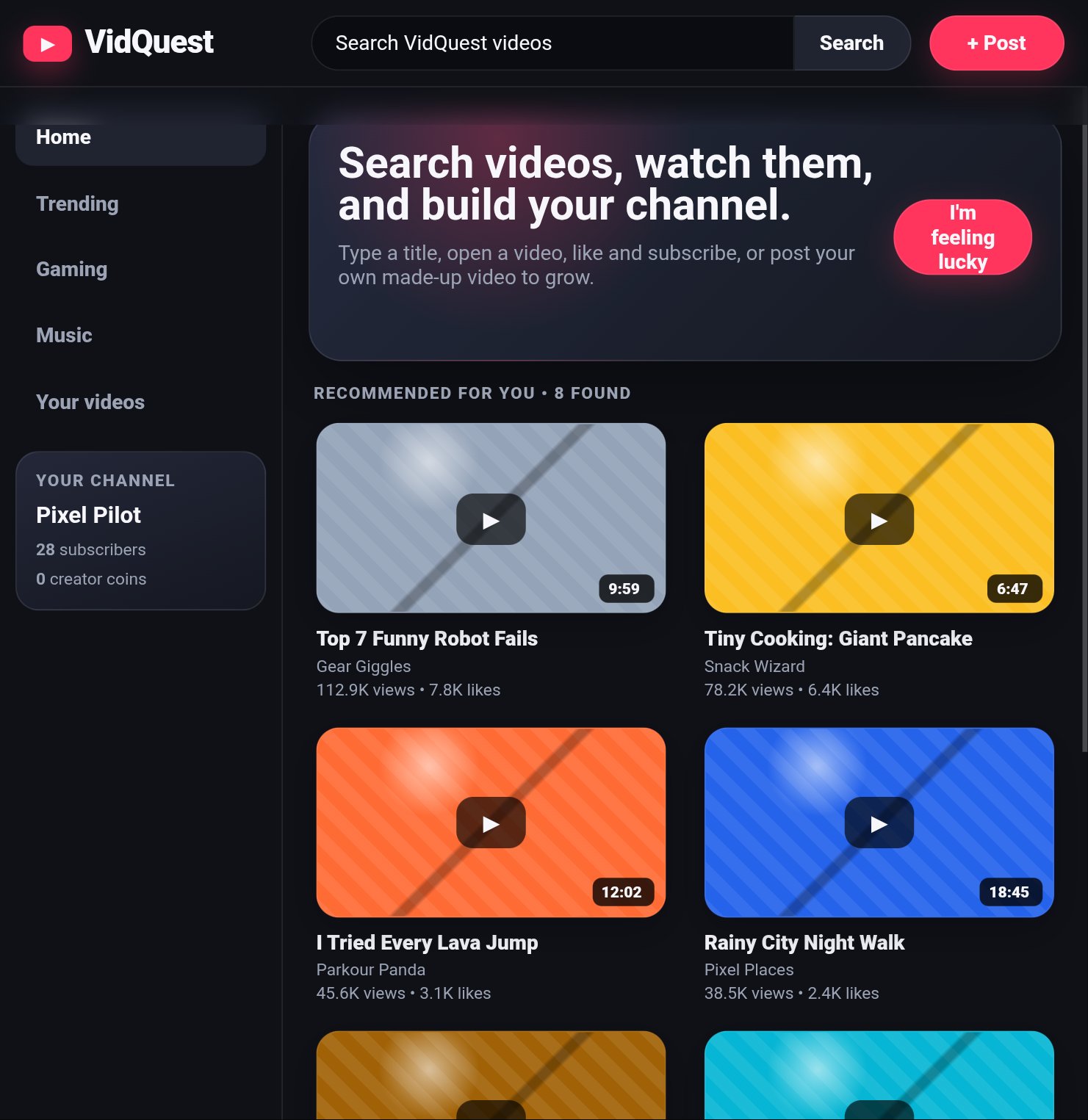
Create a responsive dark-themed short-video community web app titled "CineClip" (the visible brand in the reference is styled as “ClipLoop”), with the author blurb “youtube IG.” This is an interactive feed/studio app rather than an action game. Use a near-black background (#0b0d12), white text, muted gray secondary text, thin blue-gray borders, dark navy panels, and hot pink accent buttons; use rounded corners throughout and a clean bold system sans-serif typeface.

Desktop layout: a fixed-height top header with the ClipLoop/CineClip wordmark at left, with the second part in pink; a wide rounded search field reading “Search videos, creators, tags...” in the center; and rounded “🎥 Camera” and pink “+ Create” buttons on the right. Below, use a two-column layout: a ~230px left sidebar separated by a vertical border, and a scrollable content feed. Sidebar navigation has Home selected in a darker rounded panel, plus Trending with a fire icon, Following, and Library. Under the navigation show a bordered promotional card titled “Make your next clip,” explaining “Record with your camera, add captions, then publish it to your feed.” and a pink “Start creating” button.

The main feed begins with a “For you” heading and the subtitle “Fresh clips from the ClipLoop community,” plus a dark rounded sorting select on the right with Recommended, Newest, and Most liked options. Display video cards in a responsive grid. Each card has a large rounded thumbnail with one of three dark gradient treatments: purple/navy default, teal/navy alternate, or dark red/purple hot. Default seeded cards show a centered white circular play button with a black triangle and a small black duration badge “0:30” at bottom-right. Beneath each thumbnail, show creator information with a circular gradient avatar containing the creator initial, creator name in bold, muted view count and posting time, a bold clip title, muted description, and a small purple pill tag.

Seed the feed with these six clips: “How I make a beat in 30 seconds” by Mia Makes, M, 12.4K views, 2h ago, #music, default purple; “Easy camera tricks for your next video” by FrameLab, F, 8.1K views, 5h ago, #tutorial, teal alternate; “The snack rating challenge” by Jay Eats, J, 22K views, 1d ago, #challenge, red hot; “Sunset skate session” by Riley Roads, R, 4.7K views, 2d ago, #vibes, teal alternate; “3 captions that keep viewers watching” by Creator Club, C, 16K views, 3d ago, #creator, default; and “Tiny room makeover before and after” by Lo Studio, L, 31K views, 4d ago, #design, red hot. Cards should show “A fresh clip on ClipLoop” when no custom description exists. If a user searches, filter against title, creator, tag, and description and change the subtitle to text like `2 results for “music”`; show a “No clips found. Try another search or create one.” message when empty. The Newest option reverses the displayed order; retain the visible sort choices even if Recommended and Most liked use the default ordering.

All three Create entry points—the header Create button, sidebar Start creating button, and mobile bottom Create button—open a centered modal over a translucent black overlay. The modal is a dark bordered rounded panel titled “Create a clip” with a close X. It contains a two-column studio area on desktop (single column on narrow screens): a dashed-border preview box saying “Choose a video file or start your camera,” and controls for a video file upload, a “Use camera” button, hidden-until-needed “Stop camera” button, camera status text, a caption overlay text field, and a live caption preview initially reading “Your caption appears here.” Accept video files, create a local preview video with controls/autoplay/muted when selected, and allow the browser camera/microphone via getUserMedia; show a live muted camera preview and the status “Camera is live — record support is simulated in this browser prototype.” If permission fails, show “Camera permission was not available. You can still upload a video file.” Stop camera must stop active media tracks.

Below the studio, provide fields for Title, Description, and Tags with the placeholders “Give your video a title,” “Tell people what this clip is about,” and “#music #funny #tutorial.” Add pink “Publish clip” and dark “Save draft” buttons. Publishing creates a new top-of-feed card for creator “You,” initial Y, title from the form or “My new ClipLoop video,” description from the form or “My latest clip,” first hashtag token or #new, views 0, time “just now,” duration 0:30, and the alternate teal theme; show “Published to your local ClipLoop feed.” Saving creates the same kind of item but with views “Draft,” time “saved just now,” and shows “Draft saved on this device.” Persist created items in local browser storage so they remain after reload, and close the modal shortly after successful publish/save.

On mobile widths, hide the sidebar and use a bottom navigation bar with Home, Trending, Create, Following, and Library; keep the header compact, hide the non-primary Camera header pill, use a two-column card grid with smaller thumbnails/text, and stack the studio fields into one column. The feed itself should scroll vertically while the overall app retains the header and bottom navigation. Match the reference’s polished prototype feel, rounded card geometry, dark cinematic gradients, pink creation accent, and compact social-video metadata. Do not add likes, comments, playback pages, follows, or other mechanics not described here.