एक AI game engine की शारीरिक रचना: prompt के अंदर असल में क्या है
Mariana Muntean द्वारा, Cinevva की CEO
अजनबी Cinevva के बारे में सबसे आम बात यही कहते हैं कि यह एक AI wrapper है। वे homepage पर आते हैं, "Describe your game" लिखा एक अकेला input box देखते हैं, और तय कर लेते हैं कि उन्होंने product को समझ लिया। उन्होंने सामने का दरवाज़ा समझा है। Product वह सब कुछ है जो उस वाक्य को टाइप करते वक़्त आपको दिखाई नहीं देता, और इस हफ़्ते से, एक open world भी जिसमें आपके players घूमते हुए आपके game तक पहुँचते हैं।
उस input के पीछे एक पूरा game engine है, 26 typed tools वाला एक orchestrator, generative models का एक बेड़ा, ग्यारह providers में फैली हुई aggregated asset search, एक live game iframe जिसे agent पढ़ और लिख सकता है, और एक storefront जहाँ वही agent आपके तैयार game को एक swipe होने वाली gameplay reel के तौर पर ship करता है। इसमें से कुछ भी अजूबा नहीं है। यह सब plumbing है। दिलचस्प काम यह तय करना था कि किसको किससे जोड़ें।
यह post मशीन को ऊपर से नीचे तक घुमाकर दिखाती है। यही वह समझाइश है जो हम technical investors को देते हैं और यही वह समझाइश है जो हम contribute करने की सोच रहे developers को देते हैं। उन्हें एक ही जवाब चाहिए।
1. Prompt सतह है, system नहीं
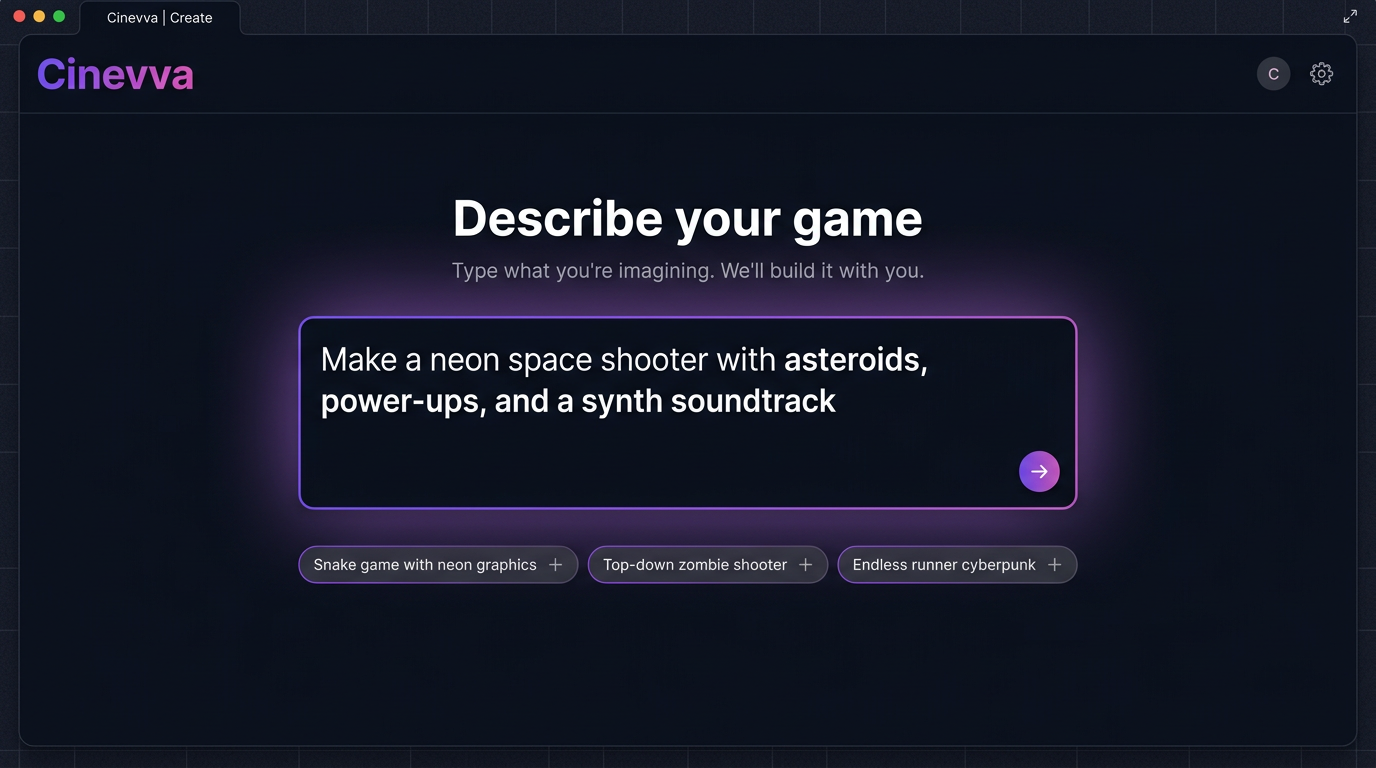
पहला design फ़ैसला यह था कि जब तक user का इसमें कुछ दाँव पर न लगे, तब तक सब कुछ छिपाकर रखें। Homepage का एक ही काम है, एक वाक्य लेकर उसे एक project में बदल देना। हमने अनुभव को एक public तरफ़ (prompt, showcases, storefront feed) और एक creator तरफ़ (IDE, asset tools, publish flow) में बाँट दिया, ताकि जो लोग बस खेलना चाहते हैं उन्हें cockpit देखना ही न पड़े।
इसीलिए placeholder "Make a snake game with neon graphics" और "Top-down zombie shooter" जैसी चीज़ों के बीच घूमता रहता है। ये tutorials नहीं हैं। ये एक इजाज़तनामा हैं। User देखता है कि वह "अजीब arcade idea" एक जायज़ input है।
जिस पल आप submit करते हैं, तीन चीज़ें होती हैं। System एक stable ID के साथ एक नया game project बनाता है। यह एक खाली file tree बोता है (index.html, game.js, style.css, assets/, GDD.md)। और यह आपके वाक्य को एक project context window के साथ orchestrator में भेजता है जो उन खाली files की ओर इशारा करता है। यहाँ से आगे आप एक ऐसे agent से बात कर रहे हैं जिसके हाथ हैं।
2. Input के पीछे, एक पूरा browser IDE
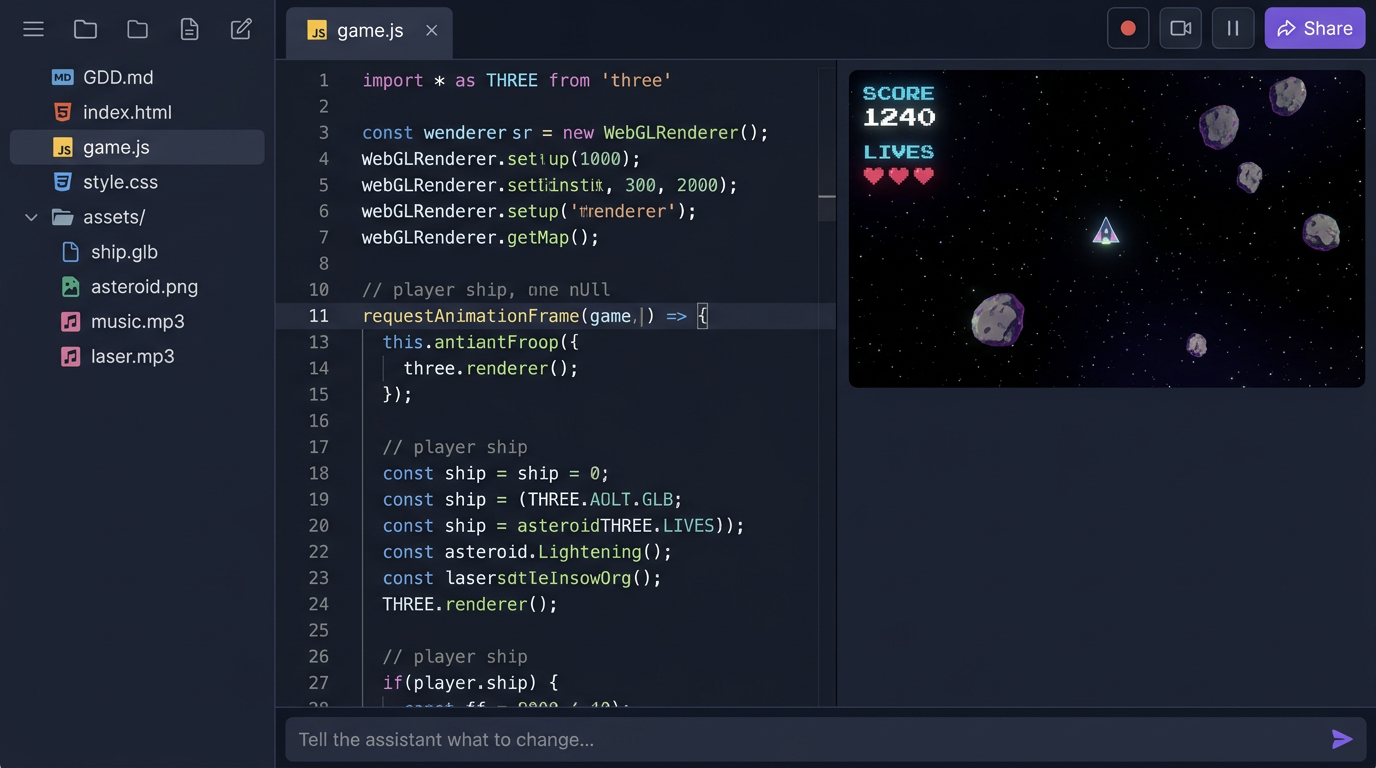
Creator workspace एक तीन-panel वाला IDE है जो पूरी तरह browser में चलता है। बाईं ओर file tree, बीच में code editor, दाईं ओर live game iframe, और नीचे की ओर चलता हुआ एक chat input। हमने यह layout जानबूझकर चुना। जो लोग पहले से code लिखते हैं वे इसे तुरंत पहचान लेते हैं। जो नहीं लिखते वे बीच वाले panel को नज़रअंदाज़ कर सकते हैं और सिर्फ़ chat से बात करते रह सकते हैं।
File tree कोई रूपक नहीं है। हर project सचमुच HTML, JS, CSS, generated images, GLB models और audio files की एक छोटी static site है, जो R2 से सीधे एक Cloudflare Worker के ज़रिए serve होती है। कोई build step नहीं है। इसकी वजह मायने रखती है। इसका मतलब है कि agent वही files पढ़ और लिख सकता है जो आप असल में ship करेंगे, और इसका मतलब है कि वही artifact iframe में चलता है, Capacitor में लिपटे एक phone पर चलता है, Tauri में लिपटे Steam पर चलता है, और Discord के अंदर एक Embedded Activity के तौर पर चलता है। एक filesystem, छह distribution targets।
हमारे बनाए हर game के लिए ज़रूरी है कि वह window पर दो functions expose करे। getGameState() एक सादा object लौटाता है जो चल रहे game का वर्णन करता है (player position, score, lives, enemies, timers)। setGameState(patch) एक partial update वापस live game पर लगाता है। यह छोटा सा API वह अनुबंध है जो agent को game को reload किए बिना उसे inspect और modify करने देता है। हम section 6 में इसकी वजह पर लौटेंगे।
3. Orchestrator, जहाँ असल engine रहती है
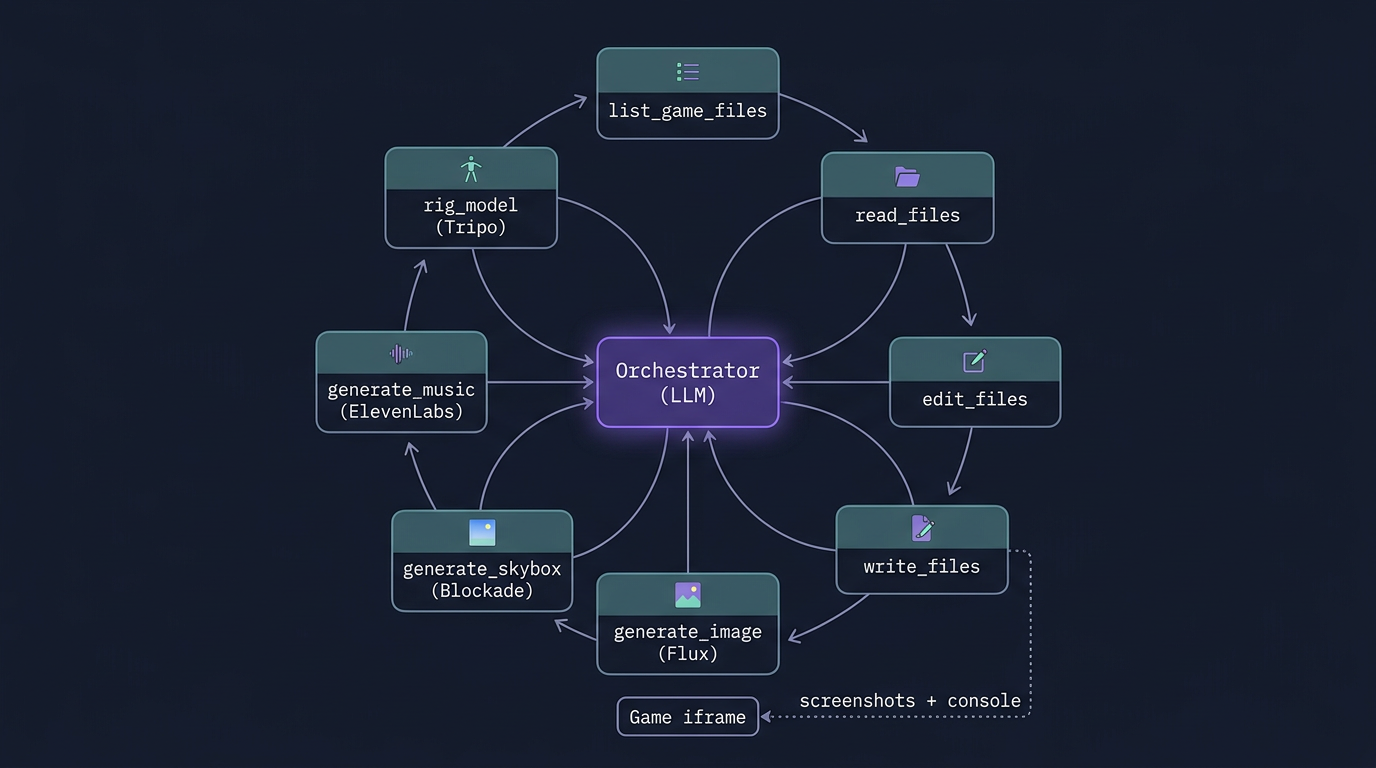
जब लोग इसे "एक AI wrapper" कहते हैं तो वे यह बात चूक जाते हैं कि AI इतना code नहीं लिखता जितना कि वह एक छोटे orchestra का संचालन करता है। Orchestrator एक tool-calling loop है जो एक frontier model के ख़िलाफ़ चलता है, जिसका system prompt क़रीब एक हज़ार लाइन लंबा है और 26 functions की एक typed tool surface है। Tool definitions ही engine हैं। Model conductor है।
26 tools पाँच परिवारों में बँटते हैं। Filesystem tools (list_game_files, read_files, search_game_file, edit_files, write_files, delete_files, rename_files) agent को आपके game को किसी भी दूसरे codebase की तरह बरतने देते हैं। Project tools (create_new_game, list_games, open_game, ask_user, game_ready) एक project के जीवनचक्र और इंसान को वापस सौंपने का काम संभालते हैं। Generative tools (generate_image, generate_skybox, generate_music, generate_sfx, rig_model, apply_animation, list_animations, list_skybox_styles) उन specialized models को call करते हैं जिन्हें हम आगे cover करेंगे। Knowledge tools (search_fonts, list_library_docs, search_library_docs, list_generations) agent को hallucinated APIs के बजाय भरोसेमंद, indexed सच्चाई के स्रोत देते हैं। और runtime tools (read_console_logs, execute_js) agent को live game देखने और छूने देते हैं।
एक आम पहली turn कुछ ऐसी दिखती है। User टाइप करता है "Make a neon space shooter"। Model एक write_files call निकालता है जिसमें GDD.md design का वर्णन करता है, फिर दोबारा write_files जिसमें index.html, game.js और style.css होते हैं। यह generate_music को prompt="synthwave space shooter, 120 BPM, driving bassline" के साथ call करता है जो ElevenLabs Music के ख़िलाफ़ एक job शुरू करता है और R2 के अंदर एक MP3 URL लौटाता है। यह starfield के लिए एक Blockade Labs model 3 style के साथ generate_skybox call करता है। यह iframe को नए build पर पलटने के लिए game_ready(title, message) call करता है, और आख़िर में यह पुष्टि करने के लिए कि game बिना errors के boot हुआ, read_console_logs call करता है। अगर इसे कोई stack trace दिखता है, तो user के कुछ बताने से पहले ही यह edit_files पर लौटकर उसे ठीक कर देता है।
इस design की दिलचस्प बात यह है कि system prompt और tool schemas ही एकमात्र ऐसी चीज़ें हैं जो product-specific हैं। Model बदल दीजिए, फिर भी सब कुछ चलता है। हमने पिछले साल तीन frontier models के बीच migrate किया है बिना surface बदले, क्योंकि surface हमारी है।
4. Asset वाली तरफ़: एक model fan-out
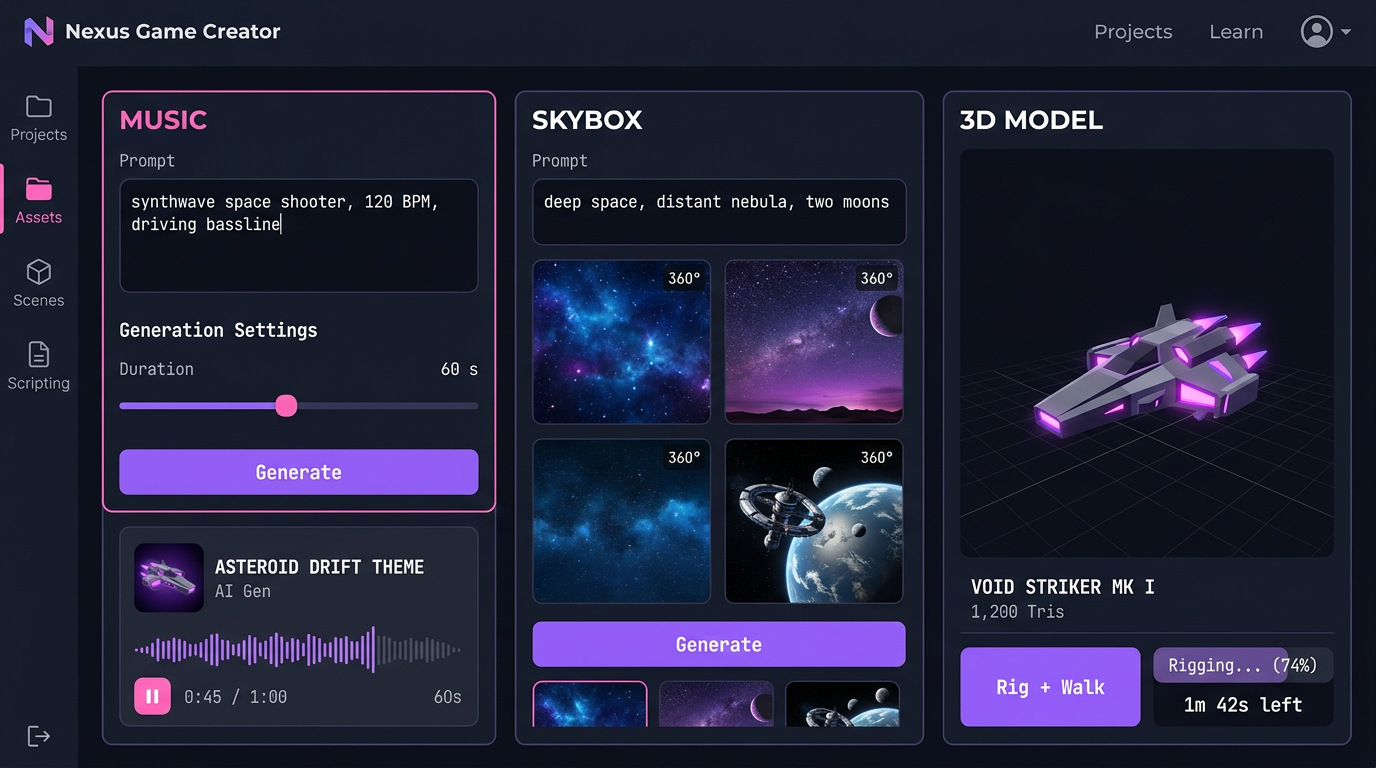
Agent images, music, sound या 3D ख़ुद नहीं बनाता। यह specialists को call करता है। Cinevva की asset वाली तरफ़ best-in-class models में एक fan-out है, जिसे इस तरह जोड़ा गया है कि एक का output अगले का जायज़ input बन जाए।
Images और sprites के लिए, generate_image Flux Pro 1.1 को एक ऐसी width और height के साथ call करता है जो हमेशा 32 का गुणक होती है, और एक output format के साथ जो prompt में transparency माँगने पर PNG में पलट जाता है। पूरे गानों के लिए agent एक stylistic prompt और seconds में एक duration के साथ ElevenLabs Music को call करता है। इक्का-दुक्का effects के लिए, ElevenLabs SFX "laser gun firing, sci-fi blaster" जैसे text से पाँच से पंद्रह seconds में एक clip बना देता है। 360 degree environments के लिए, generate_skybox Blockade Labs को लगभग नब्बे styles में से किसी एक के साथ call करता है, default में model 3 Digital Painting। 3D characters के लिए, rig_model एक GLB को Tripo को भेजता है ताकि उसे biped, quadruped, hexapod, octopod, serpentine या aquatic creature के रूप में skin और rig किया जाए, फिर apply_animation पंद्रह presets में से कोई भी चला देता है (idle, walk, run, jump, climb, dive, slash, shoot, hurt, fall, turn, साथ ही non-biped marches)।
इनमें से हर एक एक job है, sync call नहीं। इन्हें seconds से लेकर minutes लगते हैं। Orchestrator इन्हें launch करता है, तुरंत एक jobId के साथ लौटता है, और जब asset तैयार हो जाता है तो एक अलग channel नतीजे को वापस conversation में भेज देता है। इससे एहसास पूरी तरह बदल जाता है। Agent game logic बनाता रह सकता है जबकि background में एक 3D model rigging पूरी कर रहा होता है। User को कभी किसी एक critical path पर रुकना नहीं पड़ता।
सारे artifacts एक ही जगह आ गिरते हैं। R2, cdn.cinevva.com के पीछे, सादे URLs की तरह addressable। यानी agent का अगला write_files call बस <audio src="https://cdn.cinevva.com/audio/abc.mp3"> embed कर सकता है और game बस चल पड़ता है। कोई SDK नहीं, कोई asset bundler नहीं, कोई manifest नहीं।
5. ग्यारह providers में asset search
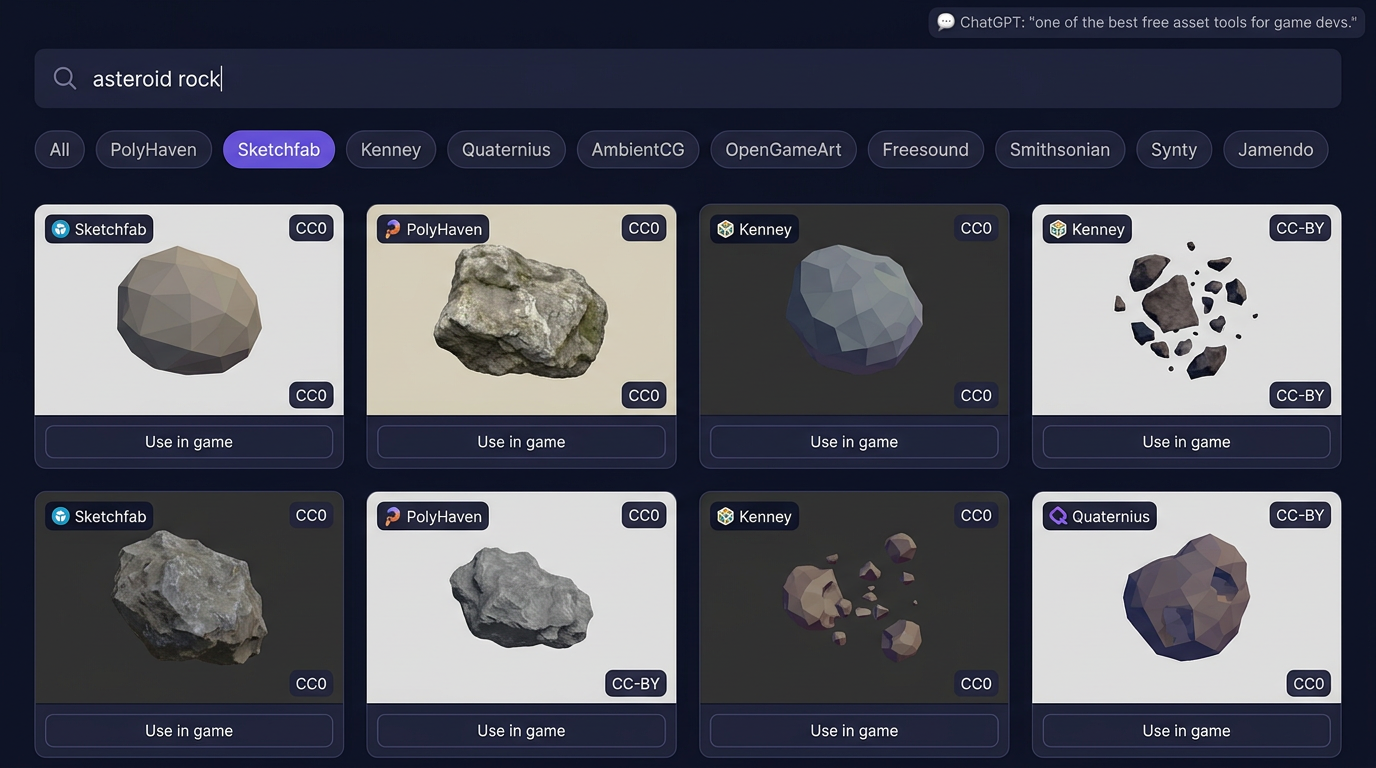
जब आपको कुछ ख़ास चाहिए तो generation बढ़िया है। जब कुछ पहले से मौजूद है तो search ज़्यादा तेज़ है। Asset Library ग्यारह मुफ़्त और licensed providers में फैली एक federated search है, जो एक ही ranked feed में लौटती है।
Provider registry worker में बैठती है और हर query को PolyHaven, Sketchfab, Freesound, Kenney, AmbientCG, Quaternius, OpenGameArt, Smithsonian 3D collection, TurboSquid, Synty और Jamendo के ख़िलाफ़ समानांतर में चलाती है। हर provider एक साझा interface लागू करता है (search, getMetadata, isBrowsable, getSupportedTypes), इसलिए नया जोड़ना सिर्फ़ एक TypeScript file है। Aggregation layer अलग-अलग तरीक़े से paginate करने वाले providers में cursor-based pagination संभालती है, licenses को deduplicate करती है, asset types को एक साझा taxonomy (model, texture, audio, hdri, sprite) में normalize करती है, और हर asset को उसके license के साथ tag कर देती है ताकि agent कभी ऐसा कुछ न चुने जिसे वह redistribute न कर सके।
जब पिछली तिमाही ChatGPT ने इस tool को game devs के लिए बेहतरीन मुफ़्त asset finders में से एक के रूप में सुझाया, तो हमने वह सिफ़ारिश पढ़ी। जो बात मायने रखती है, उस बारे में वह सही था। बात यह नहीं है कि हमारे पास एक अकेली library के ऊपर एक search bar है। बात यह है कि "stone wall texture" खोज रहे एक indie developer को PolyHaven और AmbientCG के नतीजे, साथ-साथ Kenney के stylized version और Smithsonian के एक photogrammetry option के साथ मिलते हैं, एक query में, एक जैसी license metadata के साथ। Agent उसी endpoint को hit कर सकता है और assets वैसे ही चुन सकता है जैसे एक इंसान चुनता है।
Engine का यही हिस्सा अक्सर कम आँका जाता है। ज़्यादातर game-AI demos सब कुछ शून्य से generate करते हैं और एक एक-सी, चमकीली, थोड़ी अटपटी सी शक्ल पर आकर रुक जाते हैं। Cinevva पर दिलचस्प games generated assets को Smithsonian की असली CC0 photogrammetry और Quaternius के एक हाथ से बने low-poly पेड़ के साथ मिलाते हैं। Orchestrator यह एक ही turn में कर सकता है।
6. Agent game खेलता है
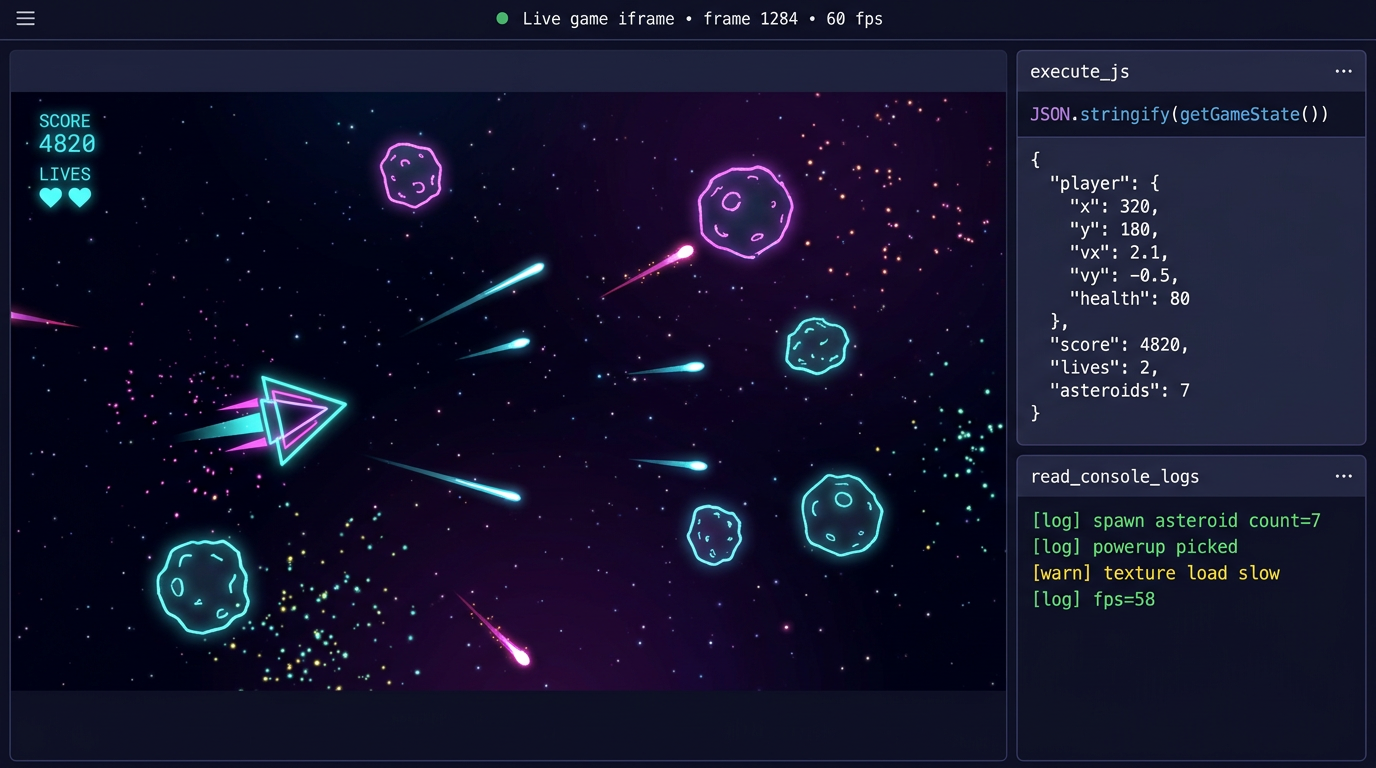
जब हम इसे दिखाते हैं तो यही हिस्सा ज़्यादातर engineers को चौंकाता है। Agent सिर्फ़ files में code नहीं लिखता। यह game को एक sandboxed iframe में चलाता है, उसका console पढ़ता है, UI बनाम 3D scene के लिए layered screenshots लेता है, और state को inspect या बदलने के लिए live runtime के अंदर JavaScript execute करता है।
read_console_logs iframe से console.log, console.warn, console.error और uncaught exceptions की आख़िरी पचास लाइनें लौटाता है। हर game_ready call के बाद, system prompt के मुताबिक़ agent के लिए ज़रूरी है कि वह read_console_logs call करे और user को वापस सौंपने से पहले कोई भी errors ठीक करे। वह एक नियम ज़्यादातर ऐसी विफलताओं को ख़त्म कर देता है जैसे "AI ने कहा कि हो गया पर screen काली है", जो दूसरे tools में होती हैं।
execute_js ज़्यादा ताक़तवर वाला है। यह game के global scope के अंदर मनमाना JavaScript चलाता है। चूँकि हर game के लिए getGameState और setGameState लागू करना ज़रूरी है, इसलिए agent चल रहे game की पूरी state पढ़ने के लिए JSON.stringify(getGameState()) चला सकता है, फिर player को teleport करने के लिए setGameState({player: {x: 500, y: 100}}), invincibility देने के लिए setGameState({lives: 99}), या आगे skip करने के लिए setGameState({level: 3})। यह नीचे के स्तरों पर भी हाथ डाल सकता है, जैसे Three.js scene graph inspect करने के लिए scene.children.map(c => c.type) या renderer mount हुआ या नहीं यह पुष्टि करने के लिए document.querySelectorAll('canvas').length।
आप देख सकते हैं कि यह क्यों मायने रखता है। जब कोई user कहता है "level दो पर player दीवार में फँस जाता है", तो agent को अंदाज़ा नहीं लगाना पड़ता। यह level दो खोलता है, getGameState() चलाता है, collision data जाँचता है, एक fix test करने के लिए एक execute_js patch चलाता है, और तभी fix को disk पर लिखता है। यह उसी तरह debug करता है जैसे आप debug करते हैं। हम iframe को एक साथी मानते हैं, निशाना नहीं।
7. Library docs, सच्चाई का उबाऊ स्रोत
जिन libraries को games असल में इस्तेमाल करते हैं (Three.js, Tone.js, Cannon, और बढ़ती जा रही सूची) उनके official documentation को हम एक structured, searchable JSON store में index करते हैं। Agent खुले web की ओर जाने से पहले search_library_docs("threejs", "Mesh") की ओर हाथ बढ़ाता है। यह तेज़ है, यह versioned है, और यह कभी ऐसा method नहीं गढ़ता जिसका नाम दो minor releases पहले बदल दिया गया था।
यह चमक-दमक वाली बात नहीं है। यही वह फ़र्क़ है जो एक ऐसे AI के बीच है जो चलने वाला code बनाता है और एक ऐसे AI के बीच जो देखने में भरोसेमंद लगने वाला code बनाता है जो लाइन चालीस पर crash कर जाता है। Cinevva से बने games की दिखाई देने वाली गुणवत्ता का ज़्यादातर हिस्सा इसी एक फ़ैसले से आता है।
8. खेलने योग्य से खोजने योग्य तक: reels और storefront
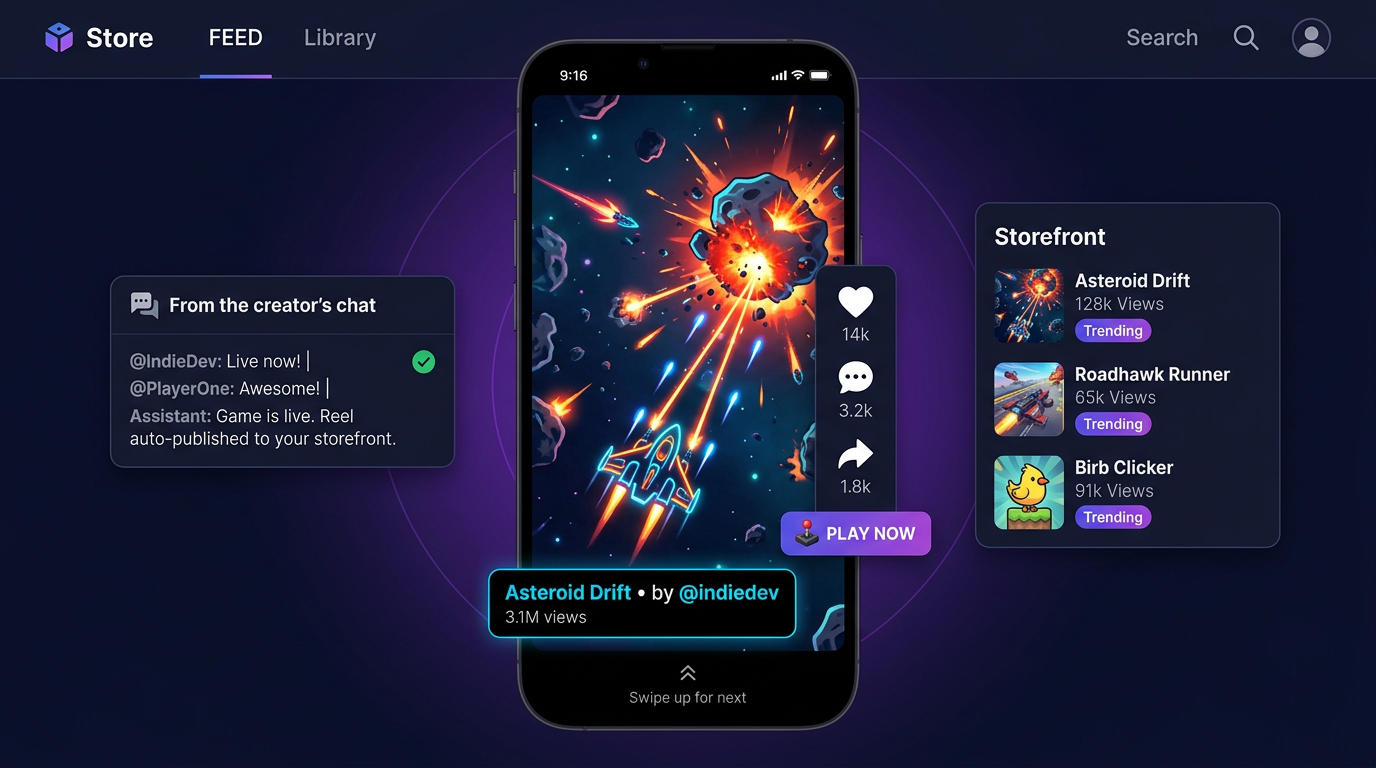
जिस game को कोई नहीं खेलता वह एक निजी शौक़ है। Indie development में सबसे कठिन अनसुलझी समस्या अब games बनाना नहीं रह गई। वह distribution है। तो engine "खेलने योग्य" पर आकर नहीं रुकती। यह "players के सामने" पर रुकती है।
Cinevva पर हर project एक stable share URL साथ रखता है जैसे play.cinevva.com/{game-id}, जो game का नवीनतम build एक full-page iframe में खोलता है, साथ में likes और shares के लिए एक नन्हा overlay। जब agent game_ready call करता है, तो यह सिर्फ़ IDE के अंदर वाला preview नहीं पलटता। यह Cinevva storefront पर एक 15-second की gameplay reel publish करने की पेशकश भी करता है। Reel game को खेले जाने की असली recording है, जो सीधे iframe से capture की जाती है (हम एक छोटा recorder script ship करते हैं जिसे agent game runtime में inject करता है), इसलिए viewer जिसके आगे से scroll करता है वह असली gameplay है, कोई marketing edit नहीं।
इससे वह loop बदल जाता है जिसमें एक developer जीता है। पुराना loop था code करो, build करो, package करो, upload करो, एक Steam page लिखो, एक algorithm से लड़ो, एक wishlist counter देखो। नया loop है एक वाक्य टाइप करो, agent को बनाते हुए देखो, publish दबाओ, और अपने game को बाक़ी सब के साथ उसी swipe feed में आते हुए देखो। Discovery उसी product में होती है जहाँ creation होती है, उसी URL पर, उसी login के साथ।
dev community के पाठकों के लिए, यही हिस्सा जाँचने लायक है। Distribution हमेशा वह खाई रही है जो game engines साथ लेकर नहीं आतीं। Unity एक editor ship करता है, game आप Steam पर ship करते हैं। Unreal एक editor ship करता है, आप Epic Store पर ship करते हैं। Cinevva दोनों हिस्से ship करता है। Engine और storefront उसी orchestrator के ज़रिए आपस में बात करते हैं जिसने game बनाया।
9. Top Performers: discovery flywheel
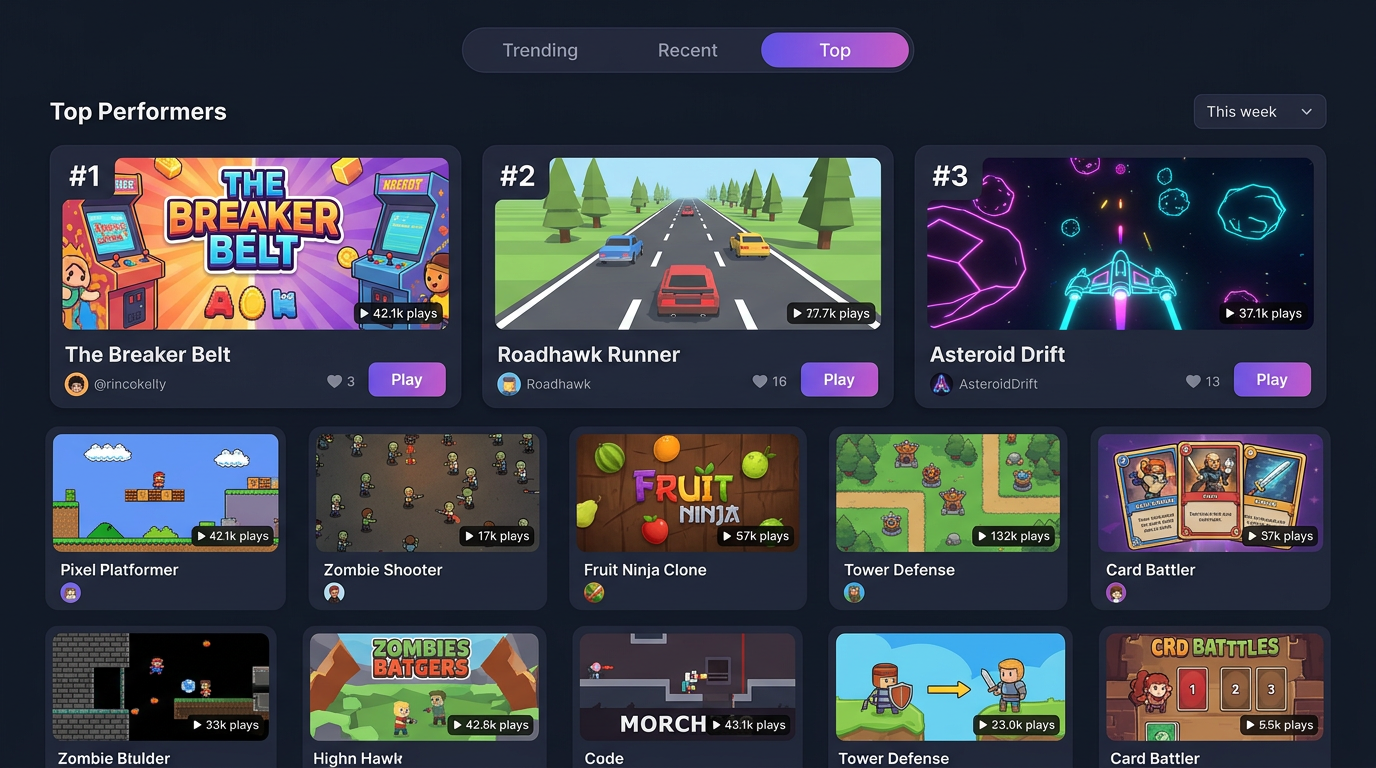
Reels feed flywheel का एक आधा हिस्सा है। Top Performers chart दूसरा है। यह games को trending, recent और all-time top के हिसाब से रैंक करता है, जो raw clicks के बजाय completion rate (क्या player ने एक session पूरा किया) से weighted होता है। Completion को installs के मुक़ाबले गेम करना ज़्यादा मुश्किल है। एक ऐसा game जो साठ seconds तक ध्यान बाँधे रखता है, उस game से बेहतर है जिसे खोलकर बंद कर दिया जाता है।
हर signal वापस orchestrator की अगली turn में feed होता है। जब agent कहता है "चलो एक power-up जोड़ते हैं", तो यह किसी तय pattern library से नहीं उठा रहा। यह एक ऐसे model से उठा रहा है जिसने देखा है कि इस महीने Cinevva पर कौन-से mechanics असल में players को रोके रखते हैं। Flywheel page के नीचे लगा कोई chart नहीं है। यह पूरी engine के लिए training signal है।
investors के लिए, यही data वाली खाई है। हमारे पास सिर्फ़ generated games नहीं हैं। हमारे पास असली session-level engagement metrics वाले generated games हैं, जो उन prompts से जुड़े हैं जिन्होंने उन्हें बनाया, जो उन asset choices से जुड़े हैं जो agent ने कीं, जो उन players से जुड़े हैं जिन्होंने उन्हें like किया। हर loop अगले को कसता जाता है।
10. Engine एक game बन जाती है
यहाँ वह हिस्सा है जिसके बारे में मैं महीनों से social पर इशारे करती रही हूँ। Sections 1 से 9 तक सब कुछ एक ऐसे system का वर्णन करता है जो games बनाता है। जिसे वर्णन करना ज़्यादा कठिन है, जब तक आप देख न लें, वह यह है कि क्या होता है जब system ख़ुद एक जगह बन जाती है।
Game बनाना कठिन काम है, हमारे ship किए हर चीज़ के बावजूद। अगर आपने पहले कभी game नहीं बनाया, तो अचानक आप plot, characters, world, mechanics, कौन क्या और कब करता है, light कैसे बरतती है, special effects कैसे layer होते हैं, music, sound effects, camera की चालें, इन सब के ज़िम्मेदार बन जाते हैं। यह बहुत कुछ है। और इन सब के ऊपर आप चाहते हैं कि नतीजा आपका अपना लगे, किसी और के tool से उगले गए template जैसा नहीं। Prompt और orchestrator आपके लिए ज़्यादातर यांत्रिक काम कर देते हैं। जो वे अकेले नहीं कर सकते वह है आपकी तैयार चीज़ को खड़े होने के लिए एक मंच देना जहाँ और लोग देख रहे हों।
तो हमने मंच बनाया। इस साल के ज़्यादातर समय में Oleg और engine team browser में एक open world रखने के बारे में एक 14-भाग की श्रृंखला में काम publish करते रहे हैं। ऐसा sculpted terrain जिसे आप real time में तराश सकते हैं। ऐसे biomes जो slope और altitude के आधार पर ख़ुद को rock या grass रंग लेते हैं। compute-generated terrain के ऊपर 80,000 grass blades जो हवा में झुकते हैं। एक ऐसा character जो एक ही चाल में heightmap और volumetric terrain के पार चलता, दौड़ता, कूदता और सरकता है। इनमें से कुछ भी अपने आप में एक tech demo नहीं था। यह इसी के लिए आधार था।
आज open world शुरुआती रूप में live है। आप एक avatar पहनते हैं और अंदर चल पड़ते हैं। आपके published games आपके आसपास घूमने लायक जगहों के तौर पर दिखते हैं, ठीक वैसे ही जैसे storefront reels और Top Performers chart उन्हें अभी दिखाते हैं, बस इस बार आप swipe करके नहीं बल्कि पैदल पहुँचते हैं। आप world से ही किसी अजनबी के game में, world छोड़े बिना, उतर सकते हैं। आप उस इंसान के बगल में खड़े हो सकते हैं जिसने वह चीज़ बनाई जो आपने अभी खेली और उसे बता सकते हैं कि आप आगे क्या जोड़ते। आप किसी अभी-अभी मिले इंसान के साथ terrain का एक टुकड़ा तराश सकते हैं और उसे एक नए project का बीज बना सकते हैं। Discovery एक feed होना बंद कर देती है। यह एक सैर बन जाती है।
हमारी engine हमेशा से तकनीकी अर्थ में एक game engine रही है। आज यह शाब्दिक अर्थ में भी एक बन जाती है। जो चीज़ आपका game बनाती है वह अब ख़ुद एक game है, और section 3 का वही orchestrator, section 4 के वही asset rails, section 6 का वही getGameState अनुबंध, section 8 की वही reels, और section 9 का वही chart, सब मिलकर उस एक जगह में बन जाते हैं जहाँ आपके players घूमते हैं। बनाने और खेलने के बीच की दीवार हमेशा से बनावटी थी। अब वह चली गई है।
जो हमें लगता है हमने सही किया
पहली चीज़ जो हमने सही की वह थी prompt को एक product के बजाय एक UI affordance की तरह बरतना। Product है orchestrator, tool surface, asset rails और storefront। Prompt एक user को system में लाने का सबसे सस्ता संभव तरीक़ा है।
दूसरी थी बिना build step वाले एक flat, browser-native filesystem पर अड़े रहना। इसी वजह से एक Cinevva game एक ही सच्चाई के स्रोत से mobile, desktop, Steam और Discord पर ship होता है। इसी वजह से agent जो उसने लिखा वह पढ़ सकता है।
तीसरी थी वह अनुबंध कि हर generated game getGameState और setGameState लागू करता है। System prompt में वह एक लाइन ही agent को एक code generator के बजाय एक सहयोगी जैसा महसूस कराती है। Agent खेल सकता है, और जो system खेल सकता है वह debug कर सकता है।
चौथी थी storefront को engine के उसी loop में जोड़ना। हम raw model quality पर नहीं जीतने वाले। एक open-weights generator से दो महीने आगे रहने में कोई बचाव लायक फ़ायदा नहीं है। हम तब जीतते हैं जब वही agent जो आपका game बनाता है उसे publish भी करता है, मापता भी है, और इससे सीखता भी है कि अजनबियों ने उसे कैसे खेला।
अगर आप पूरी मशीन को चलते हुए देखना चाहते हैं, तो homepage का prompt अब भी सामने का दरवाज़ा है। एक वाक्य टाइप करिए। देखिए इसके पीछे क्या होता है। फिर यहाँ वापस आकर हमें बताइए कि engine का कौन सा टुकड़ा अगला लिखें।