What it actually takes to build an open world in a browser
By Mariana Muntean, CEO of Cinevva
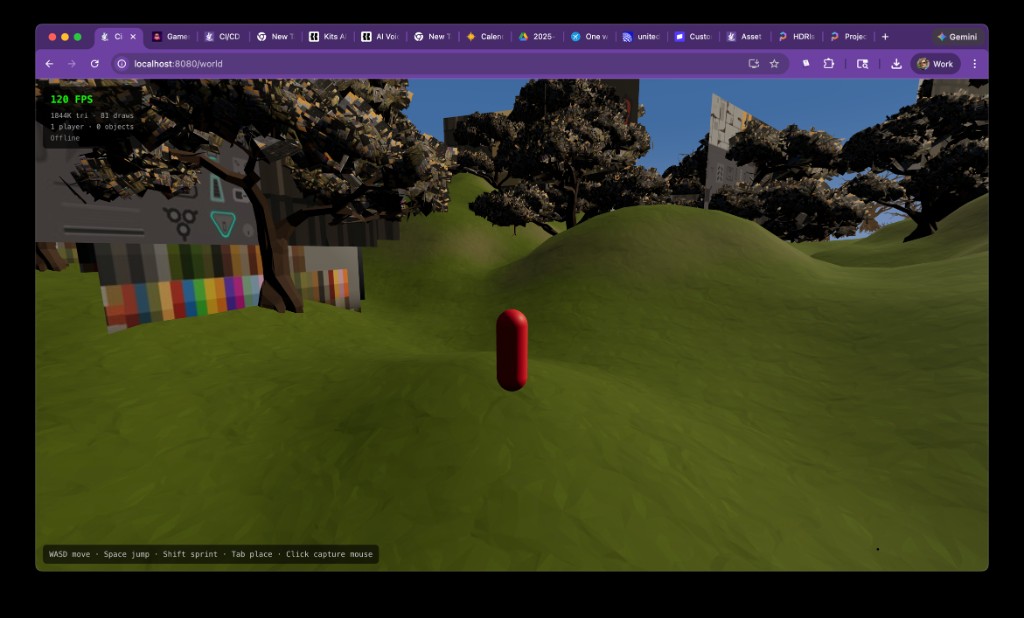
The team at Cinevva just published one of the most transparent engineering journals in recent game-dev memory: a 12-part series documenting our attempt to build a multiplayer open world that runs entirely in the browser. No download. No app store. Just a URL.
The project spanned 24 technical experiments we call "spikes" -- short, focused prototypes designed to answer one risky question each. Every spike shipped with live source code you can open and run in your browser right now. The series was written by Oleg Sidorkin, CTO and co-founder of Cinevva, and it reads less like marketing and more like a field journal from the frontlines of what browsers can actually do in 2026.
What makes the series worth reading -- even if you never plan to build terrain systems -- is the method underneath. It's a case study in how to de-risk an ambitious project before you've committed to anything expensive.
Starting with the hardest question first
Most open-world projects die in a predictable sequence. First you get a beautiful concept. Then a pretty scene. Then you discover that your frame budget was already spent before gameplay existed.
Our team inverted the order. The first spike was deliberately ugly: a 512-meter terrain mesh, 500 instanced objects, procedural height noise, a water plane, and fog. No shadows, no beauty pass. The only question was whether a browser could hold a stable frame rate while the camera moved through it.
It could. And that "yes" established something Oleg calls a "baseline contract" -- a measured reference cost for a minimal scene that every subsequent feature had to justify itself against. If a new effect looked great but blew the frame budget, it didn't ship. Not yet, anyway.
That kind of discipline sounds obvious. In practice, it's rare in fast-moving prototype environments where everyone is excited about the next visual win.
The physics gamble
The second experiment tackled an architectural debate that divides browser game developers: should physics run on the main thread, where it's simpler, or in a Web Worker, where it can't block rendering?
Worker-based physics is cleaner on paper. In practice, the fear is latency. Every input event has to cross a message boundary twice: once to reach the worker, once to bring back the result. If that round trip is too slow, pressing a key and seeing your character move will feel sluggish.
The team integrated the Rapier physics engine (compiled from Rust to WebAssembly) in a dedicated worker, wired up the message pipeline, and measured. The overhead was negligible. Controls still felt immediate. But we were careful to note that we'd validated one specific scenario, not a universal rule. When GPU pressure and streaming complexity changed later, assumptions would need rechecking.
The boring spikes that saved the project
Part three of the series has no screenshots. It covers three experiments that looked unglamorous but carried product-level consequences.
The first tested whether Cloudflare Durable Objects could handle real-time position broadcasts at game-like tick rates -- the multiplayer backbone. If this had failed, the entire network architecture would have needed early sharding rather than single-island ownership.
The second validated a mobile quality profile: not a desktop preset renamed, but an explicit low-cost rendering path from the same terrain baseline. The question was whether the world could remain readable and responsive under mobile GPU constraints without rewriting the renderer.
The third evaluated whether AI-generated behavior scripts for creator workflows would be reliable enough for production use.
None of these produced demo reels. All three set hard boundaries that shaped every architectural decision afterward. Oleg writes that these "unflashy spikes changed architecture faster than visual spikes did."
Streaming: where pretty projects fall apart
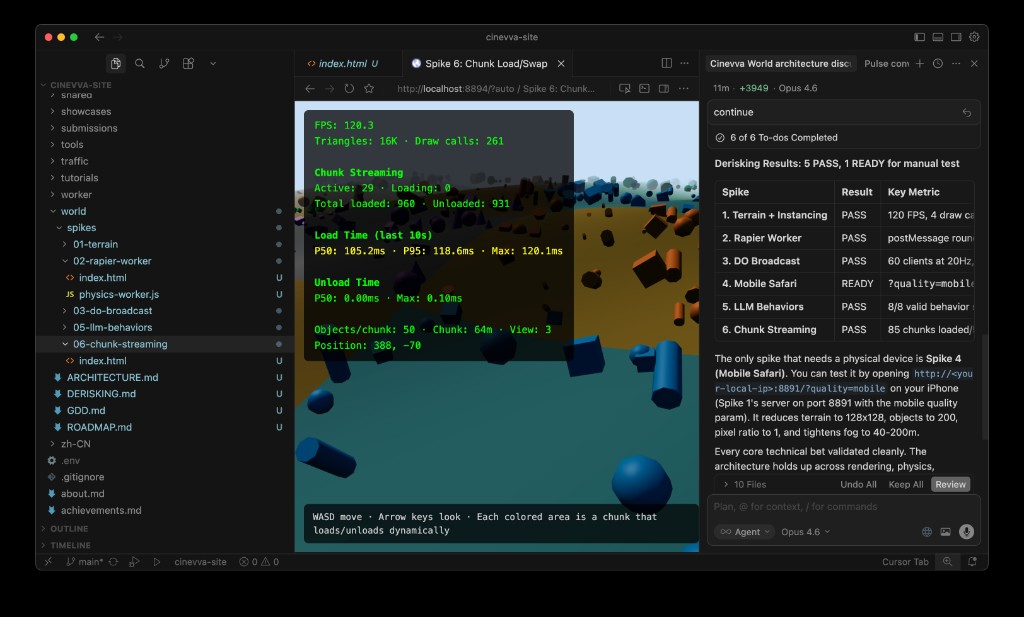
You can hide a lot in a still frame. You can't hide a 40-millisecond stutter when crossing a chunk boundary while running.
The team tested streaming before building advanced terrain, deliberately separating concerns. Spike 6 validated neighborhood chunk loading with simple content. Only after that clean signal did Spike 11 introduce compressed heightmap streaming with progressive refinement -- loading terrain at 17-sample resolution first, then 33, then the full 65-sample grid.
The sequencing mattered more than we expected. Had we started directly with compressed height chunks, every hitch would have been ambiguous. Was it a decode issue, a texture upload stall, or a geometry update problem? Testing simple streaming first eliminated one entire category of uncertainty.
A practical lesson emerged: measure upload stalls directly, not through average FPS. Averages hide frame spikes, and frame spikes are what players actually feel.
The visual budget wars
Three separate experiments attacked rendering costs in isolation rather than bundling them. Vegetation density and wind animation. Multi-layer terrain materials with triplanar mapping for cliff faces. Cascaded shadow maps under realistic terrain load.
The vegetation spike revealed that batching instances into fewer meshes mattered more than reducing per-blade polygon count. The material spike found that triplanar projection on vertical surfaces was worth the GPU cost, but adding a fifth texture splat layer wasn't. The shadow spike determined that three cascades at 1024 resolution delivered acceptable contact shadows without exceeding 2 milliseconds of GPU time.
The team adopted a blunt rule: a feature moves forward only if it can explain its cost with measured frame-time data. That constraint, set early, made later architectural decisions around volumetric terrain and clipmaps significantly cleaner.
The pivot that changed the project's trajectory
Before Spike 10, our mental model was "bigger world means more geometry." After Spike 10, it became "constant geometry budget, camera-centered ring updates."
Geometry clipmaps -- concentric rings of terrain centered on the camera, each ring progressively coarser -- meant the triangle count stayed roughly constant regardless of draw distance. The practical trick was geomorphing at ring boundaries: smoothly blending vertex heights in the shader so that the shift between resolution levels is invisible in motion.
A subtle lesson came from testing methodology. Clipmaps look fine in screenshots. They reveal their artifacts only under sustained camera movement through ring boundaries. The team spent time running constant-speed traversals and watching for temporal noise. "Screenshots lied," Oleg writes. "Motion told the truth."
Going underground
Heightmaps can't represent caves. They store one elevation value per point on a grid. The moment you need tunnels, overhangs, or carved rock faces, you need volumetric terrain.
Spike 12 implemented marching cubes on the GPU using WebGPU compute shaders, extracting triangle meshes from a 3D signed distance field. Four 64-cubed chunks ran simultaneously with per-frame mesh updates from animated SDF edits. The compute shader handled everything -- evaluating the field, classifying cells, emitting vertices -- without any CPU readback.
The challenge wasn't making it work. It was making it work alongside everything else. Integration with Three.js's scene graph, buffer lifecycle management (WebGPU buffers can't be resized), fence handling to avoid destroying GPU resources still in flight -- the series devotes two full parts to what we call "incremental hardening," the unglamorous process of adding one capability at a time and verifying the previous layer still functions after each addition.
The seam nightmare
The most technically harrowing section of the series spans Parts 9 through 11, covering what happens when terrain chunks at different resolutions meet.
When a high-detail chunk sits next to a low-detail chunk, their independently generated meshes don't align at the boundary. The result is visible cracks, flickering edges, and T-junctions where light bleeds through. The Transvoxel algorithm solves this with special transition cells that bridge resolution differences -- but implementing it correctly across all chunk configurations, with consistent winding order, proper buffer management, and accurate draw ranges, consumed six separate experiments.
The team's most memorable debugging story: two days chasing a seam artifact we blamed on transition logic. The actual culprit was stale data. The GPU compute shader wrote N vertices into a buffer, but the draw call was still configured to render N+M vertices from the previous frame. Those extra vertices contained garbage that produced flickering razor-thin triangles. One line fix: clip the draw range to the atomic counter's active vertex count.
"Rendering bugs often masquerade as meshing bugs," Oleg observes. "The geometry was correct the whole time."
From chaos to governance
After the seam battle, the team replaced ad-hoc chunk behavior with an explicit policy system. A central function now decided each chunk's LOD level, rendering mode (heightmap or marching cubes), and which faces needed transition cells. Distance rings determined the base LOD. An adjacency constraint ensured no two neighboring chunks differed by more than one resolution level. An edit bitmap kept volumetric chunks in marching-cubes mode regardless of distance if they contained creator modifications.
Color-coded debug overlays -- green for heightmap chunks, blue for marching cubes, orange for transition faces -- turned "I saw a bug somewhere near that ridge" into "the bug appears at position (142, 12, -67) facing northwest."
"Policy didn't reduce complexity," Oleg writes. "It organized complexity."
What it adds up to
The final spike combined clipmap rings, per-fragment sky fog (sampling the actual skybox color in the direction of each terrain fragment), and Three.js module wiring into a unified demonstration. The result is a terrain system that layers near-field volumetric editing, mid-field heightmap chunks, and far-field clipmap rings under a policy layer that governs mode, LOD, and transitions.
The series closes with lessons Oleg says he'd repeat on any future project:
- Start with risk spikes before feature work. Kill the "can we even do this?" questions before investing in content pipelines.
- Freeze known-good baselines before integration jumps. The day spent establishing a clean checkpoint saves multiple days bisecting regressions later.
- Force policy and observability before optimization marathons. Named conditions with trigger rules beat mystery bugs every time.
- Test under motion, not screenshots. Pops, flicker, and streaming hitches all hide in still frames.
- Measure per-feature frame time, not average FPS. Averages hide the spikes that users actually feel.
- Publish the messy parts. The wrong turns, the ghost hunts, the two days blaming the wrong system. Those are the parts people can actually learn from.
Why this matters beyond Cinevva
The series is significant for three reasons that extend past one company's terrain pipeline.
First, it demonstrates that WebGPU compute shaders, WebAssembly physics, and edge-deployed Durable Objects have crossed a threshold. A multiplayer open world with volumetric terrain, real-time editing, and streaming LOD is architecturally viable in a browser tab in 2026. That was not true two years ago.
Second, the spike methodology -- small, focused experiments that each answer one risky question with live, measurable results -- offers a template for any team attempting something that might not work. The discipline of measuring before committing, of establishing baselines before integrating, of naming edge cases before optimizing, applies far beyond terrain systems.
Third, the radical transparency is the point. Publishing source code for all 24 experiments, including the dead ends and the two-day debugging detours, makes this more than a technical blog. It's a public engineering notebook that treats the reader as a colleague rather than a customer.
The full series is available in our series guide, with every spike running live in the browser.
This article was originally published on Medium.