Landscape Generation with Dynamic LOD and Streaming for Browser Open Worlds
Heightmaps with Perlin noise are the default starting point for procedural terrain. Layer some octaves of fBm, apply a color gradient, and you have something that looks terrain-ish. Every tutorial ends here. But real landscapes don't look like stacked noise. They have river valleys carved by water, cliff faces shaped by stress fractures, caves and arches formed by erosion over millions of years. They have correlated textures (grass on flat ground, rock on steep slopes, snow above the treeline) that emerge from the same physical processes that shaped the geometry.
This guide covers what comes after noise. Physically grounded generation methods, volumetric representations that handle caves and overhangs, diffusion-based neural terrain synthesis, and the GPU-driven LOD and streaming pipelines needed to render it all in a browser tab at 60fps.
Everything here targets our specific constraint: a multiplayer open world running in WebGL 2 / WebGPU, streamed over the network, editable by creators.
Why Heightmaps Aren't Enough
A heightmap stores one height value per grid point. It's a 2D function: given (x, z), return y. This representation is compact, GPU-friendly, and fast to render. But it has fundamental limitations that matter for a creator world.
No caves or overhangs. A heightmap can't represent terrain where one point has two different heights. Caves, arches, cliff overhangs, tunnels, and floating islands are all impossible. Minecraft, No Man's Sky, and Deep Rock Galactic all need volumetric terrain for this reason.
No vertical features. A vertical cliff face in a heightmap is a near-infinite slope, which creates extreme texture stretching and collision artifacts. Real cliffs have horizontal features (ledges, crevices) that a heightmap can't represent.
Noise looks like noise. Even with 8 octaves of fBm and domain warping, the terrain has a synthetic quality. It lacks the directional structure of real geology: ridge lines, drainage networks, sediment deposits, tectonic folds. These patterns emerge from physical processes, not from noise functions.
Creator edits are limited. If creators can only modify heights, they can't dig tunnels, create caves, or build underground spaces. For a world that creators can truly shape, the terrain representation needs to support subtraction as well as addition.
The solution isn't to abandon heightmaps entirely. They remain the best representation for the 90% of terrain that is a simple surface. The solution is a hybrid approach: heightmap base terrain with volumetric overlays where complex geometry is needed, physically correct generation for realistic landforms, and neural synthesis for the diversity that noise can't achieve.
The Quick Answer: What We'd Actually Build
Before the deep dive, here's the decision framework. The rest of the article explains each piece.
Terrain representation
Use a hybrid heightmap + SDF system. The heightmap covers the entire world (cheap, compact, proven). SDF volumes exist only where caves, overhangs, or creator-carved features require them (maybe 5-10% of chunks). This keeps 90% of the world at heightmap cost while supporting arbitrary geometry where needed.
Generation pipeline
Run server-side as a chained process:
- Terrain Diffusion (or MESA for text prompts) generates the base heightmap from a seed. This replaces noise with geologically realistic landforms trained on real elevation data.
- Analytical erosion (stream power law) refines the heightmap with river networks and ridgelines in milliseconds.
- TerraFusion or Geodiffussr generates correlated textures from the heightmap (or use procedural slope/altitude rules for the WebGL 2 fallback).
- Ecosystem simulation produces vegetation density maps.
- Arenite-style erosion generates SDF volumes for cliff faces, arches, and caves where the terrain calls for them.
- Chunk, compress, upload to CDN. Average chunk: 2-8 KB. Complex chunk with volumetric data: 20-100 KB.
Creators interact with this pipeline by adjusting parameters ("wetter," "more mountainous," "add caves"), sketching intent, or directly sculpting with brushes and SDF tools.
LOD strategy
| Browser capability | Heightmap LOD | Volumetric LOD | Vegetation LOD |
|---|---|---|---|
| WebGPU | GPU-driven quadtree (CDLOD) with compute culling + indirect draw | Multi-resolution SDF with compute marching cubes + Transvoxel | ComputeInstanceCulling with indirect draw |
| WebGL 2 | Geometry clipmaps with CPU-side ring updates | Pre-generated meshes at 2-3 LOD levels, cached | CPU frustum cull, InstancedMesh |
Both paths use geomorphing in the vertex shader for pop-free transitions. Both use billboard impostors for distant vegetation. The WebGPU path is faster (3.5ms terrain budget) but the WebGL 2 path is viable (6.5ms).
Streaming
Progressive loading: terrain geometry first (<100ms), textures second (<300ms), vegetation third (<1s), volumetric data fourth (<3s). Pre-fetch based on player velocity. Memory budget: 256 MB total terrain.
Editing
Heightmap brushes for surface sculpting (raise, lower, smooth, erode). SDF primitives for volumetric editing (carve caves, add arches). Both are instant locally, sync to server in 100-300ms, broadcast to other players via delta updates.
What to build in what order
Month 1-2: Heightmap terrain with geometry clipmaps. WebGL 2 only. Streaming from CDN. Procedural slope/altitude materials. This gets terrain on screen in every browser. Use noise + analytical erosion for generation (Terrain Diffusion can wait).
Month 3-4: Vegetation and atmosphere. GPU-instanced grass and trees from density maps. Procedural sky with day/night cycle. Atmospheric fog. Cascaded shadow maps. The world starts to feel like a place.
Month 5-6: Creator editing. Heightmap brush tools. Delta-based sync for multiplayer terrain edits. Spatial locking for concurrent editing. This is when creators start shaping the world.
Month 7-9: Volumetric terrain and WebGPU path. SDF overlays for caves and overhangs. Marching cubes in WebGPU compute. Transvoxel for LOD boundaries. SDF sculpting tools. This unlocks the full creation toolkit.
Month 10-12: Neural generation and polish. Terrain Diffusion or MESA for the base heightmap. TerraFusion/Geodiffussr for textures. Phasor noise for micro-detail. Hex-tiling for anti-repetition. Virtual texturing. Laplacian blending. The terrain reaches production quality.
This ordering means something playable exists after 2 months, something beautiful after 4, something editable after 6, and something state-of-the-art after 12.
The rest of this article is the research behind each decision.
Terrain Representations Beyond Heightmaps
Signed Distance Fields (SDFs)
A signed distance field stores, at every point in 3D space, the distance to the nearest surface. Positive values are outside, negative values are inside, and the zero-crossing is the surface itself. SDFs represent arbitrary 3D shapes including caves, arches, and floating geometry.
To render an SDF as a mesh, you run marching cubes (or a variant) to extract the zero-crossing as triangles. The mesh resolution depends on the grid resolution: a 256x256x256 SDF grid produces terrain covering roughly one chunk at 1-meter resolution.
Browser implementation: WebGPU marching cubes runs entirely on the GPU via compute shaders. Will Usher's webgpu-marching-cubes implementation processes a 256^3 grid in real time in the browser, achieving native-speed performance. The algorithm is embarrassingly parallel (each cell processes independently), making it ideal for GPU compute.
@compute @workgroup_size(4, 4, 4)
fn marchingCubes(@builtin(global_invocation_id) id: vec3<u32>) {
    let sdfValues = sampleSDF(id);
    let caseIndex = classifyCell(sdfValues);
    if (caseIndex == 0u || caseIndex == 255u) { return; }
    let triangles = lookupTriangulation(caseIndex);
    let vertices = interpolateEdges(sdfValues, triangles);
    appendToMeshBuffer(vertices);
}
Storage cost: A 256^3 SDF at 8-bit quantized precision is 16 MB uncompressed. But most of the volume is empty (far from the surface). Run-length encoding or sparse octree storage typically reduces this to 100-500 KB per chunk, comparable to heightmap terrain.
Editing: SDF terrain is naturally editable. Adding material is a min() operation on the distance field. Removing material (digging) is a max() with a negated shape. Smooth blending between shapes uses smoothMin(). These operations run in a compute shader at interactive rates.
Dual Contouring
Marching cubes places vertices on grid edges, which produces smooth surfaces but loses sharp features (cliff edges, rock corners). Dual contouring places one vertex per cell at the position that best represents the surface within that cell, preserving sharp edges and corners.
The algorithm needs both the distance field values and the surface normals (the gradient of the SDF) at each grid point. It solves a small least-squares problem per cell to find the optimal vertex position. The result is a mesh that captures both smooth terrain and sharp rocky features.
Neural Dual Contouring (Chen et al., 2022, arXiv:2202.01999) replaces the least-squares solver with a neural network that predicts optimal vertex positions and edge crossings. It achieves better surface reconstruction accuracy and feature preservation, particularly for complex natural rock formations.
The Transvoxel Algorithm
The hardest problem in volumetric terrain isn't generating the mesh. It's LOD transitions. When a high-resolution chunk sits next to a low-resolution chunk, the meshes don't line up at the boundary, creating visible cracks.
The Transvoxel algorithm, designed by Eric Lengyel (transvoxel.org), solves this by inserting special transition cells along boundaries between resolutions. These cells bridge the resolution difference with additional triangles that exactly match both sides. The algorithm reduces the complex boundary problem to 73 equivalence classes (compared to ~1.2 million cases for a brute-force approach).
Transvoxel is specifically designed for real-time applications where voxel data changes dynamically (creator edits, erosion, mining). It's patent-free and has been used in shipped games (Space Engineers, Astroneer). For a browser world with editable volumetric terrain, Transvoxel is the LOD solution.
Hybrid: Heightmap Base + Volumetric Overlays
The practical approach for a browser open world is a layered system:
Layer 1: Heightmap terrain covers the entire world. This is the cheap, compact representation for rolling hills, valleys, and mountains. It streams as small heightmap patches per chunk (2-4 KB each). Rendering uses geometry clipmaps with constant GPU cost.
Layer 2: Volumetric overlays exist only in chunks where complex geometry is needed. Caves, cliff faces, arches, creator-carved tunnels, and underground spaces are stored as sparse SDF volumes. Only chunks with volumetric data incur the SDF storage and marching cubes cost.
Layer 3: Creator modifications are stored as SDF edits on top of the base layers. A creator who digs a tunnel stores the tunnel's SDF shape. The rendering system combines the heightmap surface with volumetric subtractions and additions to produce the final mesh.
This hybrid costs almost nothing for flat terrain (just the heightmap), and scales only where complexity exists. In a typical world, maybe 5-10% of chunks need volumetric data.
Physically Correct Terrain Generation
Noise produces random terrain. Physics produces realistic terrain. The difference is visible: noise terrain has no structure (it's randomly bumpy everywhere), while physical terrain has river networks, ridge lines, alluvial fans, and cliff bands that emerge from erosion and tectonics.
Hydraulic Erosion: The Foundation
Water flows downhill, picks up sediment, and deposits it when it slows down. This single process, simulated over millions of virtual years, transforms featureless noise into terrain with recognizable geological features.
The particle-based approach drops simulated raindrops on the heightmap. Each drop flows downhill (following the gradient), erodes material based on speed and slope, carries sediment as dissolved load, and deposits sediment when velocity decreases or capacity is exceeded. After 200,000-500,000 particles, the terrain develops:
- River valleys that follow the path of maximum water flow
- Ridge lines that separate drainage basins
- Alluvial fans where steep valleys open into flat plains
- V-shaped valleys in mountainous terrain, U-shaped in glaciated terrain
GPU implementation: The particle simulation is parallelizable. Each particle is independent (the approximation ignores particle-particle interaction, which is fine for erosion). A WebGPU compute shader processes 10,000 particles per frame at 60fps, completing 200,000 particles in about 3 seconds of real time.
Sebastian Lague's open-source implementation (GitHub) is the standard starting point. It runs on a single thread in C# and processes a 1024x1024 heightmap in a few seconds. The GPU version is 50-100x faster.
Thermal Erosion
Water isn't the only erosion force. Temperature changes cause rock to crack and crumble (thermal weathering). When the slope between two terrain points exceeds a material's angle of repose, material falls from the higher point to the lower one. This produces:
- Talus slopes at the base of cliffs (piles of fallen rock)
- Softened ridge lines over time
- Material-dependent profiles (hard rock maintains steep slopes, soft soil collapses to gentle angles)
Thermal erosion is simpler than hydraulic erosion. It's a local operation: for each cell, compare the height difference with neighbors. If the slope exceeds the threshold, move material downhill. It runs as a single compute shader pass per iteration and converges in 50-100 iterations.
Combining hydraulic and thermal erosion produces terrain that looks dramatically more natural than either alone. Water carves valleys; thermal erosion softens the ridges between them and fills the valley floors with debris.
The Stream Power Law: Analytical Erosion
Recent research offers an alternative to particle-based simulation. The stream power law (a geomorphological equation relating erosion rate to drainage area and slope) can be solved analytically rather than simulated iteratively.
Cordonnier et al. (2024, HAL) combine the analytical stream power law with landslide and hillslope diffusion processes. The result is terrain generation that's physically grounded but runs as a mathematical function rather than a temporal simulation. You input a noise-based heightmap and parameters (rainfall rate, rock hardness, tectonic uplift rate) and get an eroded terrain in milliseconds.
This analytical approach is ideal for a browser world because it runs once server-side during terrain generation, not iteratively. The parameters are tunable by creators ("make this region more mountainous" adjusts the uplift rate; "make it wetter" increases rainfall and deepens valleys).
Arenite: Multi-Physics Erosion (SIGGRAPH 2025)
Arenite (Project page) is a physics-based sandstone simulator that generates arches, alcoves, hoodoos, and buttes from simple initial conditions. Users paint erodability maps (soft rock vs. hard rock layers) and vegetation, then the system simulates:
- Stress distribution through the rock column
- Wind erosion that preferentially removes exposed soft material
- Fluvial erosion from water flow
- Particle deposition that creates new formations
The GPU implementation runs in under 5 minutes for complex formations on a desktop GPU. While this is too slow for real-time browser use, it's fast enough for server-side generation. A creator could define a cliff face with soft/hard rock layers and get a realistic arch formation within minutes.
The output is a 3D voxel field, which fits directly into our SDF/marching cubes pipeline.
Flexible Erosion Across Representations
A 2024 paper from IRIT-STORM ("Flexible Terrain Erosion," Springer) solves a practical problem: most erosion methods only work on heightfields. If your terrain uses voxels, SDFs, or layered materials, you need separate erosion code for each.
The flexible erosion method decomposes erosion into two independent processes: terrain alteration (removing material from the surface) and material transport (moving sediment with particles governed by basic physics). Each particle has configurable size, density, restitution, and sediment capacity. An optional vector field controls particle motion for realistic fluid dynamics.
Because the particles interact with the terrain through a unified material alteration interface, the same simulation works on heightfields, voxel grids, implicit surfaces, and layered material stacks. For our hybrid terrain (heightmap base + SDF overlays), this means one erosion system handles both representations. The particle simulation runs in parallel on the GPU.
River Networks and Drainage Basins
Erosion carves rivers, but generating convincing river networks requires more than just running water downhill. Two approaches produce better results:
Drainage-first generation (Amit Patel, Red Blob Games, Project) builds the river network before assigning elevation. Start with a graph (Voronoi or triangle mesh). Classify edges as ridges (no flow), entries (water flows in), or outlets (water flows out). This creates realistic drainage hierarchies where rivers converge from small tributaries into major waterways, following the Rosgen classification system for different river types (braided channels in flat terrain, narrow gorges in mountains).
Flow accumulation tracks how much water passes through each terrain cell. Drop simulated rain uniformly, flow it downhill, and count visits per cell. Cells with high accumulation are river channels. Cells with moderate accumulation are seasonal streams. The accumulation map also drives erosion intensity (more water = more erosion) and vegetation distribution (river banks are wetter, supporting different plant species).
For a creator world, the river network is generated server-side during terrain creation and stored as a 2D flow direction map plus a water accumulation map per chunk. The browser client uses these maps to render water surfaces (flat planes at the correct height in river channels) and to drive the vegetation distribution (lusher near water).
Coastal and Shoreline Generation
Coastlines are where terrain meets water, and they have distinctive features that standard erosion doesn't produce: sea cliffs, beach deposits, tidal flats, sea stacks, and wave-cut platforms.
NEWTS1.0 (2024, MIT) models rocky coastline evolution using two erosion mechanisms: uniform retreat (constant erosion rate) and wave-driven erosion (erosion rate as a function of fetch distance and incident wave angle). The model runs over thousands of simulated years and produces headlands, bays, sea stacks, and arches that match real coastal geomorphology.
For a browser world, coastal features would be pre-generated during world creation. The parameters (dominant wave direction, rock hardness variation along the coast) let creators control the character of their coastline. A "Norwegian fjord" setting produces steep-sided inlets. A "tropical atoll" setting produces low-lying sandy shores with lagoons.
Cave and Underground Generation
Caves require fully volumetric terrain (SDFs or voxels) since heightmaps can't represent enclosed spaces. The generation approaches:
3D noise thresholding is the simplest method. Sample 3D Perlin or simplex noise at each voxel. Values below a threshold are solid, above are empty. Adjust the threshold and noise parameters to control tunnel diameter, connectivity, and chamber size. This produces organic, worm-like cave systems reminiscent of Minecraft.
PLUME (Procedural Layer Underground Modeling Engine) (2024, arXiv:2508.20926) generates realistic cave and lava tube environments using layered procedural rules. Originally built for space exploration research (simulating Martian lava tubes), it produces geologically plausible underground structures with stalactites, columns, and chamber systems.
L-system tunnels with metaball carving use an L-system grammar to grow branching tunnel paths through the terrain, then carve the actual tunnel geometry using metaball implicit surfaces. The metaballs produce smooth, rounded cave walls. Multiple passes with different parameters create primary passages, side chambers, and narrow connecting tunnels.
For a creator world, cave generation ties into the SDF overlay system. The base terrain is a heightmap (no caves). When a chunk needs caves (either from procedural generation or creator design), an SDF volume is generated that subtracts cave geometry from the base terrain. The marching cubes pipeline renders the combined surface.
Vegetation as a Physical Process
Vegetation in games is typically placed procedurally with rules like "grass below 2000m, trees below 1500m, snow above 3000m." This is fast but produces uniform, unrealistic distribution.
Physically grounded vegetation simulation models each plant as competing for resources (light, water, soil nutrients). The simulation:
- Seeds are scattered across the terrain
- Each plant grows based on available resources (water flows from the hydraulic erosion simulation, sunlight depends on slope and aspect, soil depth depends on erosion history)
- Plants compete: trees shade out grass, dense canopy prevents new seedlings
- Over simulated time, biomes emerge naturally: forests in valleys with water, sparse vegetation on windswept ridges, wetlands where water pools
Deussen et al.'s ecosystem simulation (Paper) generates forest distributions that match real-world ecological patterns. The simulation runs on a 2D grid (one cell per terrain chunk) and produces density maps and species assignments that the rendering system uses for GPU instanced vegetation placement.
For a browser world, the vegetation simulation runs once during world generation (server-side). The output is a set of density maps per chunk: tree density, grass density, flower density, rock debris density. The browser client uses these maps with GPU instancing to scatter vegetation at runtime.
Diffusion-Based Terrain Synthesis
This is where the field is moving fastest. Diffusion models (the same technology behind Stable Diffusion for images) are being applied to terrain generation, and the results are substantially more realistic than noise-based methods.
Terrain Diffusion: A Successor to Perlin Noise
Terrain Diffusion (Goslin, 2025, arXiv:2512.08309, Project page) is the most significant advance in procedural terrain generation since Perlin noise in 1985. The work has since been accepted to SIGGRAPH 2026, and the canonical arXiv title is now "InfiniteDiffusion: Bridging Learned Fidelity and Procedural Utility for Open-World Terrain Generation." The InfiniteDiffusion algorithm and the Terrain Diffusion framework are the two halves of the same paper.
The key innovation is InfiniteDiffusion, an algorithm that reformulates diffusion sampling for unbounded domains. Traditional diffusion models generate fixed-size outputs (e.g., a 512x512 heightmap). InfiniteDiffusion generates terrain of infinite extent with:
- Seed consistency: Same seed always produces the same terrain, like Perlin noise
- Constant-time random access: You can query the height at any point without generating neighboring regions first
- No boundary artifacts: Infinite generation without visible seams or repetition
The system uses a hierarchical stack of diffusion models. The top level captures planetary-scale features (continents, mountain ranges). Each subsequent level adds finer detail (individual peaks, valleys, small-scale roughness). A compact Laplacian encoding stabilizes outputs across the enormous dynamic range from sea level to Himalayan peaks.
Performance: Generation keeps pace with real-time exploration. The paper reports that even at the theoretical extreme of orbital velocity (about 7,700 m/s), terrain synthesis runs 9x faster than traversal on a consumer GPU. The project includes a Minecraft integration demonstrating real-time terrain synthesis.
Why this matters for us: Terrain Diffusion produces landscapes trained on real-world elevation data (Earth's actual topography). The output has river networks, mountain ranges, coastal features, and plateau structures that emerge from the training data, not from hand-tuned noise parameters. A creator could say "generate terrain like the Scottish Highlands" and the diffusion model would produce something with the right geological character.
The model runs server-side during world generation. The output is a standard heightmap that streams to the browser like any other terrain data. The generation method is invisible to the client.
TerraFusion: Joint Geometry and Texture
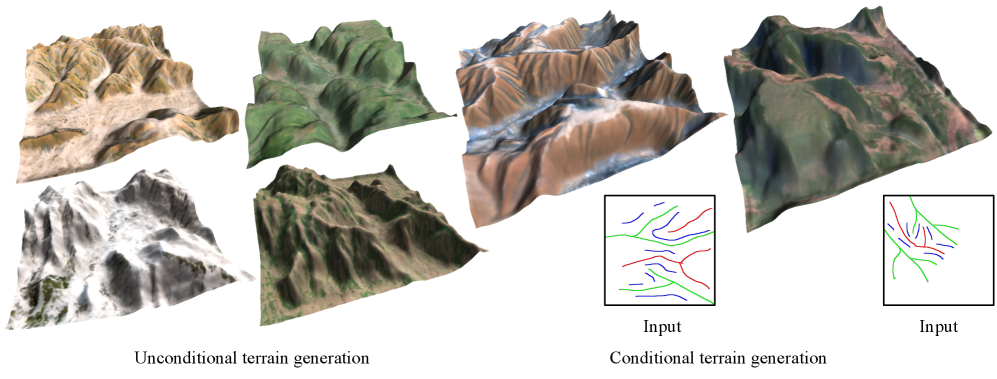
TerraFusion (2025, arXiv:2505.04050) goes further by jointly generating heightmaps and terrain textures. The key insight: terrain geometry and surface appearance are correlated (river beds are sandy, cliff faces are rocky, flat areas are grassy). Generating them separately produces mismatches.
TerraFusion uses a latent diffusion model with separate VAEs for heightmaps and textures, trained to model their joint distribution. The system supports:
- Unconditional generation: Random plausible terrain with matching textures
- Sketch-conditioned generation: A creator draws a rough map (valleys here, ridges there, cliffs along this edge) and the model generates detailed geometry and textures that match the sketch
For a creator world, this is powerful. A creator sketches the general layout of their plot, and the system fills in geologically plausible terrain with appropriate surface materials. No heightmap painting, no texture splatting, no manual material assignment.
MESA: Text-to-Terrain
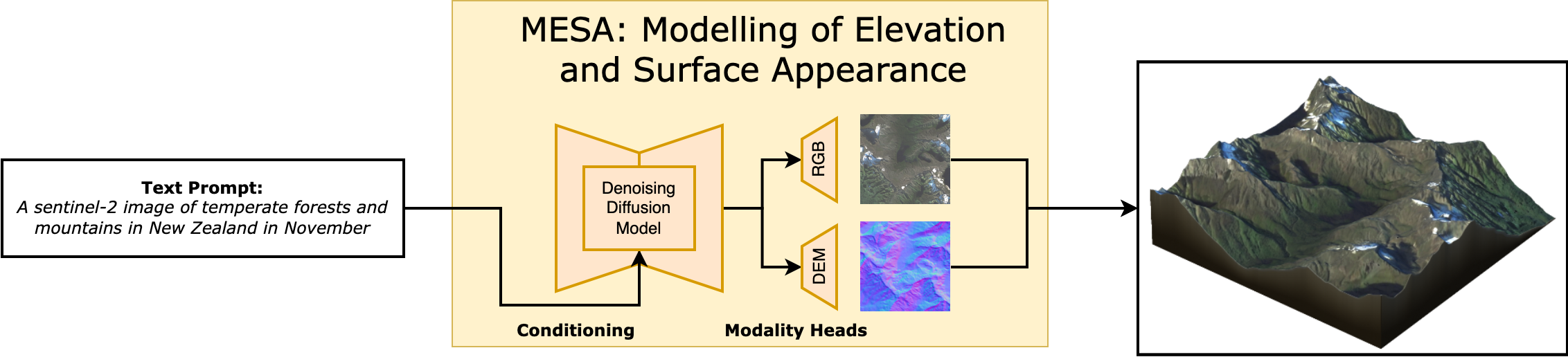
MESA (2025, arXiv:2504.07210, CVPR 2025 Workshop) generates terrain from text descriptions. It's trained on global remote sensing data from the Copernicus program, so it has exposure to every type of terrestrial landscape.
A prompt like "a fjord with steep granite walls opening to a rocky coastline" produces a heightmap with the appropriate geological structure. "Rolling farmland with gentle hills and a wide river valley" produces something completely different.
MESA introduces the Major TOM Core-DEM extension dataset, which pairs satellite imagery with digital elevation models globally. This training data gives the model understanding of how real terrain looks at every scale and in every climate zone.
Geodiffussr: Text-Guided Terrain Texturing
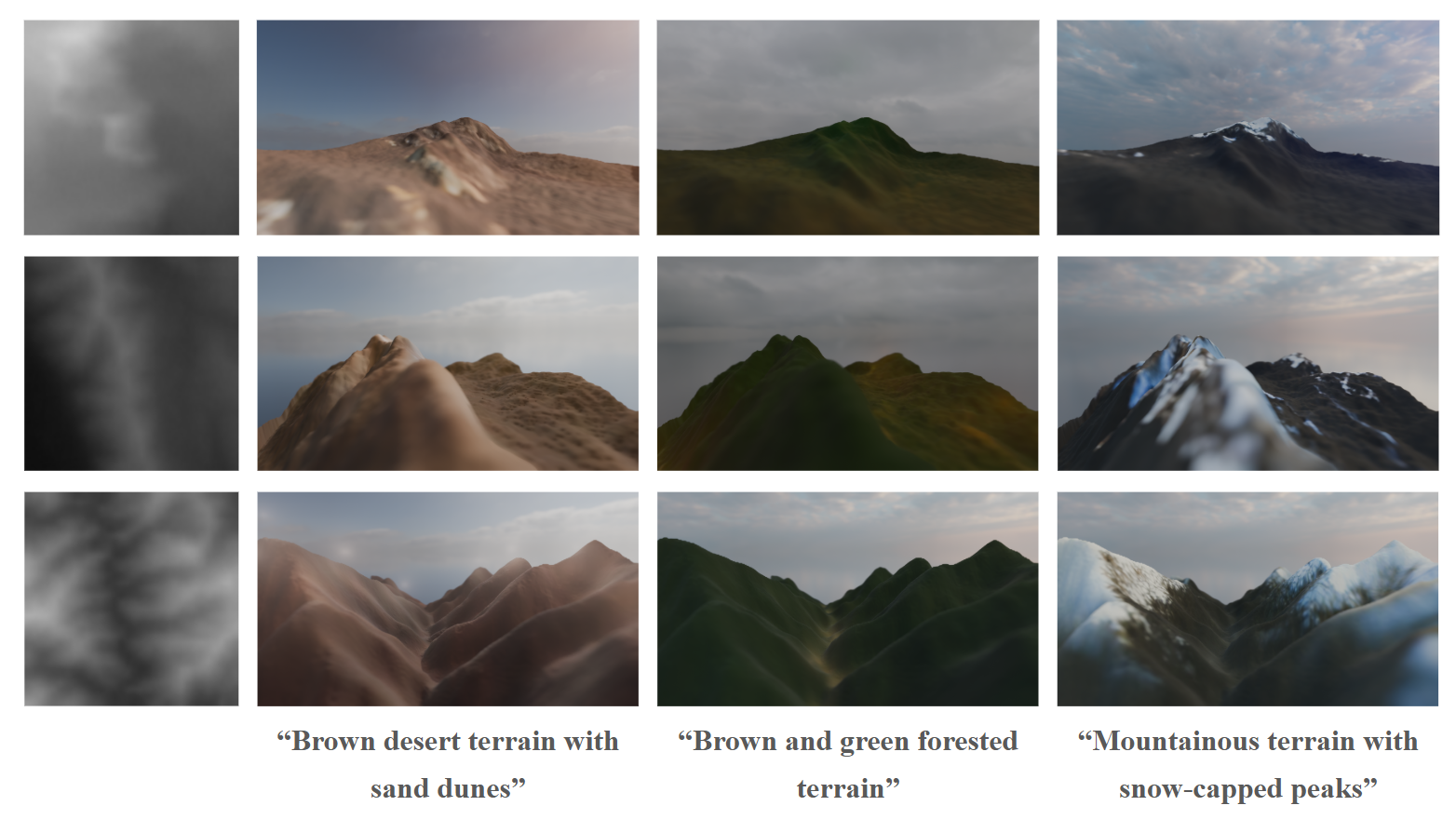
Geodiffussr (2025, arXiv:2511.23029) takes an existing heightmap and generates textures guided by text descriptions while respecting the elevation data. "Autumn forest" produces orange and gold foliage on moderate slopes with bare rock on steep faces. "Tropical coast" produces palm vegetation on low ground with coral sand at sea level.
The system uses multi-scale content aggregation to ensure texture assignments respect elevation: snow only appears above a physically plausible altitude, water features sit in depressions, vegetation thins with altitude.
For a creator world, this means terrain textures can be regenerated from a text prompt without changing the geometry. A creator sculpts the terrain they want, then describes the mood ("dark volcanic wasteland" or "lush temperate forest") and the system generates appropriate surface materials.
Dynamic LOD for Browser Terrain
Rendering large terrain at full resolution everywhere is impossible in a browser. A 4 km x 4 km world at 1-meter resolution is 16 million vertices of terrain alone. Dynamic LOD reduces this to a constant, manageable vertex count regardless of world size.
Geometry Clipmaps
Geometry clipmaps (Losasso and Hoppe, SIGGRAPH 2004, Paper) remain the gold standard for heightmap terrain LOD. The idea: render terrain as a set of concentric square rings centered on the camera. Each ring is twice the area of the previous one but at half the resolution.
Close to the camera (innermost ring): full resolution, 1-meter grid spacing. One ring out: 2-meter spacing, covering 4x the area. Next ring: 4-meter spacing, covering 16x the area. And so on for 6-8 levels, until the outermost ring covers the entire visible distance.
The total vertex count is constant: roughly N^2 * levels, where N is the ring width in vertices. With N=256 and 8 levels, that's about 500K vertices total. This renders the same whether the world is 1 km or 100 km wide.
Browser implementation: Geometry clipmaps work in WebGL 2 because they only require standard vertex buffer updates (no compute shaders). As the camera moves, the CPU updates the heightmap data for each ring by sampling the terrain at the appropriate resolution. The vertex shader reads height values from a texture and displaces the flat grid.
Morphing: The transition between LOD levels produces visible "popping" if handled naively. Geomorphing (detailed in its own section below) blends vertex positions between levels over a transition zone in the vertex shader, producing smooth, pop-free transitions at no extra draw call cost.
CDLOD: Quadtree-Adaptive Clipmaps
CDLOD (Strugar, 2014, Paper) improves on geometry clipmaps by using a quadtree instead of fixed concentric rings. The quadtree adapts to the terrain: flat areas use coarse nodes, while areas with high detail (cliffs, ridges) get finer subdivision.
This matters for a creator world because different chunks have different complexity. A flat meadow needs minimal resolution. A mountainous region with cliffs and caves needs maximum detail. CDLOD allocates resolution where it matters.
The CPU-side quadtree traversal is lightweight (a few hundred nodes) and determines which terrain patches to draw at which resolution. The GPU renders each patch as an instanced grid with per-patch LOD uniforms.
Concurrent Binary Trees: Planetary-Scale Tessellation
Concurrent Binary Trees (CBT) are a GPU-friendly data structure for adaptive terrain tessellation, presented by Benyoub and Dupuy (Intel, HPG 2024, Paper, GitHub).
The core idea: represent the terrain as a binary tree where each node is a triangle. Adaptive subdivision splits triangles that are close to the camera and merges triangles that are far away. The binary tree lives entirely in GPU memory as a 1D array (a binary heap), and subdivision/merge operations run as compute shaders.
The 2024 paper extends CBT from square heightmap domains to arbitrary polygon meshes. This means you can tessellate a sphere (for planetary rendering) or an arbitrary base mesh (for a game world with non-rectangular boundaries). The key improvement: using CBT as a memory pool manager instead of implicit encoding allows much higher subdivision levels.
Performance: planetary-scale terrain tessellation in under 0.2ms on console-level hardware. The algorithm scales linearly with processor count. For WebGPU, this provides a path to planet-scale terrain rendering in a browser, though the implementation complexity is high.
GPU-Driven LOD with WebGPU
WebGPU enables a fully GPU-driven terrain pipeline that eliminates CPU involvement in LOD decisions:
Compute pass 1: Frustum and occlusion culling. A compute shader tests each terrain patch's bounding box against the view frustum and an occlusion buffer (the depth buffer from the previous frame, downsampled). Invisible patches are discarded entirely.
Compute pass 2: LOD selection. For visible patches, compute the screen-space size and select the appropriate LOD level. Write the LOD level and patch ID into an indirect draw buffer.
Compute pass 3: Mesh generation (for volumetric terrain). For chunks with SDF data, run marching cubes to generate the mesh at the selected LOD resolution.
Indirect draw. A single
drawIndexedIndirect()call renders all terrain patches. The GPU decides everything: what to draw, at what resolution, in what order.
This pipeline has constant CPU cost (dispatching compute shaders and the indirect draw call) regardless of world size or complexity. The GPU handles all the per-patch decisions.
@compute @workgroup_size(64)
fn lodSelection(@builtin(global_invocation_id) id: vec3<u32>) {
    let patchIdx = id.x;
    let bounds = patchBounds[patchIdx];

    if (!frustumTest(bounds, viewProjection)) { return; }
    if (occlusionTest(bounds, depthPyramid) == OCCLUDED) { return; }

    let screenSize = projectedSize(bounds, viewProjection, screenDimensions);
    let lod = clamp(u32(log2(maxScreenSize / screenSize)), 0u, MAX_LOD);

    let drawIdx = atomicAdd(&drawCount, 1u);
    drawArgs[drawIdx] = DrawArgs(patchIdx, lod, indexCount[lod], indexOffset[lod]);
}
Geomorphing: Pop-Free LOD Transitions
The biggest visual artifact in terrain LOD is popping: vertices suddenly jump to new positions when a patch switches LOD level. Geomorphing eliminates this by smoothly interpolating vertex positions between LOD levels over a transition zone.
The implementation lives entirely in the vertex shader. Each vertex stores both its current-LOD position and its next-coarser-LOD position. As the camera distance crosses the transition threshold, a morph factor blends between the two:
float morphFactor = smoothstep(lodNear, lodFar, distanceToCamera);
float morphedHeight = mix(fineLodHeight, coarseLodHeight, morphFactor);
gl_Position = viewProjection * vec4(worldPos.x, morphedHeight, worldPos.z, 1.0);
Hoppe's geometry clipmap paper (GPU Gems 2, Chapter 2) describes the full implementation for clipmap rings. The morph zone is the outer 20% of each ring. Within this zone, vertices smoothly converge to the next ring's resolution. The visual effect: terrain geometry "melts" between detail levels rather than snapping. At typical camera speeds, the transition is invisible.
Image-space blending (Scherzer et al., Paper) is an alternative that blends rendered images of two LOD levels in screen space. This handles more extreme LOD differences (e.g., mesh-to-billboard transitions) but costs an extra render pass for the transition zone.
GPU-Driven Vegetation Culling
Vegetation (trees, grass, rocks) is often the largest source of draw calls in an open world. A naive approach draws every vegetation instance every frame. GPU-driven culling, now available in Three.js via WebGPU, eliminates invisible instances before they reach the rasterizer.
Three.js's ComputeInstanceCulling (Docs) provides frustum and LOD culling for instanced meshes with 10-100x performance gains for large instance counts. The pipeline:
- A compute shader reads all instance bounding spheres
- Tests each against the camera frustum (6-plane test)
- Applies distance-based LOD: instances beyond a threshold switch to lower detail or are culled entirely
- Surviving instances are compacted into a buffer and drawn via
drawIndirect
The CPU does zero per-instance work. After initial setup, the cost is one compute dispatch plus one indirect draw call per vegetation type, regardless of instance count.
For denser vegetation, Three.js's IndirectBatchedMesh (Docs) packs multiple geometry types (trees, bushes, rocks) into a single buffer and draws them with multi-draw indirect. One draw call for all vegetation in a chunk.
Combined with the density-map-based scattering from our vegetation system, this means: the density map generates 50,000 grass blade positions in a compute shader, the culling pass eliminates the 70% that are off-screen or too far away, and one indirect draw call renders the surviving 15,000 blades. Total CPU cost: negligible.
LOD for Volumetric Terrain
Volumetric terrain (SDF + marching cubes) needs its own LOD system because the mesh is generated, not pre-authored. The approach:
Multi-resolution SDF storage. Store the SDF at multiple resolutions in a mipmap-like hierarchy. Level 0 is full resolution (1-meter voxels). Level 1 is 2-meter voxels (8x less data). Level 2 is 4-meter voxels. At each level, the SDF is downsampled by taking the minimum absolute distance.
LOD-selected marching cubes. Run marching cubes on the SDF level that matches the desired LOD. Close-up chunks use level 0. Distant chunks use level 2 or 3. The Transvoxel algorithm handles the boundary between different levels.
Caching. Generated meshes are cached until the SDF changes (creator edit) or the LOD level changes (camera moved significantly). For static terrain, the mesh is generated once and reused.
Streaming Architecture for Terrain
Chunk Data Format
Each terrain chunk (64x64 meters) streams as a compact binary package:
ChunkPacket {
  header: {
    chunkX: i16, chunkZ: i16,
    version: u32,
    flags: u8  // hasHeightmap | hasVolumetric | hasVegetation
  }
  heightmap: {
    resolution: u8,      // 65x65 for full, 33x33 for half, 17x17 for quarter
    quantizedHeights: u16[resolution * resolution],  // delta-encoded, zlib compressed
    splatMap: u8[4 * resolution * resolution]         // RGBA blend weights, LZ4 compressed
  }
  volumetric?: {         // only present if flags.hasVolumetric
    sdfResolution: u8,   // typically 32 or 64
    sparseOctree: bytes  // run-length encoded sparse SDF
  }
  vegetation?: {         // only present if flags.hasVegetation
    treeDensityMap: u8[16 * 16],    // 4m resolution density grid
    grassDensityMap: u8[32 * 32],   // 2m resolution density grid
    rockDensityMap: u8[16 * 16]
  }
  creatorObjects: {
    count: u16,
    objects: PlacedObject[]   // assetId + transform + properties, ~40 bytes each
  }
}
Typical sizes:
- Heightmap-only chunk (flat terrain): 2-4 KB compressed
- Heightmap + vegetation: 4-8 KB
- Heightmap + volumetric + vegetation (complex chunk): 20-100 KB
- 5x5 full-detail neighborhood: 50-500 KB total
Progressive Chunk Loading
Chunks load in priority order based on distance, direction of movement, and data type:
Priority 1 (immediate, <100ms): Heightmap geometry for chunks the player is about to enter. The terrain surface appears first. Even at the lowest resolution (17x17 per chunk), the ground is there.
Priority 2 (fast, <300ms): Splat maps and terrain textures. The ground gets color.
Priority 3 (streaming, <1s): Full-resolution heightmap upgrade. Vegetation density maps. GPU instancing generates trees and grass.
Priority 4 (background, <3s): Volumetric SDF data for chunks with caves/overhangs. Marching cubes generates the mesh in a Web Worker, transfers the buffer to the main thread.
Priority 5 (lazy, <10s): Creator-placed objects. High-resolution textures for structures. Detail objects like flowers, small rocks, debris.
Predictive Pre-fetching
Don't wait for the player to enter a chunk before loading it. Predict where they're going based on velocity and load ahead:
- Walking speed (5 km/h): Pre-fetch 2 chunks ahead (128m). At typical broadband latency, this is 200-400ms of lead time.
- Running/riding (15 km/h): Pre-fetch 4 chunks ahead. The load ring shifts with velocity direction.
- Flying/fast travel: Pause rendering during the transition. Stream the destination chunks at highest priority. Resume rendering when enough data exists for a first frame.
The pre-fetch system tracks which chunks are in the cache, which are in-flight (requested but not yet arrived), and which are needed. A priority queue sorts pending requests by urgency. Cancel requests for chunks the player has moved away from.
Memory Budget and Eviction
A browser tab gets 2-4 GB on desktop. The terrain system needs to live within a fraction of that (the rest is for rendering, physics, networking, and the JavaScript heap).
Target budget: 256 MB for all terrain data.
At our typical chunk sizes:
- Full-detail cached chunks: ~100 (10x10 neighborhood) at 5-100 KB each = 5-10 MB for raw data
- GPU terrain geometry: ~50 MB (vertex buffers, index buffers for visible terrain)
- Terrain textures: ~100 MB (KTX2 compressed, atlas-packed)
- Vegetation instance buffers: ~50 MB (positions, rotations, scales for GPU instancing)
- SDF volumes and cached marching cubes meshes: ~50 MB
Chunks beyond the visible range are evicted from GPU memory first (textures, vertex buffers), then from CPU cache. The raw heightmap data is the last to go because it's the cheapest to keep and the most important to have when the player turns around.
Biome Transitions and Anti-Tiling
Smooth Biome Boundaries
Real landscapes don't have hard edges between biomes. A forest doesn't stop at a line and become desert. There's a gradient: dense forest thins into scattered trees, then scrubland, then sparse desert vegetation. Getting this right makes the world feel continuous rather than tiled.
AutoBiomes (Kötter et al., Paper) combines procedural terrain generation with simplified climate simulation. Temperature, humidity, and elevation determine biome type at each point. Between biomes, material weights and vegetation density interpolate over a transition zone (typically 50-100 meters wide). The transition width varies by biome pair: forest-to-grassland is wide and gradual, cliff-to-water is narrow and abrupt.
For a creator world, biome assignment runs on a coarse grid (one biome sample per 16x16 meter area). The terrain shader reads the biome values for the current fragment and its neighbors, interpolates material weights in the transition zone, and blends textures accordingly. Vegetation scattering uses the same interpolated density values, so tree density fades gradually at the forest edge.
Creator control: let creators paint biome overrides on their plots. The system generates default biomes from terrain properties, but creators can override them. Paint "swamp" on a low-lying area and the material shifts to murky water, moss, and dead trees. The biome paint map is a per-chunk 16x16 grid of biome IDs (256 bytes) that overrides the procedural assignment.
Hex-Tiling: Eliminating Texture Repetition
The most common visual artifact in terrain rendering is texture repetition. A 1-meter grass texture tiled across a 100-meter meadow produces visible grid patterns. Two techniques fix this:
Hex-tiling (Mikkelsen, Demo) replaces the square tiling grid with a hexagonal one. Each hexagonal tile samples the texture at a random offset and rotation. The hexagonal boundaries are blended to hide seams. The result is a surface that looks uniformly random rather than tiled. Cost: about 3 extra texture samples per fragment. The technique is widely used in production games and runs in any fragment shader.
Stochastic texture filtering (Pharr et al., NVIDIA, 2024, Paper) applies filtering after shading rather than before, using stochastic sampling. The error from stochastic sampling is minimal and handled well by spatiotemporal denoising. This produces more accurate filtered results and works with compressed/sparse textures. For terrain, it eliminates both tiling artifacts and the filtering artifacts that hex-tiling can sometimes introduce at transitions.
For a browser world, hex-tiling is the practical choice (it works in any shader). Stochastic filtering requires more infrastructure but produces better results if temporal denoising is available (which it would be in a WebGPU path with TAA).
Terrain Material System
Triplanar Mapping
Standard UV-mapped textures stretch horribly on steep slopes because the UV coordinates compress. Triplanar mapping projects textures along all three axes (X, Y, Z) and blends based on the surface normal:
vec3 blending = abs(normal);
blending = normalize(max(blending, 0.00001));
blending /= (blending.x + blending.y + blending.z);

vec4 xaxis = texture(material, worldPos.yz * scale);
vec4 yaxis = texture(material, worldPos.xz * scale);
vec4 zaxis = texture(material, worldPos.xy * scale);

vec4 color = xaxis * blending.x + yaxis * blending.y + zaxis * blending.z;
Cliff faces get the X or Z projection (no stretching). Flat ground gets the Y projection. The blending is smooth and automatic. No UV unwrapping required.
Babylon.js has a built-in TriPlanar Material. Three.js requires a custom shader, but the implementation is about 30 lines of GLSL.
For PBR terrain, apply triplanar mapping to all channels: albedo, normal, roughness, and ambient occlusion. The same blending weights apply to each channel.
Slope and Altitude-Based Material Assignment
Rather than hand-painting splat maps, assign materials procedurally based on terrain properties:
float slope = acos(dot(normal, vec3(0, 1, 0)));
float altitude = worldPos.y;

float grassWeight = smoothstep(0.3, 0.0, slope) * smoothstep(2000.0, 1500.0, altitude);
float rockWeight = smoothstep(0.2, 0.5, slope);
float snowWeight = smoothstep(2500.0, 3000.0, altitude) * smoothstep(0.4, 0.1, slope);
float sandWeight = smoothstep(5.0, 0.0, altitude) * smoothstep(0.15, 0.0, slope);
Flat ground at low altitude gets grass. Steep slopes get rock. High altitude gets snow (but only on surfaces flat enough for snow to accumulate). Near sea level gets sand. The transitions are smooth and physically motivated.
For a creator world, expose the altitude thresholds and blend zones as paintable parameters per chunk. Creators can move the treeline up or down, extend the snow coverage, or turn a grassy hill into a sandy desert by adjusting the material rules for their plot.
GPU-Friendly Laplacian Texture Blending
Standard texture blending (linear interpolation between layers) produces either visible seams or washed-out, low-contrast results. Laplacian pyramid blending solves this but traditionally requires expensive precomputation.
Wronski (NVIDIA, 2025, JCGT) presents a GPU-friendly variant that works in real-time shaders with no precomputation and no extra memory. The technique uses the standard mipmap chain as an approximation of the Laplacian pyramid: sample the texture at both the current mip level and a coarser level, compute the difference (the Laplacian), and blend the Laplacian contributions from each layer.
The result preserves sharp local features (individual grass blades, rock cracks) while blending smoothly at larger scales. The cost is a few extra texture taps per fragment. For terrain where you're blending 4+ material layers per pixel, this produces noticeably better results than linear blending, especially at the transitions between grass, rock, and sand.
Phasor Noise for Erosion Detail
Standard terrain often looks flat at close range because the erosion simulation operates at the heightmap resolution (1-meter grid). Real terrain has fine-scale erosion patterns (rills, gullies, weathering cracks) at centimeter scale.
Grenier et al. (2024, CGF) use phasor noise to add terrain micro-detail in real time. Phasor noise synthesizes structured patterns by defining a stochastic phase field fed into periodic functions. Applied to terrain, it creates spatially varying erosion patterns that:
- Cascade narrow rills into larger gullies across scales
- Automatically align with the terrain slope (erosion patterns follow the fall line)
- Achieve up to 32x amplification (adding detail at 32x the heightmap resolution)
- Run entirely in a fragment shader at interactive frame rates
For a browser world, phasor noise runs in the terrain shader as a detail layer. The heightmap provides the large-scale shape. Phasor noise adds convincing micro-erosion in the fragment shader without increasing geometry complexity. The parameters (pattern frequency, amplitude, orientation) can vary per biome: deep rills on bare rock, gentle ripples on sand dunes, rough bark-like texture on dried mud.
Virtual Texturing for Terrain
At large scales, the terrain texture atlas becomes unwieldy. A 4 km x 4 km world at 1 texel per centimeter needs a 400,000 x 400,000 pixel texture. Obviously impossible.
Virtual texturing (also called megatexture, from id Software's Rage) solves this by treating the terrain texture as a paged structure. The full texture exists conceptually but only the tiles visible on screen are loaded into GPU memory.
The pipeline:
- Feedback pass: Render the terrain with a shader that outputs which texture tile each pixel needs (tile ID and mip level). Read this back to the CPU (or process with a compute shader).
- Tile loading: Load requested tiles from the CDN or generate them procedurally from the splat map data.
- Indirection texture: A small texture maps virtual tile coordinates to physical tile coordinates in a texture atlas.
- Render pass: The terrain shader looks up the indirection texture to find the correct physical tile, then samples the material texture from the atlas.
WebGPU's compute shaders can handle the feedback analysis and page table management entirely on the GPU. The CPU only manages tile I/O.
The result: terrain with unique texturing at any resolution without a texture memory explosion. Tiles far from the camera load at low resolution. Close-up tiles load at high resolution. The total memory usage stays within a fixed budget (typically 128-256 MB of texture atlas).
Dynamic Terrain Effects
Puddles and Wetness
Rain doesn't just fall. It accumulates. In depressions, it forms puddles. On surfaces, it creates a wet sheen. On steep slopes, it runs off. Simulating this makes weather feel connected to the terrain rather than a purely visual overlay.
The shader-based approach doesn't simulate fluid dynamics. It uses the terrain heightmap to determine where water pools:
float concavity = heightCenter * 4.0 - heightLeft - heightRight - heightUp - heightDown;
float puddleDepth = max(0.0, concavity * rainIntensity - evaporationRate * timeSinceRain);
float wetness = smoothstep(0.0, 0.02, puddleDepth);

vec3 wetColor = baseColor * 0.7;
float wetRoughness = baseRoughness * 0.3;
vec3 finalColor = mix(baseColor, wetColor, wetness);
float finalRoughness = mix(baseRoughness, wetRoughness, wetness);
Concave areas (negative Laplacian of the heightmap) collect water. The deeper the concavity, the larger the puddle. Wet surfaces darken and become more reflective (lower roughness). The effect fades over time after rain stops.
For full puddle reflections, add a planar reflection pass at the puddle surface. Or use screen-space reflections (SSR) which are cheaper and already available in both Three.js and Babylon.js post-processing stacks.
Raindrops on puddle surfaces use a simple 2D wave equation in a feedback texture (Saurel, 2026, Blog). Each raindrop creates a ripple that propagates outward and decays. The wave texture modulates the puddle normal map, creating convincing ripple patterns at 60fps.
Footprints and Terrain Deformation
When a player walks on soft terrain (sand, snow, mud), footprints add to the sense of physical presence. The technique: maintain a small deformation texture per chunk (64x64 pixels = 4 KB) that stores height offsets. When a character steps on soft terrain, stamp a footprint shape into the deformation texture.
The terrain vertex shader reads the deformation texture and subtracts the offset from the height. The terrain fragment shader darkens the footprint area (compressed soil is darker) and increases roughness (disturbed surface).
Footprints fade over time (snow fills in, rain washes out mud prints) by gradually zeroing the deformation texture. The fade rate depends on weather: fast in rain, slow in dry conditions.
For a multiplayer world, footprint data is ephemeral and local. Each client generates footprints for visible players. The deformation texture doesn't need to sync across clients (everyone sees their own version of transient footprints). This avoids the networking cost of broadcasting every step.
Procedural Sky and Day/Night Cycle
The sky is the largest visible surface in any open world. It sets the mood for the entire terrain.
Three.js has a complete sky system that includes procedural sun/moon, day/night cycle, clouds, stars, and lens flares. The built-in Three.js Sky example (also available in WebGPU) implements Preetham's analytical sky model.
For more physically accurate results, webgpu-sky-atmosphere implements Hillaire's atmosphere model as a WebGPU post-process. It supports multiple scattering phase functions and produces correct aerial perspective (distant terrain appears hazier), sun/sunset colors, and sky gradients from first principles.
TerrainView7 demonstrates full-scale planet rendering in WebGPU with precomputed atmospheric scattering, proving that physically accurate atmosphere rendering runs in a browser.
For a creator world, the sky parameters (sun position, cloud coverage, haze density) are synchronized across all clients from the server's world clock. The sky shader runs locally on each client, producing consistent lighting across all players.
Terrain Lighting: Indirect Illumination
Direct sunlight is handled by shadow maps. But the color and brightness of terrain in shadow (ambient/indirect light) is equally important for visual quality. Pure black shadows look wrong. Shadows should be tinted by sky color (blue on a clear day, grey on an overcast day).
For a browser world, the practical approach:
Screen-space indirect lighting with visibility bitmask (Jimenez et al., 2023, Paper) improves on standard SSAO by tracking 32 directional visibility sectors per pixel. This captures not just how occluded a point is, but the directionality of the occlusion. Thin surfaces correctly allow light through from the other side. The result is indirect illumination that reacts to nearby geometry without global illumination infrastructure.
The cost is comparable to SSAO (1-2ms). The visual improvement is significant: terrain in canyons picks up bounce light from the canyon walls. The undersides of overhangs are illuminated by ground reflection. The effect combines with the atmospheric scattering from the sky shader to produce physically motivated ambient lighting.
Terrain Physics Integration
Rapier Heightfield Colliders
Rapier's WASM physics engine provides native heightfield colliders optimized for terrain. Creating a terrain collider is straightforward:
const heights = new Float32Array(65 * 65);
// Fill with heightmap data...
const groundCollider = RAPIER.ColliderDesc.heightfield(
  64, 64, heights, new RAPIER.Vector3(64.0, 100.0, 64.0)
);
world.createCollider(groundCollider);
The heightfield collider uses the structured grid for efficient broadphase queries. Raycasting against a heightfield is O(log n) rather than O(n) for a triangle mesh. For a 65x65 chunk, collision queries resolve in microseconds.
For chunks with volumetric terrain (SDF overlays), generate a triangle mesh from the marching cubes output and use a trimesh collider. This is more expensive than a heightfield collider but handles arbitrary geometry. Only generate trimesh colliders for the 3-5 chunks closest to the player. Distant chunks don't need physics.
Performance: Rapier's heightfield collider for a 65x65 chunk adds approximately 0.1ms per physics step for character controller queries. 5 active chunks with heightfield colliders: 0.5ms. One trimesh collider for a volumetric chunk: 0.2-0.5ms. Total terrain physics budget: under 1ms, well within the 2-3ms physics budget for the entire world.
Terrain-Aware Character Controller
The character controller needs to respond to terrain properties:
- Slope limiting: The character can walk on slopes up to 45 degrees. Steeper slopes cause sliding. This uses the terrain normal at the character's position (cheaply computed from the heightmap gradient).
- Surface material response: Walking on rock produces different footstep sounds and movement speed than walking on sand or mud. The terrain's splat map provides the surface material at any point.
- Step climbing: The character can step up ledges up to 0.5 meters. Rapier's
KinematicCharacterControllerhandles this automatically with configurable step height.
Interactive Terrain Editing in the Browser
For a creator world, terrain isn't just generated. It's sculpted, modified, and reshaped by players. The editing tools need to be responsive (instant visual feedback) and networked (other players see changes within seconds).
WebGPU SDF Editor
Reinder Nijhoff's WebGPU SDF Editor demonstrates that full-featured SDF modeling works in the browser today. The editor supports:
- Six primitive shapes (sphere, box, cone, cylinder, capsule, torus) with position, rotation, and scale
- Boolean operations (union, subtraction, intersection) with smooth blending and configurable blend radii
- Hierarchical scene graphs with groups and nested operations
- Real-time rendering using multiple GPU compute shader stages, octree-based space partitioning across 16,384 grid cells, and surface extraction via marching cubes or surface nets
- Temporal anti-aliasing and ambient occlusion via shadow maps
Each primitive is stored as 28 floats (112 bytes) in a single GPU buffer. This compact representation means a complex terrain edit (dozens of SDF primitives defining a cave entrance, an arch, or a carved cliff face) weighs under 5 KB and syncs to other players instantly.
For a creator world, the SDF editing workflow looks like:
- Creator selects a sculpting tool (add sphere, subtract box, smooth blend)
- Click/drag in the world to place and size the SDF primitive
- The client immediately runs marching cubes on the modified SDF to update the local mesh (feedback in <16ms)
- The SDF edit (primitive type + transform + blend mode, ~100 bytes) is sent to the server
- The server validates the edit (within the creator's plot, doesn't intersect protected areas) and broadcasts to nearby players
- Other players' clients apply the SDF edit and regenerate their local mesh
The total round-trip for an edit to become visible to others: 100-300ms depending on network latency. The creator sees their edit instantly because it's applied locally before server confirmation.
Brush-Based Heightmap Editing
For the heightmap layer (the 90% of terrain that doesn't need volumetric features), a simpler editing model works. The creator paints height modifications with a brush:
- Raise/lower: Add or subtract height in a radius with falloff
- Smooth: Average heights in a radius, removing sharp features
- Flatten: Set all heights in a radius to a target value
- Erosion brush: Apply a few steps of hydraulic erosion locally in the brush radius
The heightmap edit is a delta: a small patch of height changes that overlays the base terrain. The delta patch is tiny (a 32x32 grid of 16-bit height offsets = 2 KB) and syncs to other players as a single message. Multiple delta patches accumulate per chunk and are periodically merged server-side into the chunk's persistent heightmap.
Collaborative Editing Constraints
When multiple creators edit the same chunk simultaneously, the system needs rules:
- Spatial locking: Only one creator can edit a given 8x8 meter sub-region at a time. The lock is acquired when the creator starts an edit stroke and released when they lift the brush. Locks timeout after 10 seconds of inactivity.
- Non-overlapping edits: If two creators edit different parts of the same chunk, both edits apply without conflict (they modify different heightmap cells or SDF regions).
- Overlapping edits: If two creators edit the same location, the server serializes the edits in arrival order. Both clients see the same final result after reconciliation.
This is simpler than the full CRDT approach used for placed objects because terrain edits are additive operations on a continuous field (heights, SDF distances) rather than discrete object state.
Nanite-Style Virtual Geometry in WebGPU
Unreal Engine 5's Nanite renders billions of triangles by building a cluster DAG (directed acyclic graph) at build time and selecting the right LOD per-cluster at runtime based on screen-space error. The entire pipeline runs on the GPU. This approach has been ported to WebGPU.
Nanite WebGPU
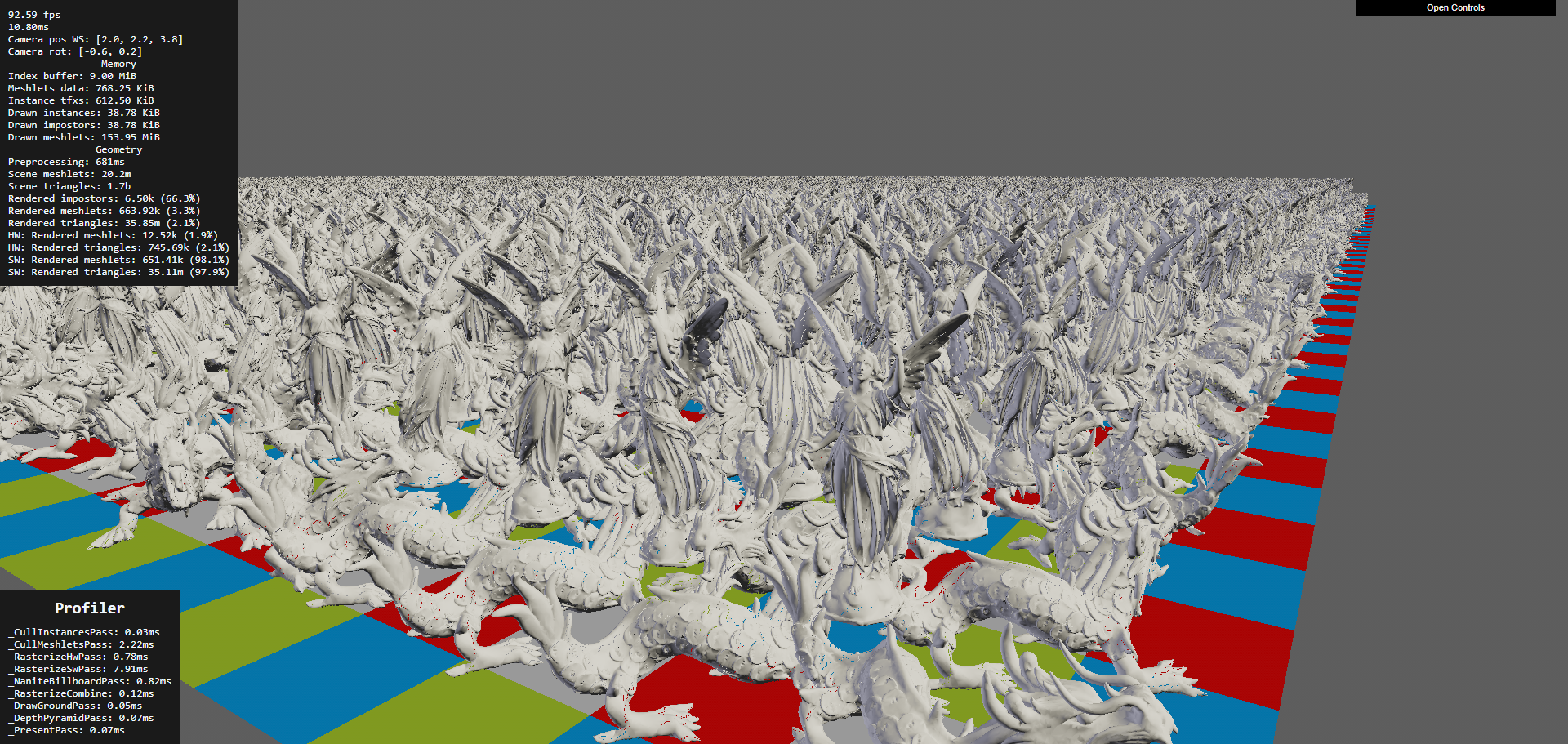
Nanite WebGPU by Scthe (1.1k+ GitHub stars) is a complete browser implementation of Nanite's core architecture:
- Meshlet LOD hierarchy built offline using meshoptimizer's cluster generation
- Software rasterizer implemented in WGSL compute shaders (working within WebGPU's constraints where hardware rasterization can't do per-cluster draws efficiently)
- Per-instance and per-meshlet culling using frustum and occlusion tests
- Billboard impostors for extremely distant objects
- Texture and per-vertex normal support
The pipeline: meshes are split into clusters of ~128 triangles. Neighboring clusters are grouped, and each group is simplified (using meshoptimizer) while preserving shared boundaries. This recurses until the entire mesh collapses to a single cluster. At runtime, a compute shader walks the DAG and selects the coarsest cluster per-group that produces less than 1 pixel of error at the current screen resolution.
THREE-Nanite is an emerging Three.js implementation achieving 20-40fps on integrated graphics hardware while handling hundreds of thousands of triangles. It demonstrates that Nanite-style rendering is viable even on low-end browser hardware.
meshoptimizer: The LOD Pipeline Foundation
meshoptimizer (by Arseny Kapoulkine) is the library behind most browser-compatible LOD pipelines. Version 1.0 (2025) provides:
- Mesh simplification with error metrics (how much the shape changed, used for LOD selection)
- Cluster generation for Nanite-style meshlet hierarchies
- Vertex cache optimization for GPU-friendly triangle ordering
- Overdraw optimization to reduce pixel shader cost
- Vertex quantization and compression for smaller downloads
meshoptimizer 1.0 (released December 2025) ships a new single-header clusterlod.h that implements Nanite-style continuous LOD directly. It builds a hierarchy of clusters that are progressively grouped and simplified, usable as-is or as a reference for a custom pipeline. This is the exact cluster-DAG primitive the terrain pipeline needs for SDF/marching-cubes mesh LOD.
For our terrain pipeline, meshoptimizer processes the marching cubes output from SDF terrain into optimized, clustered meshes with LOD hierarchies. The offline processing runs server-side. The browser receives pre-clustered meshes and performs GPU-driven LOD selection at runtime.
The combination of meshoptimizer for LOD generation and WebGPU compute for runtime selection gives browser terrain the same architectural pattern as Nanite, adapted for web constraints.
Terrain-Aware Level Design
Terrain isn't just a surface to walk on. Its shape guides player movement, directs attention, and creates the emotional rhythm of exploration. The best open worlds use terrain as a design tool.
Sightlines and Landmarks
The Level Design Book's wayfinding chapter documents how terrain elevation controls what players see and where they go. A ridge hides what's beyond it, creating curiosity. A valley funnels movement toward its lowest point. A tall landmark (tower, mountain peak, unusual tree) visible from a distance gives players a goal to walk toward.
For a creator world, this means terrain generation should produce natural wayfinding features. Ridge lines should break sightlines, creating "reveal moments" when a player crests a hill and sees a new area. Valleys should converge toward interesting locations. Elevated points should exist where creators can place landmarks visible from far away.
Curiosity-Driven Exploration
Research from Purdue University (Paper) identifies four spatial exploration triggers:
- Reaching extreme points (highest peak, furthest edge, deepest cave). Terrain should have clear extremes that reward reaching them.
- Resolving visual obstructions (what's behind that cliff? inside that cave?). Terrain that blocks the view motivates movement to find what's hidden.
- Out-of-place objects (a structure in the wilderness, a light in the darkness). Creator-placed objects against natural terrain create contrast that draws attention.
- Understanding spatial connections (how does this valley connect to that coast?). Terrain that creates legible geography encourages map-reading and route-planning.
PlotMap: AI-Assisted POI Placement
PlotMap (arXiv:2309.15242) automates point-of-interest layout by taking narrative requirements (this quest needs a village near a river, that quest needs a ruin on a hilltop) and finding terrain locations that satisfy the spatial constraints. For a creator world, a similar system could suggest where to place structures based on terrain properties: "this hilltop has good sightlines for a watchtower," "this sheltered valley would suit a village."
Flowing Water and Waterfalls
Rivers and waterfalls are terrain features that combine visual appeal with ambient sound and gameplay affordance (water as a barrier, a resource, or a path).
River Rendering
Rivers in open worlds are typically rendered as textured strips that follow the terrain surface. The strip mesh is generated from the river spline (stored as control points) and projected onto the terrain heightmap. The river shader applies:
- Flow-aligned UVs that scroll in the river's direction, creating the appearance of flowing water
- Foam at edges where the river meets the bank (depth-based, similar to shoreline foam)
- Speed variation based on channel width (narrow sections flow faster, wide sections slow down)
- Transparency with depth-based color (shallow is clear, deep is dark)
For a browser world, river data is compact: a spline (20-50 control points per river segment, ~400 bytes) plus width and flow speed parameters. The client generates the river mesh locally by projecting the spline onto its terrain surface.
Waterfall Rendering
Where a river drops off a cliff face, a waterfall particle system replaces the flat river surface. The hybrid approach from real-time water simulation research (EG): regions that can't be represented by a height field (waterfalls, splashes) convert to spray, splash, and foam particles that exchange mass and momentum with the fluid simulation.
For a browser world, waterfalls are simpler: detect where the river spline crosses a terrain height discontinuity, spawn a particle system at that point with downward velocity, and add a foam splash at the base. The particles are GPU-instanced quads with scrolling alpha textures. 500 particles per waterfall, one draw call. The sound of falling water uses the Web Audio API with distance attenuation.
Impostors for Distant Terrain Features
Trees, rocks, buildings, and other terrain features become tiny at distance. Rendering them as full 3D meshes wastes GPU cycles. Impostors replace distant objects with pre-rendered flat images that face the camera.
Octahedral Impostor Atlases
An octahedral impostor captures the appearance of a 3D object from multiple viewing angles and stores them in a texture atlas. At runtime, the shader samples the atlas based on the current view direction, interpolating between the two closest captured angles.
A hemi-octahedral atlas (views from the upper hemisphere only, since you rarely look at trees from below) provides twice the angular resolution of a full octahedral atlas with the same texture size. Unity's impostor system reports frame time dropping from 111ms to 5.78ms when switching 1,600 tree instances from real meshes (140K triangles each) to impostors.
For a browser world, the impostor pipeline:
- Server-side: render each asset from 16-32 viewing angles, capturing color, normal, and depth
- Pack into an atlas texture (one atlas per asset, ~256x256 pixels, <100 KB as KTX2)
- At runtime: instances beyond the impostor distance (typically 100-200m) render as billboards sampling the atlas
- Crossfade between mesh and impostor over a 20m transition zone to hide the switch
Billboard Splatting (BBSplat)
Billboard Splatting (2024, arXiv:2411.08508) takes this further by using learnable textured planar primitives. Instead of pre-rendered views, BBSplat optimizes billboard positions and textures to best represent the 3D object from any angle. This achieves up to 17x compression compared to 3D Gaussian Splatting while maintaining view-dependent appearance. For distant terrain features in a browser world, BBSplat could reduce the per-asset impostor storage while improving angular coverage.
Professional Terrain Tools and What They Teach
Before building a terrain pipeline from scratch, it's worth understanding what professional offline tools do. These tools represent decades of terrain generation research distilled into production workflows.
Gaea (QuadSpinner) is GPU-accelerated and provides near-instant feedback on changes. It supports tiled builds up to 2 million pixels per side, automatic LOD mesh export, and a node-based graph where each node is a physical process (erosion, sedimentation, uplift, thermal weathering). Gaea's erosion nodes produce terrain that looks hand-sculpted because they model specific physical processes rather than generic noise. The key insight: Gaea doesn't use a single erosion algorithm. It offers separate nodes for fluvial erosion (river carving), thermal erosion (cliff crumbling), coastal erosion (wave action), and wind erosion (sand dune formation). Combining them in a graph produces terrain with the geological character of a specific climate.
World Machine takes a similar graph approach with a focus on terrain macro-structure. Its "layout generator" lets artists sketch the rough shape of terrain features (mountain here, valley there, coastline along this edge) and the system fills in physically plausible detail. This is exactly the creator workflow we want: sketch intent, get geology.
World Creator differentiates itself with real-time preview during editing and built-in river generation that analyzes the terrain and auto-calculates flow paths based on drainage analysis.
What we take from these tools: The node-graph approach to combining physical processes is more powerful than any single algorithm. Our server-side generation pipeline should support chaining: noise base > tectonic uplift > hydraulic erosion > thermal weathering > coastal erosion > vegetation. Creators control parameters at each stage. The pipeline runs server-side in seconds and produces heightmaps, splat maps, and vegetation density maps.
SoilMachine: Open-Source Geomorphology
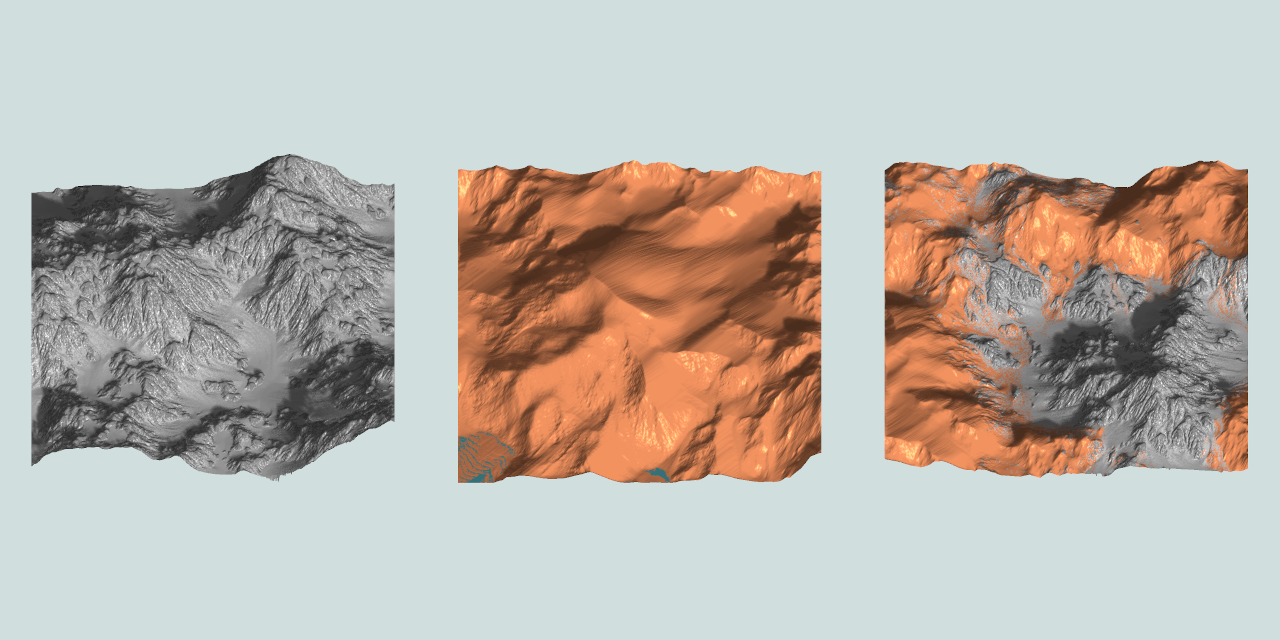
SoilMachine is an open-source modular geomorphology simulator that couples multiple erosion systems (hydraulic, thermal, wind) with sediment transport and deposition. Built in C++ with GPU compute, it provides a reference implementation of the multi-process erosion approach that professional tools use.
The related soillib (C++20, MIT license) provides the underlying geomorphology simulation primitives as a reusable library. And hydro-gen implements both grid-based (shallow water) and particle-based (raindrop) hydraulic erosion in OpenGL compute shaders with real-time parameter adjustment.
These open-source tools could be adapted for our server-side generation pipeline. The compute shader implementations translate directly to WebGPU if we ever want to run erosion in the browser for real-time creator feedback.
Multi-Layer Terrain Materials
Real terrain isn't a single surface. It's layers: bedrock at the bottom, soil on top, snow or sand accumulating on surfaces. Dynamic layering changes the visual character of terrain with seasons, weather, and creator actions.
Layered Heightfield Representation
Instead of a single heightmap, use multiple height layers per grid cell:
Cell {
  bedrock_height: f16,    // permanent rock surface
  soil_height: f16,       // accumulated soil/sediment above bedrock
  snow_height: f16,       // dynamic snow accumulation
  water_height: f16       // standing water depth
}
Total: 8 bytes per cell (vs 2 bytes for a single heightmap). For a 65x65 chunk, that's 34 KB before compression. Still compact.
The visual surface is bedrock + soil + snow. The terrain shader reads all layers and blends materials accordingly: where soil is thin, rock shows through. Where snow has accumulated, the surface is white. Where water sits, you get puddles or lakes.
Dynamic Accumulation
Snow accumulates on flat, upward-facing surfaces during snowfall. The accumulation rate depends on surface normal (steep slopes don't hold snow), temperature (altitude-dependent), and shelter (areas below overhangs stay clear). A compute shader pass updates the snow layer once per weather tick (every few seconds).
Sand accumulation works similarly with wind-driven deposition. Wind carries particles from exposed surfaces and deposits them behind obstacles and in sheltered areas.
For a creator world, dynamic accumulation means the terrain looks different in different weather. Snow covers the world during a blizzard and melts during a clear spell. Rain fills depressions with water. This makes the world feel responsive without creators doing anything.
Multi-Layered Erosion
The 2024 paper "3D Real-Time Hydraulic Erosion Simulation using Multi-Layered Heightmaps" (EG) extends erosion to work across layers. Water erodes soil faster than bedrock. Sediment deposits as a new soil layer. The simulation maintains layer integrity (bedrock stays below soil) while enabling complex features like overhangs (where bedrock overhangs eroded soil below).
Performance: approximately 6ms per simulation step on an RTX 3070 at 2048x2048 resolution. This is fast enough for server-side generation but too slow for per-frame browser simulation. The layered representation works for static terrain generation, and the dynamic snow/water accumulation runs as a cheaper per-frame shader.
Grass, Rock, and Detail Rendering
The landscape needs more than terrain geometry and textures. It needs grass blades that sway in the wind, rocks scattered on slopes, and small details like flowers, pebbles, and fallen branches that make close-up views look natural.
GPU-Instanced Grass
Browser-based grass rendering is well-proven in Three.js and works through GPU instancing. The approach from al-ro's grass demo renders 100,000 grass blades with a single draw call using InstancedBufferGeometry.
Each grass blade is a simple quad (4-8 triangles). Per-instance attributes define position, height, bend direction, color variation, and wind phase. The vertex shader:
- Reads the per-instance transform
- Applies wind animation using sine waves keyed to world position and time
- Bends the blade based on wind strength (more bend at the tip, none at the base)
- Applies color gradient (darker at the base, lighter at the tip for subsurface scattering)
Codrops' fluffy grass tutorial (2025, Tutorial) demonstrates a shell texturing approach: render the ground plane multiple times at increasing offsets, with each layer sampling a noise texture to create the appearance of dense grass volume. This is cheaper than individual blade instancing for very dense coverage but less realistic at close range.
For a creator world, grass density comes from the vegetation density map per chunk. The GPU scatters blade positions from the density map at render time. No per-blade data is stored or streamed. The density map is a 32x32 grid per chunk (1 KB), and the GPU generates thousands of blade instances from it.
Procedural Rock and Cliff Detail
Cliff faces and rocky terrain need geometric detail that the base heightmap or SDF can't provide at reasonable resolution. Two approaches complement each other:
GPU mesh shader resurfacing (Raad et al., Eurographics 2025, Paper) generates procedural geometry at render time from a coarse control mesh. The mesh shader reads a base terrain surface and adds displacement, cracks, and protrusions without storing the detail geometry in memory. This reduces VRAM usage and enables dynamic LOD.
Instanced rock scattering places pre-made rock meshes on steep slopes and cliff edges using GPU instancing. A compute shader reads the terrain normal and slope, and scatters rock instances where the slope exceeds a threshold. Each instance is a small mesh (200-500 triangles) with random rotation and scale. 10,000 scattered rocks add negligible rendering cost with instancing.
Roads and Paths
Creator-placed roads, trails, and paths need to conform to terrain and modify the surface material (replacing grass with dirt or stone).
The approach used by every major game engine: define the path as a spline (a series of control points). Project the spline onto the terrain surface. Generate a strip mesh that follows the spline and sits slightly above the terrain. Apply a road texture to the strip. In the terrain shader, blend the terrain material toward the road material within the spline's width using a projected texture or decal.
For a browser world, a creator draws a path on the terrain. The client generates control points and sends them to the server (a few dozen vec3 values). The server stores the spline. All clients render the road strip locally by projecting the spline onto their terrain mesh. The road data is tiny (path spline points, maybe 200 bytes) but the visual impact is large: paths connecting creator builds make the world feel inhabited.
Shadows for Terrain
Terrain shadows are critical for readability (understanding terrain shape) and atmosphere (time-of-day mood). In an open world, the sun casts shadows across the entire visible terrain.
Cascaded Shadow Maps (CSM)
CSM splits the view frustum into 3-4 distance ranges (cascades). Each cascade renders a shadow map from the sun's perspective at a resolution appropriate for its distance. Close cascade: high resolution (detailed shadows under trees and buildings). Far cascade: low resolution (broad mountain shadows).
Both Three.js and Babylon.js support CSM. The key optimization for terrain: only render terrain in the shadow map, not individual grass blades or small details. Grass self-shadows using the terrain's shadow map, not its own.
Performance budget: 3-4 shadow cascades at 1024x1024 each. Rendering terrain into shadow maps costs 0.5-1ms (the terrain geometry is already in GPU memory). Sampling 4 cascades in the terrain shader adds 0.2-0.3ms.
Terrain Self-Shadowing from Heightmap
For very large terrain where CSM becomes expensive, pre-compute a horizon map: for each terrain cell, store the maximum elevation angle in 8 compass directions. At render time, compare the sun angle to the horizon map to determine if a point is in shadow. This is how Skyrim handles terrain self-shadows for distant terrain (beyond CSM range).
The horizon map is computed server-side from the heightmap (a few seconds of processing) and streams as a 128x128 per-chunk texture (16 KB compressed). The visual impact is significant: mountain valleys darken realistically even at extreme view distances.
Terrain Data Compression for Streaming
The network is the bottleneck for a browser world. Every byte saved in terrain data is a faster load time.
Heightmap Compression
Raw 16-bit heightmaps compress well because adjacent cells have similar values. The pipeline:
- Delta encoding: Store the difference between each cell and its predicted value (average of neighbors). Delta values are small, clustering near zero.
- Quantization: For distant chunks, reduce precision from 16-bit to 12-bit or 8-bit. At 500 meters away, 8-bit height precision (0.4m resolution on a 100m height range) is indistinguishable from 16-bit.
- Entropy coding: Apply zlib or brotli compression to the delta-encoded stream. Typical compression ratio: 4-8x.
Result: a 65x65 chunk at 16-bit goes from 8.4 KB raw to 1-2 KB compressed. At 8-bit reduced precision: 0.5-1 KB.
Progressive Heightmap Streaming
Send terrain at low resolution first, then refine. A 17x17 heightmap (the minimum for a 64m chunk with 4m cell spacing) is 578 bytes raw, under 200 bytes compressed. The terrain is visible instantly. Then stream the 33x33 refinement (adds odd-row/column samples). Then the 65x65 full resolution. Each level adds detail without replacing previous data.
This maps to the geometry clipmap LOD rings: distant terrain uses the low-resolution version (17x17), mid-range uses medium (33x33), close-up uses full (65x65). The streaming priority matches the rendering LOD.
SDF Volume Compression
Sparse SDF volumes compress dramatically because most voxels are far from the surface (empty space). Options:
Run-length encoding: Encode runs of identical values (empty voxels). Typical SDF volumes are 95%+ empty, so RLE achieves 10-50x compression.
Sparse octree: Only store octree nodes that contain surface-crossing voxels. Empty space has no nodes. A 64^3 SDF volume with a single cave tunnel might have only 2,000-5,000 occupied nodes (vs 262,144 total voxels), each stored as 1-2 bytes.
Entropy-driven progressive compression (2024, HAL) applies to 3D spatial data by recursively partitioning space with entropy-optimized planes and adaptive quantization. This produces a stream of refinements optimized for rate-distortion trade-offs, particularly beneficial at the low bitrates of network streaming.
Putting It All Together: The Browser Terrain Pipeline
The strategic overview at the top of this article gives the quick decision framework and phased build plan. This section provides the full technical detail for both the server-side generation pipeline and the browser rendering pipeline.
Generation Pipeline (Server-Side)
The generation pipeline runs as a directed graph of physical processes, inspired by Gaea and World Machine's node-graph approach. Each stage takes the previous stage's output and refines it. Creators control parameters at each stage.
| Stage | Input | Process | Output | Time |
|---|---|---|---|---|
| 1. Base terrain | Seed or text prompt | Terrain Diffusion / MESA / noise + fBm | 16-bit heightmap | 1-5s |
| 2. Erosion | Heightmap | Analytical stream power + thermal erosion | Eroded heightmap, flow accumulation map, sediment map | 0.5-2s |
| 3. Rivers | Eroded heightmap, flow map | Drainage network extraction, channel carving | River splines, water level map | 0.5s |
| 4. Coast | Heightmap near sea level | NEWTS-style wave erosion | Coastline features (cliffs, beaches, stacks) | 1-3s |
| 5. Volumetric | Heightmap + creator intent | Arenite erosion / cave generation / SDF sculpts | Sparse SDF volumes for affected chunks | 1-60s |
| 6. Materials | Heightmap + erosion maps | TerraFusion / Geodiffussr / procedural rules | Splat maps, terrain textures | 1-5s |
| 7. Vegetation | Heightmap + flow map + materials | Ecosystem competition simulation | Density maps per biome per chunk | 1-3s |
| 8. Horizon maps | Final heightmap | 8-direction max elevation angle | Self-shadow texture per chunk | 2-5s |
| 9. Chunking | All outputs | Slice, delta-encode, compress, hash | Chunk packages on CDN | 5-10s |
| Total | 15-90s |
A new 4x4 km world generates in 15-90 seconds. Creator edits (sculpting, parameter changes) re-run only the affected stages for the affected chunks, typically completing in under 5 seconds.
Rendering Pipeline (Browser)
| Step | WebGPU path | WebGL 2 fallback | Frame budget |
|---|---|---|---|
| 1. Streaming | Priority queue, predictive pre-fetch | Same | N/A (async) |
| 2. Heightmap terrain | GPU-driven CDLOD quadtree, compute culling, indirect draw | Geometry clipmaps, CPU ring updates | 0.5-1ms |
| 3. Volumetric mesh | Compute marching cubes + Transvoxel | Pre-generated meshes from Web Worker, 2-3 cached LODs | 0.5-2ms |
| 4. LOD transitions | Geomorphing in vertex shader | Same | Included above |
| 5. Materials | Triplanar PBR + Laplacian blending + phasor noise detail + virtual texturing | Triplanar PBR + linear blending + pre-baked splat maps | 1-1.5ms |
| 6. Vegetation | ComputeInstanceCulling + IndirectBatchedMesh, hex-tiled ground cover | CPU frustum cull + InstancedMesh | 1-1.5ms |
| 7. Water | Flow-aligned river strips, depth-based shoreline foam | Same (simpler reflections) | 0.5ms |
| 8. Shadows | 3-4 cascade CSM + horizon map self-shadows | 2 cascade CSM | 0.5-1ms |
| 9. Atmosphere | Hillaire sky model + volumetric fog + weather particles | Preetham sky + distance fog | 0.5ms |
| 10. Dynamic effects | Puddle accumulation, footprint deformation, snow/rain | Puddle accumulation, rain particles | 0.3ms |
| Total terrain | 3.5-6.5ms |
At 60fps (16.6ms per frame), the terrain system uses 21% of the frame budget on WebGPU and 39% on WebGL 2. The remainder is available for player avatars, creator objects, UI, networking, and post-processing.
Why This Works in a Browser
The entire pipeline is designed around three browser constraints:
Memory (2-4 GB max): The 256 MB terrain budget fits because heightmap chunks are 2-8 KB each (delta-encoded), SDF volumes are sparse (100-500 KB per volumetric chunk), vegetation is generated at runtime from 1 KB density maps, and textures use KTX2 compression (150 KB per 1024x1024). At any moment, the world visible in the browser weighs 50-200 MB total.
No disk access: Everything streams over the network. Progressive loading means the player sees terrain in <100ms (low-res heightmap), textured terrain in <300ms, and full detail in <3s. Pre-fetching based on velocity hides load times during normal exploration.
GPU varies wildly: The WebGPU path handles high-end desktops. The WebGL 2 fallback handles everything else, including mobile. The same chunk data drives both paths. The difference is rendering technique, not data format. A Chromebook running WebGL 2 sees the same world as an RTX 4090 running WebGPU, just at lower detail and shorter view distance.
Research Papers
Terrain Representation and Mesh Generation
"Marching Cubes: A High Resolution 3D Surface Construction Algorithm" -- Lorensen and Cline (SIGGRAPH 1987). DOI. The foundational algorithm for extracting triangle meshes from volumetric data. Still the most widely used isosurface extraction method 38 years later. GPU-parallel implementations run in real time in WebGPU compute shaders.
"Dual Contouring of Hermite Data" -- Ju, Losasso, Schaefer, Warren (SIGGRAPH 2002). DOI. Produces meshes that preserve sharp features (cliff edges, rock corners) that marching cubes rounds off. Requires surface normals in addition to distance values.
"Neural Dual Contouring" -- Chen et al. (2022). arXiv:2202.01999. Replaces the least-squares vertex placement in dual contouring with a learned predictor. Better surface quality for complex natural features.
"The Transvoxel Algorithm" -- Lengyel (2009, updated 2024). transvoxel.org. Seamless LOD transitions for voxel terrain. Eliminates cracks at resolution boundaries using 73 transition cell types. Patent-free, designed for real-time applications.
Terrain LOD and Rendering
"Geometry Clipmaps: Terrain Rendering Using Nested Regular Grids" -- Losasso and Hoppe (SIGGRAPH 2004). Paper. Constant-cost terrain rendering with concentric LOD rings. Handles 40 GB terrains at interactive rates. The foundation for most browser terrain renderers.
"CDLOD: Hybrid LOD for Terrain Rendering" -- Strugar (2014). Paper. Quadtree-adaptive improvement on geometry clipmaps. Allocates resolution based on terrain complexity rather than distance alone.
"GPU-Driven Rendering Pipelines" -- Ubisoft (SIGGRAPH 2015), Wihlidal and Hoppe. Formalized the GPU-driven approach where compute shaders handle culling, LOD selection, and draw call generation. The architectural pattern for our WebGPU terrain pipeline.
Physical Terrain Generation
"Physically-Based Analytical Erosion for Fast Terrain Generation" -- Cordonnier et al. (2024). HAL. Analytical stream power law erosion that avoids iterative simulation. Generates physically plausible terrain in milliseconds.
"Fast Hydraulic Erosion Simulation and Visualization on GPU" -- Mei, Decaudin, Hu (2007). HAL. GPU-parallel hydraulic erosion using shallow-water simulation. The basis for most game engine erosion implementations.
"Arenite: A Physics-Based Sandstone Simulator" -- SIGGRAPH 2025. Project. Multi-physics erosion generating arches, hoodoos, and alcoves from stress and erosion simulation. Runs in under 5 minutes on desktop GPUs.
"Efficient Debris-flow Simulation for Steep Terrain Erosion" -- Purdue CGVLAB (2024). Paper. GPU-accelerated debris flow and steep-slope erosion producing realistic mountain terrain features.
"Flexible Terrain Erosion" -- IRIT-STORM (2024). Springer. Particle-based erosion that works across heightfields, voxel grids, implicit surfaces, and layered materials with a unified interface. Enables one erosion system for hybrid terrain representations.
Terrain Detail and Texturing
"GPU-Friendly Laplacian Texture Blending" -- Wronski (NVIDIA, 2025). JCGT. Real-time Laplacian pyramid blending for terrain materials without precomputation. Preserves sharp features while eliminating seam artifacts. A few extra texture taps per fragment.
"Real-time Terrain Enhancement with Controlled Procedural Patterns" -- Grenier et al. (2024). CGF. Phasor noise-based micro-erosion detail at up to 32x heightmap resolution. Slope-aligned patterns run entirely in a fragment shader.
Adaptive Tessellation
"Concurrent Binary Trees for Large-Scale Game Components" -- Benyoub and Dupuy (Intel, HPG 2024). Paper. GPU-friendly binary tree data structure for adaptive terrain tessellation. Renders planetary-scale geometry in under 0.2ms. Extended from square domains to arbitrary polygon meshes.
Cave and Underground Generation
"PLUME: Procedural Layer Underground Modeling Engine" -- 2024. arXiv:2508.20926. Open-source framework for generating realistic cave and lava tube environments using layered procedural rules. Originally built for space exploration robotics.
Neural Terrain Synthesis
"InfiniteDiffusion: Bridging Learned Fidelity and Procedural Utility for Open-World Terrain Generation" -- Goslin (2025, SIGGRAPH 2026). arXiv:2512.08309. Infinite, seed-consistent terrain generation using hierarchical diffusion models with Laplacian encoding. 9x faster than baseline on consumer GPUs.
"TerraFusion: Joint Generation of Terrain Geometry and Texture" -- 2025. arXiv:2505.04050. Latent diffusion for simultaneous heightmap and texture synthesis with sketch conditioning.
"MESA: Text-Driven Terrain Generation" -- CVPR 2025 Workshop. arXiv:2504.07210. Text-to-terrain using Copernicus remote sensing training data.
"Geodiffussr: Generative Terrain Texturing with Elevation Fidelity" -- 2025. arXiv:2511.23029. Text-guided terrain texture generation that respects elevation data using flow-matching.
"Sketch2Terrain: AI-Driven Real-Time Terrain Sketch Mapping" -- 2025. Project. Sketch-to-terrain in augmented reality. 38% efficiency improvement over manual mapping.
Vegetation and Ecosystem Simulation
"GPU-Based Real-Time Procedural Distribution of Vegetation on Large-Scale Virtual Terrains" -- SBGames 2018. Paper. Quadtree-based vegetation scattering using biotic/abiotic factors on GPU.
"Procedural Generation and Rendering of Forests" -- 2022. Paper. L-system tree generation combined with ecosystem competition simulation for realistic forest distribution.
"Real-Time Procedural Generation with GPU Work Graphs" -- AMD GPUOpen 2024. Paper. GPU work graphs generating 79K+ vegetation instances in under 4ms.
Browser GPU Technology
"GSWT Renderer" -- SIGGRAPH Asia 2025. GitHub. WebGPU + Rust/Wasm renderer using Gaussian Splatting Wang Tiles for infinite 3D terrain with dynamic LOD and streaming.
"GPU Compute in the Browser at the Speed of Native: WebGPU Marching Cubes" -- Usher (2024). Blog. Demonstrates that WebGPU compute achieves native-speed performance for parallel mesh generation algorithms.
Voxel Rendering and Large-Scale Scenes
"Aokana: A GPU-Driven Voxel Rendering Framework for Open World Games" -- 2025. arXiv:2505.02017. Sparse Voxel DAG with LOD and streaming for scenes with tens of billions of voxels. 9x memory reduction and 4.8x faster rendering than prior state-of-the-art. Designed for integration with game engines.
Procedural Geometry and Resurfacing
"Real-time Procedural Resurfacing using GPU Mesh Shaders" -- Raad et al. (Eurographics 2025). Paper. Generates detailed geometric surfaces from coarse control meshes at render time using mesh shaders. Enables dynamic LOD without storing high-resolution geometry in memory.
Terrain Shadows
"Optimizing Terrain Shadows" -- AMD GPUOpen. Blog. Practical CSM optimization for large-scale terrain. Covers cascade splitting, GPU-efficient shadow map rendering, and terrain-specific optimizations.
Virtual Geometry and Mesh Optimization
"Nanite WebGPU" -- Scthe (2024). GitHub, Demo. Complete browser implementation of UE5 Nanite architecture: meshlet LOD hierarchy, software rasterizer in WGSL, per-meshlet culling, billboard impostors.
"Billions of Triangles in Minutes" -- Kapoulkine (2025). Blog. Meshoptimizer v1.0 for hierarchical clustered LOD generation. Processes massive meshes into Nanite-style cluster DAGs efficiently.
"Billboard Splatting (BBSplat)" -- 2024. arXiv:2411.08508. Learnable textured planar primitives for novel view synthesis achieving 17x compression vs 3D Gaussian Splatting.
Terrain Lighting and Global Illumination
"Global Illumination in Once Human" -- GDC 2025. Session. Hybrid GI for 16km open world: neural network compressed probes (69:1 ratio), ML-based indoor/outdoor leak resolution, dynamic probe reactions.
"GI with AMD FidelityFX Brixelizer" -- GDC 2024. Paper. Compute-based sparse distance field cascades with screen-space probes. No hardware ray-tracing required.
"Radiance Cascades" -- 2024. Blog. Noiseless real-time global illumination using cascaded radiance structures without temporal accumulation.
Level Design and Exploration
"PlotMap: Automated Layout Design for Building Game Worlds" -- 2023. arXiv:2309.15242. AI-assisted POI placement satisfying narrative spatial constraints on terrain.
"Spatial Exploration Triggers" -- Purdue University (FDG 2022). Paper. Four design patterns that drive player exploration: extreme points, visual obstructions, out-of-place objects, spatial connections.
Data Compression and Streaming
"Entropy-driven Progressive Compression of 3D Point Clouds" -- SGP 2024. Paper. Rate-distortion optimized progressive compression using recursive space partitioning with adaptive quantization. Produces refinement streams suited to variable-bandwidth network streaming.
Interactive Editing
"WebGPU SDF Editor" -- Nijhoff (2026). Project. Full-featured SDF modeling in the browser with real-time marching cubes, boolean operations, smooth blending, and octree space partitioning. 112 bytes per primitive.
River and Coastal Generation
"Procedural River Drainage Basins" -- Patel (Red Blob Games). Project. Drainage-first river generation using Voronoi/triangle mesh edge classification. Builds river hierarchies before assigning terrain elevation.
"NEWTS1.0: Numerical Model of Coastal Erosion by Waves and Transgressive Scarps" -- MIT (2024). Paper. Simplified coastal erosion model using uniform retreat and wave-driven erosion. Generates headlands, bays, sea stacks, and arches matching real geomorphology.
Further Reading
- Browser 3D Open World Tech covers the full architecture for a multiplayer creator world in the browser
- Web Games Tech Stack in 2026 covers WebGL, WebGPU, and WebAssembly fundamentals
- Three.js + USDC Tech Report on loading 3D assets in the browser
- Frontier Open-Source Gen AI Models for the AI generation pipeline
- WebGPU getting started — compute shaders for GPU-driven terrain
- Web Workers for game logic — offloading terrain generation to Workers
- Game physics libraries — physics for terrain interaction and heightfield colliders
- Where to Find Free Game Assets — texture and material sources for terrain rendering
Terrain is better when you can walk on it.