Frontier Open-Source Generative AI Models for Games
Here's the thing about generative AI — for years, the best models lived behind API keys and unpredictable pricing. You'd build your workflow around a tool, get comfortable, then wake up to an email saying the pricing changed. Or worse, the company pivoted entirely.
That changed in late 2024. Tencent, Alibaba, DeepSeek — they started releasing models you can actually download. Models that rival the closed alternatives. And suddenly, creators have options that don't depend on someone else's business model.
What if you could generate video, 3D assets, music, and voices — all from models you control? That's where we are now. This guide walks through what's real, what works, and what you can start using today.
Video Generation
For years, video generation meant Runway or Pika — closed platforms, subscription fees, limits on what you could do with the output. Now? You can run comparable models on your own hardware.
HunyuanVideo text-to-video generation — 720p output from the leading open-source video model
| Model | Org | Params | Specs | Hardware | Cost |
|---|---|---|---|---|---|
| HunyuanVideo | Tencent | 13B | 720p, text+img | 80GB | ~$0.20 |
| Mochi 1 | Genmo | 10B | 480p@30fps | 12GB+ | ~$0.10 |
| LTX-Video | Lightricks | — | 768x512, real-time | 12GB | ~$0.02 |
| LTX-2 | Lightricks | 19B | 4K, synced audio | High-end | ~$0.30 |
| Wan 2.1 | Alibaba | 1.3-14B | 480p-720p | 8GB+ | ~$0.03 |
| CogVideoX | Tsinghua | 5B | 720x480@8fps | 12GB | ~$0.04 |
| Open-Sora 2.0 | HPC-AI | 11B | Flux integration | High-end | ~$0.20 |
Weights: HunyuanVideo ↗ · Mochi 1 ↗ · Wan 2.1 ↗ · Open-Sora ↗
See samples: HunyuanVideo gallery ↗ · Mochi examples ↗ · CogVideoX samples ↗
What this means for creators
HunyuanVideo outperforms Runway Gen-3 in professional evaluations — and it's fully open. The catch? You need serious hardware. An A100 or H100 with 80GB VRAM. For most of us, that means renting cloud GPUs when you need them.
Mochi 1 is the one you can actually run. A 12GB GPU — that's RTX 3060 territory — handles it fine. The output is genuinely creative, with a distinct artistic quality. Not quite HunyuanVideo's fidelity, but you own the process.
LTX-2 is where things get interesting for games. It's the first open model that generates synchronized audio with video. Imagine cutscenes where the sound just... matches. No post-production sync. Weights drop later in 2025.
Wan 2.1 runs on a gaming laptop. An 8GB GPU works for the smaller variants. If you've ever wanted to prototype with video generation but couldn't justify the hardware, this is your path in.
The workflow that makes sense: Mochi 1 or Wan 2.1 for prototyping locally. HunyuanVideo on cloud GPUs when you need final quality.
Image Generation
This is where open-source already won. The models you can download today genuinely compete with Midjourney. Not "almost as good" — actually competitive.
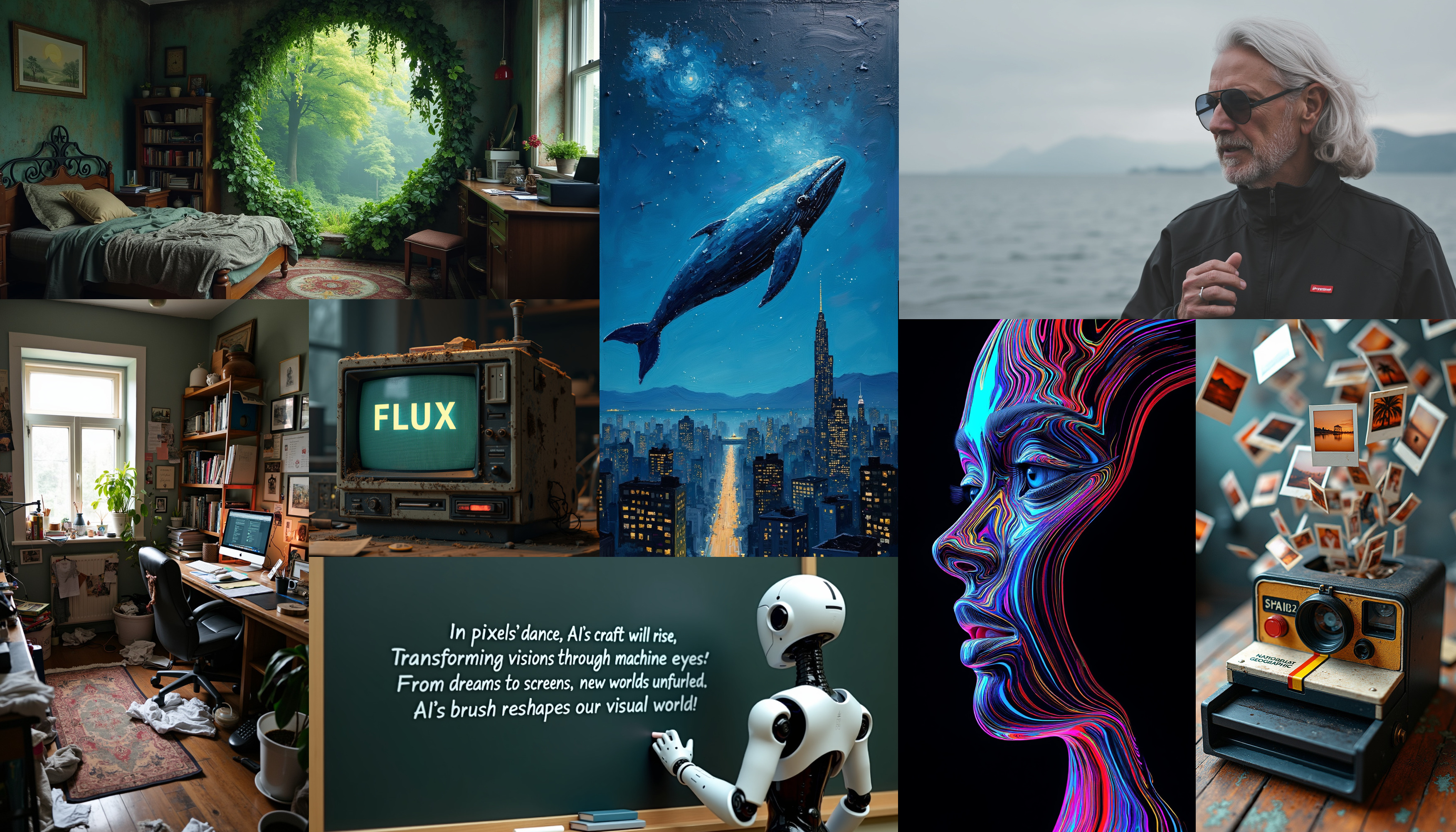 FLUX.1 samples — photorealistic quality from an Apache 2.0 licensed model
| Model | Org | Released | Params | Key Feature | License | Cost/image |
|---|---|---|---|---|---|---|
| FLUX.1 [schnell] | Black Forest Labs | Aug 2024 | 12B | 4-step generation, fast | Apache 2.0 | ~$0.001 |
| FLUX.1 [dev] | Black Forest Labs | Aug 2024 | 12B | Quality close to Pro | Non-commercial | ~$0.002 |
| SD 3.5 Large | Stability AI | Oct 2024 | 8B | Text rendering, diverse styles | Stability license | ~$0.002 |
| SD 3.5 Large Turbo | Stability AI | Oct 2024 | 8B | 4-step, fast | Stability license | ~$0.001 |
| CogView4 | Tsinghua | Mar 2025 | 6B | Native Chinese text | Open | ~$0.002 |
Try them directly: FLUX.1 schnell demo ↗ · SD 3.5 Large demo ↗ · GitHub (FLUX) ↗
See samples: FLUX gallery ↗ · FLUX LoRA gallery ↗ · Replicate examples ↗
For building game assets
FLUX.1 [schnell] is the one to know. Apache 2.0 license — meaning you can ship commercial games without worrying about licensing drama. It generates in just 4 steps, so you can iterate fast. Describe what you want, see the result, adjust, repeat.
SD 3.5 Large finally handles text rendering properly. Previous versions mangled any text you tried to include. This matters for UI mockups, in-game signage, title screens — anywhere you need readable words in your images.
The ecosystem around Stable Diffusion is still unmatched. ControlNet for precise composition. Inpainting for fixes. LoRA fine-tuning for custom styles. FLUX is catching up, but if you need deep customization today, SD's tooling maturity gives you more to work with.
Here's how I'd think about it: textures and sprites, either works. Concept art with specific style requirements, SD 3.5 with LoRAs. Pure quality for commercial shipping, FLUX schnell.
3D Generation
If you've ever spent eight hours modeling a prop that appears in your game for three seconds, this section is for you. 3D generation went from "interesting research" to "actually usable" in 2024. You can now go from a sketch to a textured mesh in under a minute.
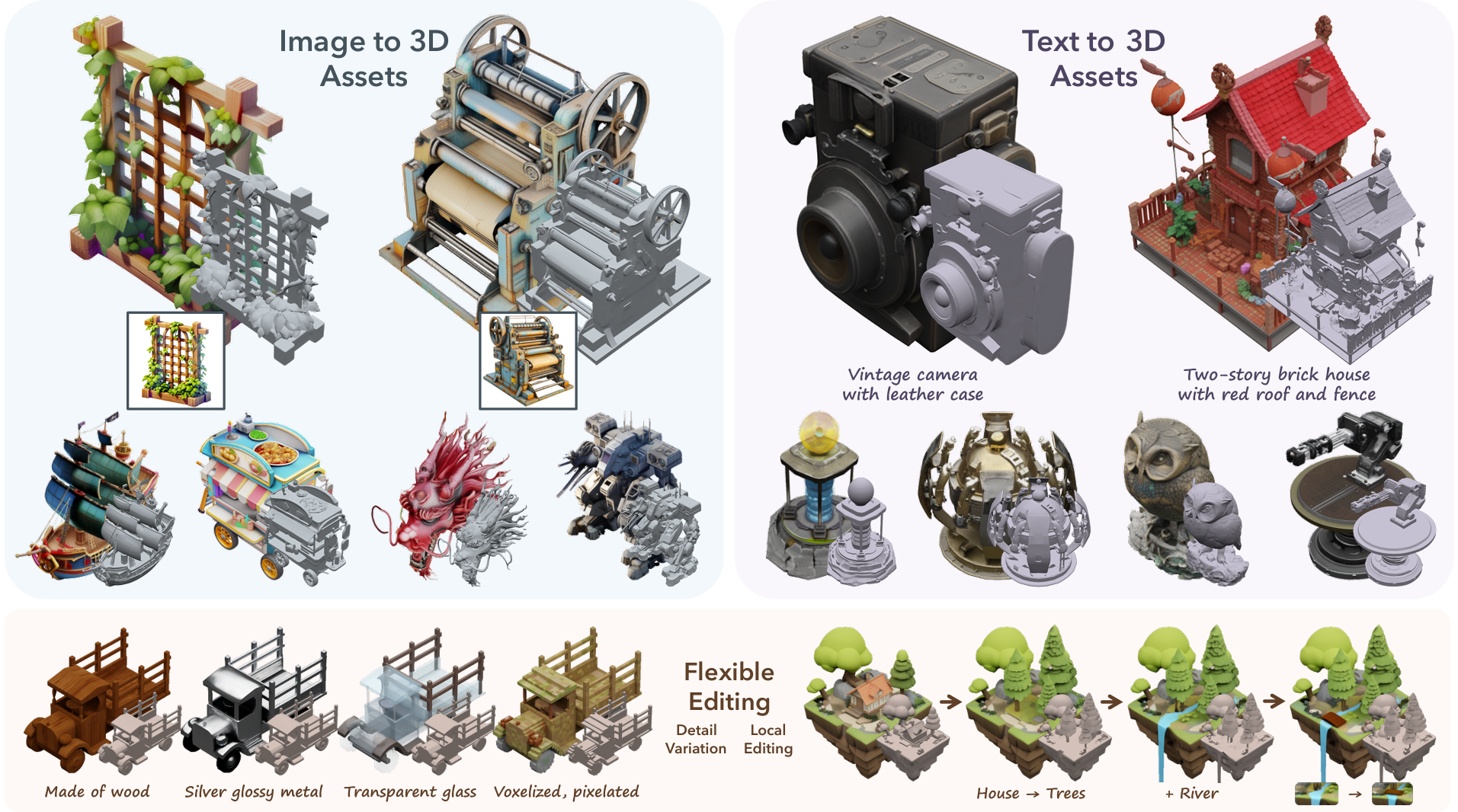 TRELLIS generates textured 3D meshes with PBR materials from single images
| Model | Org | Released | Key Feature | Output | Cost/mesh |
|---|---|---|---|---|---|
| TRELLIS 2 | Microsoft | 2025 | 4B params, PBR materials | Textured mesh with normals | ~$0.03 |
| Hunyuan3D 2.0 | Tencent | Jan 2025 | Two-stage DiT | High-fidelity textured mesh | ~$0.05 |
| TripoSR | VAST/Stability | Mar 2024 | Single image → mesh in 0.5s | Mesh (no texture) | ~$0.001 |
| InstantMesh | TencentARC | Apr 2024 | Multi-view diffusion | Quality mesh | ~$0.02 |
| Stable Zero123 | Stability AI | 2024 | Novel view synthesis | Multi-view images | ~$0.01 |
Try them directly: TRELLIS 2 demo ↗ · Hunyuan3D demo ↗ · InstantMesh demo ↗
See samples: TRELLIS 2 project page ↗ · 3D AI Studio gallery ↗
A workflow that actually works
The approach that's clicking for creators right now chains models together. Start with an image — generated or photographed, doesn't matter. Run it through Stable Zero123 or Wonder3D to get multiple views. Feed those views to InstantMesh or TripoSR for the mesh. Then TRELLIS 2 or Hunyuan3D for proper materials.
TRELLIS 2 from Microsoft is the new leader for production-ready assets. It handles the geometry that breaks other models — thin surfaces, holes, complex topology. The 4B parameter version outputs meshes with real PBR textures, not just vertex colors pretending to be materials.
TripoSR is about speed. Half a second from image to mesh. The mesh needs cleanup and texturing, but for prototyping? For figuring out if an idea works before you invest hours? Unbeatable.
Hunyuan3D 2.5 (coming soon) focuses on simulation-ready assets. Game props that actually work in physics engines without manual fixes. No more invisible collision issues because the mesh topology is weird.
Here's the realistic expectation for indie creators: generate concept art with FLUX, run it through InstantMesh for geometry, then texture in Blender or use TRELLIS for automated PBR. You're looking at 30-60 minutes per asset instead of 4-8 hours. Not zero time — but a real difference.
Audio and Music
Audio generation hasn't caught up to images and video yet. But there's enough here to change how you work — especially for prototyping and sound effects.
AI-generated music sample — describe the mood you want, get music that fits
| Model | Org | Released | What It Does | License | Cost/30s |
|---|---|---|---|---|---|
| YuE | MAP | Jan 2025 | Full songs from lyrics, vocals + accompaniment | Apache 2.0 | ~$0.05 |
| MusicGen | Meta | 2023 | Text-to-music, controllable | MIT | ~$0.01 |
| AudioGen | Meta | 2023 | Sound effects, ambient | MIT | ~$0.01 |
| Stable Audio Open | Stability AI | 2024 | Up to 47s samples | Research | ~$0.02 |
Try them directly: MusicGen demo ↗ · AudioCraft playground ↗
See samples: MusicGen examples ↗ · AudioGen samples ↗
What you can actually ship with
MusicGen from Meta is the practical choice for game audio. Describe the mood you want, get music that fits. MIT license means you can ship it. The 3.3B model runs fine on a 12GB GPU — describe, generate, iterate.
AudioGen handles sound effects: footsteps, door creaks, ambient wind, mechanical sounds. Same deal — MIT licensed, runs locally, actually useful for filling out your game's soundscape.
YuE is genuinely exciting. It's the first open model that generates full songs with vocals. Theme songs. Background music with actual singing. The quality varies, but it's miles ahead of anything else you can download and run yourself.
Stable Audio Open is limited — 47-second clips, research-only license. Good for prototyping ideas, not for shipping.
Here's the honest take: the gap between open models and closed ones (Suno, Udio) is still real for music. For sound effects, open models are genuinely competitive. For full songs you want to ship, expect to iterate heavily — or bring in a musician for final production and use these tools for everything else.
Speech and Voice
Voice generation crossed into "good enough for games" territory in 2024. And that changes what's possible for small teams.
AI-generated game narration — natural speech with proper pacing and emotion
| Model | Org | Released | Key Feature | License | Cost/min |
|---|---|---|---|---|---|
| CSM | Sesame AI | Mar 2025 | Conversational flow, natural pauses | Open | ~$0.005 |
| Fish Speech 1.5 | Fish Audio | 2024 | Zero-shot cloning from 10-30s | Apache 2.0 | ~$0.002 |
| OpenVoice V2 | MyShell/MIT | Apr 2024 | Emotion/accent control | MIT | ~$0.003 |
| XTTS-v2 | Coqui (community) | 2024 | 17 languages, voice cloning | CPML | ~$0.005 |
Hear samples: Fish Audio voices ↗ · OpenVoice demo ↗
Making NPCs sound like people
CSM (Conversational Speech Model) from Sesame was built specifically for dialogue. It produces natural pauses. Intonation shifts. The rhythm of actual conversation. Most TTS sounds like someone reading a script — you can hear it instantly. CSM sounds like someone talking. That difference matters more than you'd think.
Fish Speech and OpenVoice handle voice cloning. Record 10-30 seconds of a voice actor, then generate unlimited dialogue in that voice. Think about what this means: you can hire voice talent for key lines, then extend their performance to cover hundreds of variations and ambient dialogue.
NVIDIA ACE (not fully open, but worth knowing) now supports Qwen3-8B for on-device NPC deployment. Local LLM + local TTS + lip sync — all running on consumer GPUs. This is the stack for real-time NPC conversations that don't need cloud calls.
The approach that makes sense for indie creators: hire voice actors for main characters and the lines that matter most. Use Fish Speech or OpenVoice to extend coverage for ambient dialogue, variations, and all the incidental lines that would otherwise be silent or prohibitively expensive.
World Models and Game Simulation
This is where things get genuinely weird — and genuinely exciting. These models don't generate static assets. They generate experiences that feel like games.
🎮 Play Oasis — AI-Generated MinecraftReal-time world generation with no game engine, just AI prediction
| Model | Org | Released | What It Does | Status | Cost/frame |
|---|---|---|---|---|---|
| DIAMOND | Research | 2024 | Diffusion world model, Atari simulation | Open weights | ~$0.001 |
| Oasis | Decart/Etched | Oct 2024 | Real-time Minecraft generation | 500M weights open | ~$0.002 |
| GameGen-X | Research | 2024 | Open-world video generation | Open code + dataset | ~$0.005 |
| NVIDIA Cosmos | NVIDIA | Jan 2025 | Physical AI simulation | Open weights | ~$0.01 |
| Genie 2 | DeepMind | Dec 2024 | Interactive 3D from images | Not released | N/A |
See the research: DIAMOND project page ↗ · Cosmos blog ↗
Try it: Oasis live demo ↗ · Genie 2 examples ↗
Why you should care about this
DIAMOND proved something that changes how you think about game AI. You can train an agent entirely inside a generated world. No real game engine needed for training. The AI plays in a diffusion model's imagination — and then transfers to the real game. The implications here are significant.
Oasis runs a Minecraft-like world in real-time. Frame by frame. No game engine, no textures, no pre-built assets. Just a transformer predicting what comes next. It's a proof of concept, but imagine where this goes. The 500M parameter version is already open.
GameGen-X released the largest dataset for open-world game video. If you want to train your own models or fine-tune existing ones to generate game-like content, this is your starting point.
NVIDIA Cosmos was built for robotics and autonomous vehicles, but the world foundation models work for games too. They understand physics. Object permanence. Spatial relationships. Open weights, permissive licensing.
For practical game development today, these are still research tools. But if you're working on AI-driven content, procedural generation, or just thinking about where this is all going — this is the frontier.
Large Language Models
LLMs power dialogue, quest generation, and game logic. And the open options now genuinely compete with GPT-4. This wasn't true two years ago.
| Model | Org | Released | Size | Best For | License | Cost/1K tok |
|---|---|---|---|---|---|---|
| DeepSeek-V3 | DeepSeek | Dec 2024 | 671B MoE (37B active) | Reasoning, general | Permissive | ~$0.02 |
| DeepSeek-R1 | DeepSeek | Jan 2025 | Based on V3 | Chain-of-thought | Permissive | ~$0.03 |
| Qwen3 | Alibaba | 2025 | 235B MoE (22B active) | Multilingual, code | Apache 2.0 | ~$0.01 |
| Llama 4 | Meta | 2025 | Various | Agents, 128k context | Llama Community | ~$0.01 |
| DeepSeek Coder V2 | DeepSeek | 2024 | — | 300+ languages | Permissive | ~$0.01 |
| Qwen2.5-VL | Alibaba | Jan 2025 | 7B-72B | Vision + language | Permissive | ~$0.02 |
Get started: Qwen3-8B on HuggingFace ↗ · DeepSeek-V3 on HuggingFace ↗
For building games
Qwen3 is the practical choice for most game uses. Apache 2.0 license — meaning you own your integration. Strong multilingual support, which matters if you're thinking about localization. Good at following structured instructions. The 7B and 14B variants run locally on consumer GPUs.
DeepSeek-V3 matches or beats GPT-4 on most benchmarks. The architecture is clever — only 37B parameters activate per token despite the 671B total. You need serious hardware (multi-GPU), but the quality is frontier-level without the API dependency.
Qwen2.5-VL adds vision understanding. Useful for games that need to analyze screenshots, understand player-drawn content, or process camera input. The 7B variant runs on a single GPU.
For on-device NPCs — characters that respond in real-time without cloud calls — Qwen3-8B through NVIDIA ACE is the most practical path right now. It runs alongside your game on the player's hardware.
Utility Models
These don't generate content directly — but they make your pipelines work.
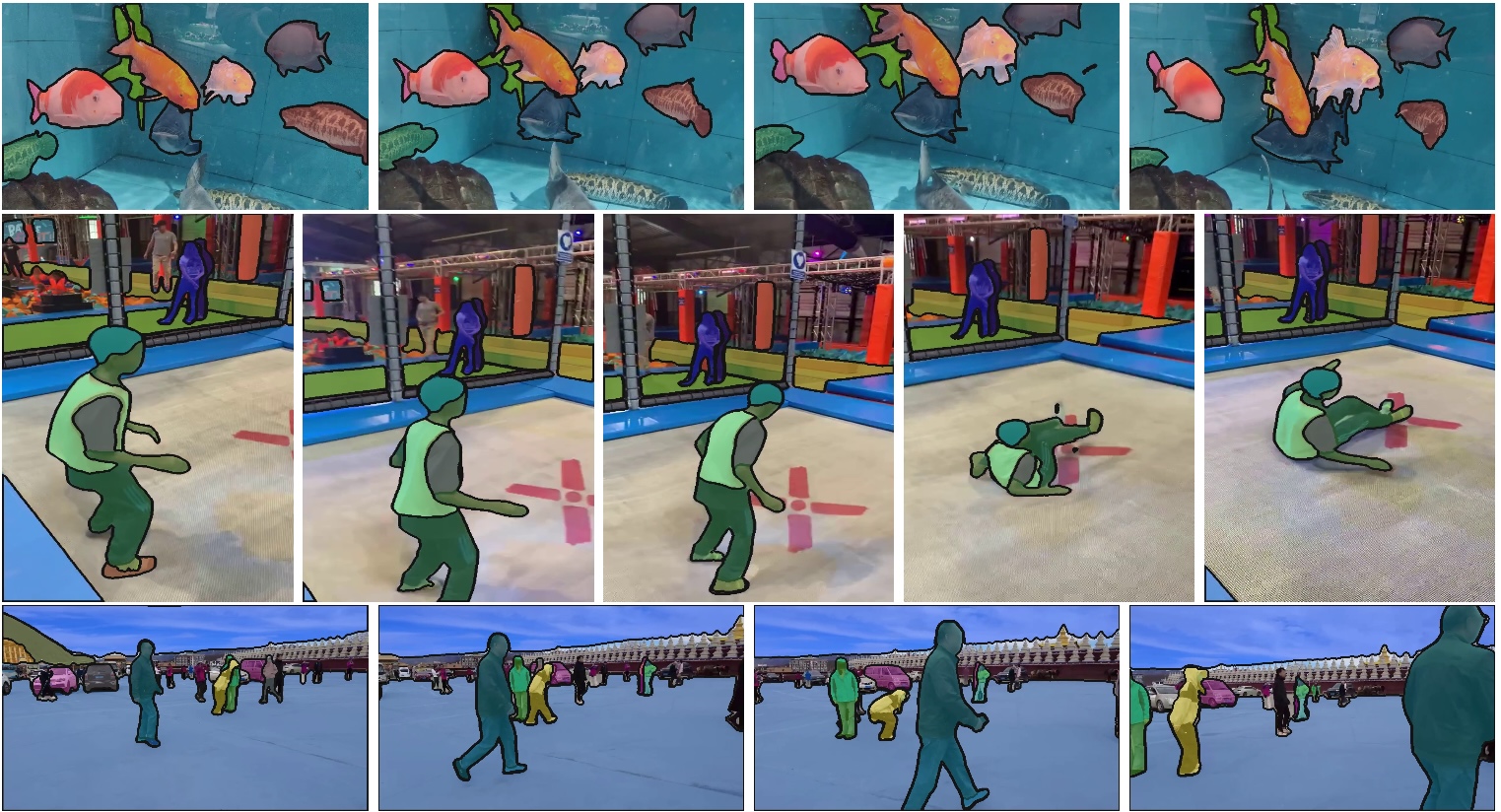 SAM 2 segments any object in images and video — click once, get a perfect mask
| Model | Org | Released | What It Does |
|---|---|---|---|
| SAM 2 | Meta | Aug 2024 | Segment anything in images and video |
| Depth Pro | Apple | Oct 2024 | Metric depth from single image |
| gsplat | Nerfstudio | 2024+ | Gaussian splatting, CUDA accelerated |
SAM 2 segments objects in video in real-time. Click on something, get a perfect mask. Useful for rotoscoping, compositing, or extracting objects from footage to use as game assets. Try SAM 2 ↗
Depth Pro from Apple produces metric depth maps from single images in under a second. This unlocks a lot: converting 2D art to 2.5D with parallax effects, generating depth data for 3D reconstruction, creating normal maps from flat images. Depth Pro on HuggingFace ↗
gsplat is the fast implementation of Gaussian splatting. If you're capturing real environments for games — photogrammetry, environment scans — this is the library that makes it practical.
What I'd Actually Use
If you're starting a game project today, here's the stack that makes sense:
Textures and sprites: FLUX.1 [schnell] — Apache 2.0, fast iteration, quality that ships
Concept art: SD 3.5 Large with LoRAs for style control
3D assets: InstantMesh for geometry, then Blender for texturing or TRELLIS 2 for automated PBR
Sound effects: AudioGen — MIT licensed, runs locally, fills out your soundscape
Music: MusicGen for prototypes, then bring in a composer for final production
Voice: Fish Speech for prototyping, voice actors + cloning for production
NPC dialogue: Qwen3-8B locally, or cloud LLM for complex reasoning
Video (cutscenes): Mochi 1 locally, HunyuanVideo on cloud when you need final quality
Here's the thing about all of this: the common mistake is trying to use AI for everything. These are tools, not replacements. They compress the tedious parts — iteration, variations, placeholder assets — so you can spend your time on the creative decisions that actually matter. The parts that make your game yours.
Hardware Reality Check
Let's be honest about what you actually need to run this stuff:
8GB VRAM (RTX 3060, 4060): SD 1.5/SDXL, Wan 2.1 small, AudioGen, Fish Speech, small LLMs (7B quantized). This is gaming laptop territory — and it's enough to get started.
12GB VRAM (RTX 3080, 4070): SD 3.5, FLUX schnell, Mochi 1, MusicGen, TripoSR, Qwen 14B quantized. This is where things get comfortable. Most of the useful models run here.
24GB VRAM (RTX 3090, 4090): Most models at full precision, InstantMesh, larger LLMs. If you're serious about this workflow, this is the sweet spot.
48-80GB VRAM (A100, H100): HunyuanVideo, LTX-2, DeepSeek-V3, production-scale generation. Enterprise hardware. You're not buying this — you're renting it.
Cloud instances on RunPod, Lambda Labs, or Modal cost $2-4/hour for A100s. For occasional use, that's cheaper than hardware. Spin up when you need final quality, shut down when you're done.
About the cost estimates in this guide: Per-generation costs assume self-hosted inference on cloud GPUs at ~$2-3/hour (A100) or ~$0.40/hour (RTX 4090). Actual costs vary based on hardware, optimization, and batch sizes. These are ballpark figures for planning — your mileage will vary.
What's New in 2026
Just released: LTX-2 weights dropped — the first open model with synchronized audio and video. Hunyuan3D 2.5 is now available for simulation-ready 3D assets that work in physics engines.
Coming this year: Real-time video generation with sub-second latency. Better world models for game simulation. And smaller models that run on integrated graphics — meaning laptops without dedicated GPUs.
The trajectory is clear: every capability that exists in closed models shows up in open models 6-12 months later. The question isn't whether open models will be good enough — they already are for most uses. The question is how fast they become the default.
And here's what that means for creators: the tools that used to require enterprise budgets or monthly subscriptions are becoming something you can just... run. On your own hardware. With no one else's permission.
That's the shift. That's what we're building toward.
More Reading
- AI controversy, trust, and the post-AI economy — our position on AI in games
- AI-generated content policy — how we handle AI disclosure
- Web Games Tech Stack in 2026 — WebGL, WebGPU, and Wasm for games
- Browser 3D Open World Tech — using AI-generated 3D assets in browser worlds
- Landscape Generation for Browser Open Worlds — diffusion-based terrain synthesis
- Where to Find Free Game Assets — traditional asset sources alongside AI generation
- Agentic AI code tools — AI for writing game code, not just generating assets